I did some more investigation 
This is an example of an unmatched album, which has the file structure of ArtistName\TrackName…

All of the entries are filled out but still Plex considers this unmatched (and even the band info is all filled in above the album).
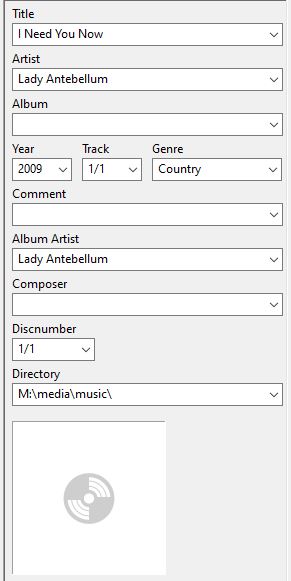
It has the following mp3 tags (the Directory is actually after I created and put one in just to see if Plex would automatically pick it up)…

However, even if I go with the structure of ArtistName\AlbumName\TrackName it still doesn’t pick up with a refresh metadata…I have to use the File Match option.
Here is another example of a similar file structure, but at the root of the media folder (i.e. no ArtistName folder)…

…even though this one has the correct mp3 tags, Title, Artist, Album Artist, those are missing properties in Plex.
Some of this behaviour is probably similar to the discussion going on in this other thread
And the info provided in…
https://support.plex.tv/articles/correcting-your-music-content-matches/?_ga=2.224485274.1059409610.1571707213-267311128.1566358042
Especially the red box of…

However, I just don’t recall in the past when the mp3 tags were all proper that there would be missing entries in Plex, especially since I use Local Media Assets for both Artists and Albums.
I am getting older so perhaps my brain isn’t firing like it used to 
