My site certificate is fine but plex says I'm not secure

Server Version#: DSM 6.2.4-25556 Update 6
Player Version#: Current (updated today after the issue appeared)

My web cert is secure when I go to the normal web site URL, but Plex seems to have exploded.

If I connect to the plex it can’t connect but the site https:mysite.com::32400/web give me the error below.

All I get is:

our connection is not private

Attackers might be trying to steal your information from XXX.com (for example, passwords, messages, or credit cards). Learn more

NET::ERR_CERT_COMMON_NAME_INVALID

Any help would be appreciated.

Did you add the certificate to PMS (Settings - Server - Network - Show Advanced) ?

In the P12 file, don’t forget to include the C.A.

The error you show comes from the browser not seeing matching certs.
(e.g. your cert at invocation but PMS responding with its cert)

When properly configured, this won’t happen.

image

nice touch, but maybe not have your synlogy exposed directly (at least on the default port). Also might wanna remove the url from your post.

Adding to that, Plex is serving the local SSL cert (plex.direkt)
download logs, and check the first 100 lines of Plex Media Server.log for any cert info. I’m guessing Plex can’t read your cert and just doesn’t apply it.

I was having a wierd issue with the link aggregation. Breaking the link resolved the issue. I’m still not sure why, Plex was working fine for about 5 years over the bonded channels. I removed the server from the link above, thanks.

I can play videos from plex.tv now even with the cert not resolving from my server directly. I’m not sure how to resolve issue if it isn’t I can export the cert from synology, but I havn’t had time to see if I can get Plex to recodnise it.

The export gives me three files

  • privkey.pem
  • Chain.pem
  • Cert.pem

Since this is system generated by synology I don’t have a password for the certs. Do I just put the directory they’re in in the Plex UI?

I wish I know why this suddenly stopped working. I also don’t have an easy way to create a PKCS #12 file from the ,pem files.

Pem certs aren’t password protected. You can generate p12 easily with command line openssl

I’ve generated the cert and referenced the file location but I’m still getting an insecure message outside my network. It looks like plex is still serving the plex certificate.

I added all three of the pem files synology exports to the new cert but it still looks like Plex isn’t using it. Is there a way to navagate to the file so I can make sure Plex can see it? I know I have the full path and caplitlization correct.

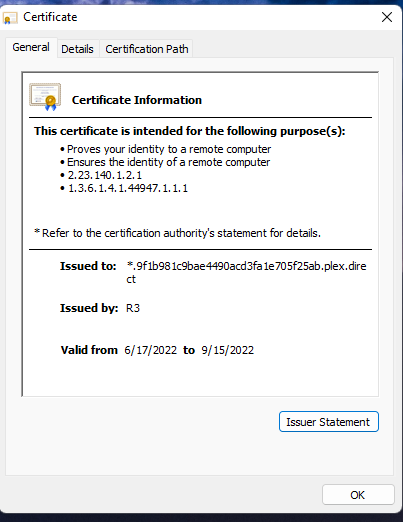
cert

  1. Are you giving PMS a PEM or P12?
  2. Is the cert in a location, with permissions, PMS can read it when it starts?

Is it safe to post here or is there somewhere else i can send it?

With DEBUG logging enabled,

When you restart PMS,

Let it sit for 3 minutes

Then pull the server logs,

What does it show? (I’ll look if you like)

Is it safe to post here or is there somewhere else i can send it?

PM sent, upper right, green dot

Rebooting the service To get the logs fixed it. Thanks for all the help! Both of you!

This topic was automatically closed 90 days after the last reply. New replies are no longer allowed.
