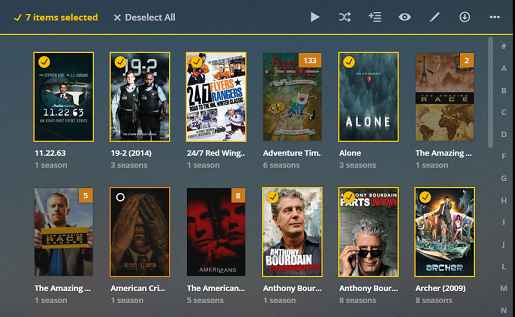
I have setup many TV shows, and now find I have way too many files on my server.
But I found there is no way to just select 10 files and delete the rest of tv shows of a particular series.
Instead, it seems the only way to purge older tv shows like daily news shows is delete the entire collection, then start again.
Why isn’t there an easier way to do this?
Or if I want to keep only two specific years of a TV series, and delete the rest, how to easily do that.
Or if I want to just select the oldest 15 shows and delete them, why do I have to click buttons 3-4 times for EVERY show?
More improvements are needed to maintain and selectively purge unwatched TV shows.
Have you looked at the advanced settings when editing such a tv show?
You can configure it to…
Set the maximum number of unwatched episodes to keep for the show. -> e.g. keep all episodes, keep the last X episodes or keep episodes of the last X days
Choose how quickly episodes are removed after the server admin has watched them. -> e.g. never, after a day or after a week
I don’t want automatic episode retention or removal times. I was a quick and easy way without needing four clicks to delete each tv show icon as i view it. You need an easier format for experts who don’t need all the hand holding with TWO clicks required after clicking delete.
I have reviewed corporate software and this user interface wastes too much time for simple tasks like DELETING ONE AT A TIME, or batch delete.
select the movies you want to delete (multi-selection)
click the “…” button to access the selection actions
click “delete”
works for movies, tv shows, seasons and episodes.
if the “delete” action is missing you might need to allow it in the server settings (Settings > Server > Library > Allow Media Deletion).
Thanks - your comment gave me the tip I needed. I wanted to select older TV news shows and if I did Ctrl click on each, it became “checked”, then when i used the three dots and delete they all deleted at once. Much better.
Another question - how to STOP or PAUSE recording of a TV series. When I get 87 episodes of GunSmoke, I want to stop recording any more, but still keep the ones I have. I have not found how to do that. i.e. How to PAUSE or STOP recording a TV series while still keeping the episodes I have.
Thanks for clarifications. I did not realize that there were TWO separate interfaces - one for recording settings, and another for recorded programs. I was searching for the ability to halt recordings in the recorded programs icons - didn’t realize you have to go the “recordings” then select the series icon in right column to find how to CANCEL recordings while still retaining existing episodes. The interface is not intuitive to me. .