@elifer said:
I’m still having problems, even with the new 3.52 Chromecast client.
I tried a few cases and have buffering with and without subtitles (I haven’t modified my Chromecast.xml file).
Sometimes it starts after 15-20 min, sometimes after 2 min (this usually happens when I managed to finish an episode, and so the next one starts buffering right at the beginning)
I checked the Now Playing tab in my server and noticed that in all cases the video stream says DirectStream. For some videos the audio is transcoded from AC3 to AAC, and for others it’s also DirectStreamed. Either way it buffers, so it doesn’t make a difference.
If I wait for a really long time the video eventually continues. Otherwise I need to stop and start, as other people mentioned.
When it’s buffering the server is not doing much. CPU usage (and especially the Plex transcoding process) is next to idle.
The logs don’t seem to show much, other than it’s buffering.
Is this what others are still experiencing?
Exactly like you, could not describe it better. The only way I can use Plex now, is to make a Profiles folder in Plex Server pref, and place the edited chromecast.xml (I delete the .ass line). Then PMS burns all subtitles and transcode all videos, but I least I can watch something without buffering.
@mattrak said:
Exactly like you, could not describe it better. The only way I can use Plex now, is to make a Profiles folder in Plex Server pref, and place the edited chromecast.xml (I delete the .ass line). Then PMS burns all subtitles and transcode all videos, but I least I can watch something without buffering.
I probably should’ve mentioned that I did try deleting that line, without it having any positive effect. I just wanted to make it clear that I was using an unmodified xml profile. I restored it when I saw this comment about needing it for the fix to take effect.
Regardless, I’m experiencing the same issue without subtitles as well, so I don’t see how that would help in my case.
(Also: I’m running on a local server, connected by Ethernet. Chromecast connected to 2.4 WiFi, next to the router, separated only by a thin wall. Never had issues before, up until this problem started a month or so ago.)
I am still having this issue. I’m streaming over the internet, with my chromecast 2 & ultra on wifi (I should be using the latest versions on everything, but can’t check at the moment). Both are having this issue with and without subtitles where it will play for 20-30 minutes then start buffering. If i change the quality (both up and down) it’ll start playing again for 20-30 minutes.
These files work just fine playing on PC and mobile. (and it shouldn’t be a bandwith thing as both the server and chromecast are on fiber lines and the chromecast is connected to a gigabit wifi router).
Hi,
Same problem here. Everything is connected by cable, so no wifi problems. Movies that I was able to watch before without buffering issues now buffer constantly. The only way to make everything work is by creating optimized versions of all the videos, which I have never had to do before… I even tried opting in for Plex pass again to see if the hardware acceleration option would make any difference, but no luck there.
I have tried modifying the Chromecast.xml in all different ways possible. If I could just go back one or two months to when everything streamed fine I would be happy.
It is quite frustrating… I’ll soon have to move my Mac Mini to beside the television and go back to using Kodi with keyboard and mouse which would be sad…
Edit: I tried removing the subtitle “ass” line from Chromecast.xml, it seems to have fixed the issue for now, but it is too early to say really.
I am seeing the same issue. Chromecast was fine until the new Chromecast app version back in March. I have noticed that it is fine until someone else starts to stream. It doesn’t matter if they are using the iPad or the chromecast. Happy to share my logs but what I see my stream which is directplay just sits there buffering. I am running the Chromecast off wired network and the server is local to my network. I look at the server load and it is fine no high CPU usage.
I am having the exact same problems where playback stops after about 15 minutes and the buffering/lag makes it then impossible to continue watching using chromecast 2
Having the same issue here, videos will stop playing and buffer after 15-30 minutes of playing. If I wait several minutes, the video will resume playing. Otherwise if I stop playback and start it again, the video starts playing again immediately. Happens on multiple files of multiple types. PMS 1.13.4.5271, Chromecast 2 connected via 5ghz WiFi.
My wife and I run android and use our android phones to send media to chromecast (gen 2). I find that the issue happens much more often with my phone than hers, so I poked around and noticed that on my version of plex (the same version as hers) the max H.264 level was set to 5.0, hers to 4.0. The gen2 chromecast can only handle up to 4.1 so I switched to that and it sems to have mostly solved the problem. It does mean that direct play is off the table now because my media uses the newer h.264 5.0 codec but I’d rather see transcoding than constant buffering.
I would like to add that I also am having similar issues. I have been using Plex for years and generally its been perfect. The last month I have been noticing “buffering” usually at the first 5-15 min of a file, and then every 30 min afterwards. I’m currently running two Gen2 Chomecasts with 5Ghz wifi. I have noticed that if I select a different quality option in the Android app it will clear up the buffering almost immediately. I feel strongly that there is nothing wrong with my system as nothing has changed. My server is a Core i5 16GB ram, as well as a very high end Asus 4x4 Dual Band router. I’m also running the latest server version, and Android app version.
Server: 1.13.4.5271
Android App: 7.3.2.6276
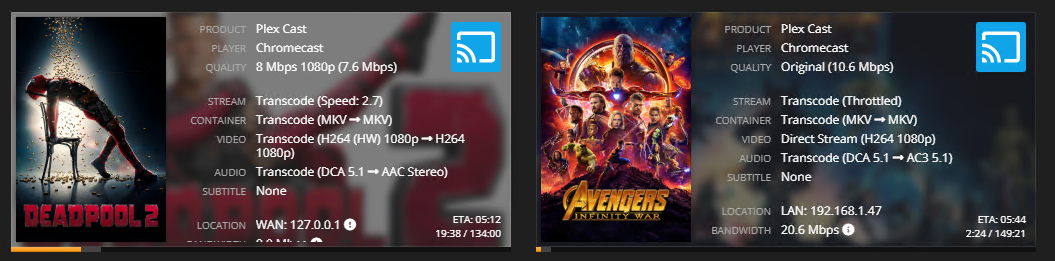
EDIT: You can see here how Plex has it throttled because enough is transcoded but its actually buffering right now . Network still shows that data is being transferred to the Chromecast, CPU usage is around 15%. Transcode speed is around 2.5-3 as being shown by Tautulli,
Last Edit: Right now it’s transcoding to two seperate chromecasts. Both files stopped around the 4min mark, and the 19 min mark. My network is obviously able to handle the streaming, something has to be wonky either on Plex or chromecast software.
Same here, it’s been happening for weeks. I even bought new routers to use WDS/AP mode near the chromecasts to try and fix the issue, my network speed is pretty fast and my server transcodes fast enough according to tautulli and the logs. It’s very frustrating to say the least.
I put a movie on last night at 2 am, I fell asleep before it started buffering and when I woke up at 9 the movie was not even halfway through yet and was still buffering, this happens almost every time I use it now.
In your first screenshot, the Chromecast is showing as using Plex Relay, which probably is slowing things down. I’ve had the same symptom, but even when I factory reset the Chromecast and successfully showed the correct local network IP in Tautulli, I’m still getting frequent stutter unless I lower the quality (down to 2-4 Mbps) on my local network. This is on 5ghz wifi which worked fine for months before.
Question : did you try casting from another type of device? I just tried casting from my desktop, with much better results than my Pixel Xl2 on P. The plex android support forums suggest the issue is on the android app side of things.
In the second image you can see how it actually shows a LAN address. For that one I was casting from Chrome on one of my PCs and not from the Android app like the first one. I will play around with that, maybe your right and the Android app is causing some issues.
Thought it might be my old ChromeCast having issues so i picked up a ChromeCast Ultra today an am using the Ethernet port - same issue.
It only happens on certain episodes of my shows, i’m currently transcoding and episode myself to a different format to see if that makes any difference… not that it’s a feasible issue to do to my 6TB library of media.