I’m not new to Plex, and I have a decently-sized music collection in it. Today, I discovered PlexAmp existed, so I installed it on my Windows 11 machine.
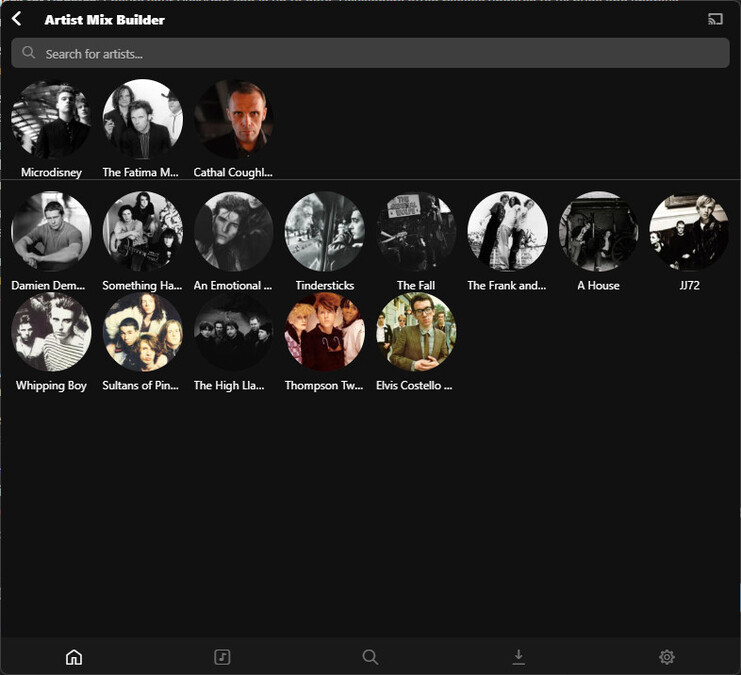
I just started poking around, and the first thing that caught my eye was “Artist Mix Builder”-- I popped in, already familiar with the artist bubble thing, and picked three related artists.
Now what? There is no Play or Save or anything. If I back out, the list is lost. I even tried with a track playing already, but that made no difference-- the artists didn’t enter the queue. I also tried adding a ton of artists to see if there were some kind of minimum (no).
Please tell me something is broken, and not that this was designed this way and I’m doing it wrong.
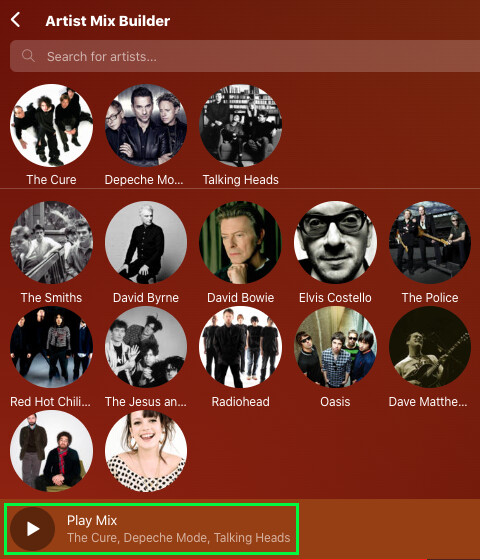
Artist/Album Mix Builders are Plex Pass features for Plexamp. If you have a Plex Pass, you’ll get a “Play Mix” button toward the bottom of the screen in the screenshot you show there.
Something like:
Unsolicited opinion: Full-featured Plexamp alone is probably worth the investment in a Plex Pass. It really is that good.
Well, then it is designed that way. And that is horrible. I’m perfectly fine with having it be a paid feature; I don’t even listen to that much music, and I have other ways of playlisting and organizing it, but this not being marked with a padlock, nor giving any indication that that’s what’s wrong is like a flaming cul-de-sac for the user.
It’s definitely not designed that way. Please don’t assume we’re intentionally making things awful just for the sake of it.
This is a bug, there’s supposed to be an indicator that it’s a paid feature and it seems the indicator went missing in a recent update. I’ll make sure this is fixed in a future update.