NFS no longer works with Linux and NAS

Finally shut down my Linux Cent OS Server.

Set up a new Fedora 36 Plex server. All set up, but ran into a problem.

I can’t get the Fedora PC to connect automatically with the file system on my NAS.

If I do a manual command of:
sudo mount -t nfs 10.0.10.4:/Library/Extras /media/shares

It works.

However, put the line in /etc/fstab
10.0.10.4:/Library/Extras /media/shares nfs4 auto,defaults 0 0

NOPE… WILL NOT WORK NO MATTER WHAT.

I’ve been using this for over 5+ years this way… What changed that you can’t use NFS anymore??

Thanks to anyone who knows.

Server Version#:
Player Version#:

Sounds like an NFS problem and has nothing to do with PWS.

BTW did you exportfs to this Fedora box?

Finally shutdown your good time and moved on to trouble time ?

10.0.10.4:/Library/Extras /media/shares nfs auto,defaults,vers=4 0 0

–or–

sudo mount -o vers=4 -t nfs .........

Are you 100% certain the NFS server is exporting NFSv4 ??

The original mount statement, which works, will negotiate NFS v4, v3, or v2 if it has to.

On my client, I specify nfs in /etc/fstab. I know the server exports NFSv4 so that’s what I get.

I have merely

jupiter:/volume1/Media          /nas            nfs default

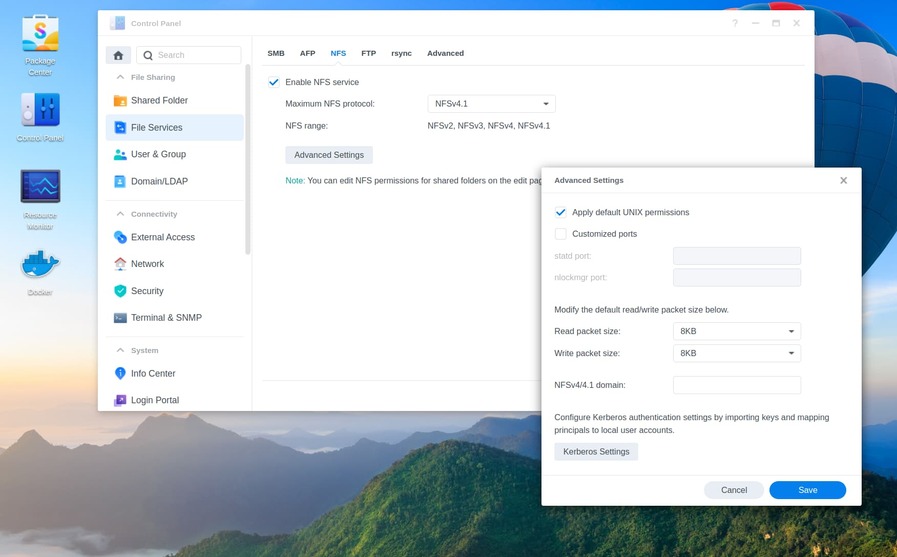
I have Maximum NFS protocol in Control Panel > File Services > NFS set to NFSv4.1. According to nfs(5) - Linux man page it says that “if this option is not specified, the client negotiates a suitable version with the server, trying version 4 first, version 3 second, and version 2 last”.

BTW I don’t the auto option on that page.

@adefaria

Synology NFS v4.1 works perfectly. It’s one of the few things Syno does right :wink:
(I wish they would allow rsize and wsize > 131072 though… :roll_eyes: )

One thing I noticed after changing the setting to 4.1 was that the Performance Monitor Overview doesn’t seem to log anything - it’s always 0 reads and 0 writes even though I’m hammering the NFS mounts with Tdarr compressing my videos. I also experience huge wait times on simple commands like ls or filename completion on these NFS mount points at times like when I’m copying a compressed file like 2-3 gigs back over to my Synology over NFS. Doesn’t happen all the time but sometimes I’m waiting 20-30 seconds up to minutes just for the ls to complete.

Add the async option.

Default is sync , which makes it wait until all data is actually flushed to disk on file close.

I just tried “nfs4” and “nfs” on the Fedora box… no go

I just went to my NAS and turned off NFS-2, and NTF-3 (on the options), and still no go.

I just tested it out with my Ubuntu laptop, and it works!

I’ve about HAD it with Fedora… I thought it might be nice to go from CentOS to Fedora, but their cryptos are KILLING ME.

I just spent hours trying to get any SSH clients to work, then spend more hours trying to get Cockpit remote to work. Aparently, Fedora has redone all their crypto, and they use really harsh keys and got rid of RSA. no older clients or browsers can get into Fedora at any levels.

While I apresiate Fedora being Fort Knox… I just need a ‘dumb plex server’. :slight_smile:

@borg357

After using Fedora since FC-5 days, I had to give up. It was too far out in “right field”. (not the same since IBM took over)

I now use Ubuntu Server on my DIY and NFS is flawless and painless as it should be.

Did you turn off the firewall? Did you turn off SELinux?
NFSv3 is rock solid on RH/Fedora/CentOS, never had any troubles connecting to Kodi/Ubuntu/Debian instances, both as a server & as a client. I’ve had nothing but troubles with NVSv4, so I choose to just use NFSv3. I also add noatime,nodiratime to my mount options.

The strange thing is that sometimes I’ll do a mv of a file that’s like 2 gig and it happens a minute or two and other times I’ll mv a 1 gig file and it’ll take like 10 minutes. Same thing with ls which I’m often doing because I’m transcoding a 2.4 gig file and I’ll end up with a 1.2 gig transcoded file so I have an ls command which I’ll do occasionally to watch its progress. As I said, sometimes the ls will come back immediately and other times it’ll take 20-30 seconds or up to a minute just to ls.

Thanks for the async tip. I’ll be turning that on.

Any idea on why Synology’s Performance Monitor isn’t registering anything for NFS in the overview tab? I coulda sworn that I used to often see the NFS “needle” register quite a bit of activity like when I’m backing up my machines to the Synology and the like.

That wreaks of a NFS server problem or a network problem.

Open a terminal window.

watch -n 1 nfsstat -c

Adjust the size to display all the text.

Now perform the transfer and watch

Tried the async option. Added it to /etc/fstab. Umounted files systems then mounted them again. No real difference. I was moving a 2.1 Gig file from the local file system → NFS mount and it was taking a while. So in another terminal I did:

Earth:ll -h /tmp/Star\ Trek\ -\ Discovery\ S04E03\ -\ Choose\ to\ Live-TdarrCacheFile-Pf_hTccW8Z.mkv /Videos/TV/Star\ Trek\ Discovery/Star\ Trek\ -\ Discovery\ S04E03\ -\ Choose\ to\ Live.mkv
-rw-rw-r-- 1 andrew defaria 2.1G Jun 18 15:02 '/tmp/Star Trek - Discovery S04E03 - Choose to Live-TdarrCacheFile-Pf_hTccW8Z.mkv'
-rwxrwxrwx 1 andrew defaria 2.1G Jun 18 15:21 '/Videos/TV/Star Trek Discovery/Star Trek - Discovery S04E03 - Choose to Live.mkv'*
Earth:

The ls hung until the mv in the first window finished then completed as shown above.

I tried the watch -n 1 nfsstat -c but I don’t know how exactly to interpret the output:

Maybe I should just change the NFS settings on the Synology back to NFSv3

Please read and then repeat this read test after making the following changes.

Now mount at the command line (using whichever shared folder with content you prefer)

This is a little DS1815+ , C2538 CPU. It can push all 4 ethernet adapters to their max with ease over NFS.

[chuck@lizum ~.2011]$ ssh moesern
chuck@moesern:~$ hostname
moesern
chuck@moesern:~$ uname -a
Linux moesern 3.10.105 #25556 SMP Sat Aug 28 02:15:59 CST 2021 x86_64 GNU/Linux synology_avoton_1815+
chuck@moesern:~$ logout
Connection to moesern closed.
[chuck@lizum ~.2012]$ sudo mount -o rsize=131072,wsize=131072,async moesern:/volume1/backup /mnt
[chuck@lizum ~.2013]$ dd if=/mnt/Valerian\ and\ the\ City\ of\ a\ Thousand\ Planets\ \(2017\)/Valerian\ and\ the\ City\ of\ a\ Thousand\ Planets\ \(2017\).mkv of=/dev/null bs=4M status=progress
35097935872 bytes (35 GB, 33 GiB) copied, 300 s, 117 MB/s
8373+1 records in
8373+1 records out
35120834634 bytes (35 GB, 33 GiB) copied, 300.197 s, 117 MB/s
[chuck@lizum ~.2014]$ mount | grep /mnt
moesern:/volume1/backup on /mnt type nfs4 (rw,relatime,vers=4.1,rsize=131072,wsize=131072,namlen=255,hard,proto=tcp,timeo=600,retrans=2,sec=sys,clientaddr=192.168.0.13,local_lock=none,addr=192.168.0.23)
[chuck@lizum ~.2015]$

117 MB/sec is the wire speed limit with TCP/IP
You can see it autonegotiated to NFSv4 and accepted the rsize & wsize.

NFS standard allows 4M sizes but Synology has opted to limit NFS.
At Gigabit speed, there’s no real need as you can see here.

OK, well first, my Synology looks a little different:

but it seems to be just cosmetic.

Performing your test I see:

Earth:sudo -s
Wizard Earth:umount /downloads
Wizard Earth:grep /downloads /etc/fstab
jupiter:/volume1/downloads	/downloads	nfs async,defaults
Wizard Earth:mount -o rsize=131072,wsize=131072,async jupiter:/volume1/downloads /downloads
Wizard Earth:dd if=/downloads/America\'s\ Got\ Talent\ S17E03\ -\ Auditions\ 3.mkv of=/dev/null bs=4M status=progress
3141533696 bytes (3.1 GB, 2.9 GiB) copied, 153 s, 20.5 MB/s
750+1 records in
750+1 records out
3149668176 bytes (3.1 GB, 2.9 GiB) copied, 153.426 s, 20.5 MB/s
Wizard Earth:mount | grep /downloads
jupiter:/volume1/downloads on /downloads type nfs4 (rw,relatime,vers=4.1,rsize=131072,wsize=131072,namlen=255,hard,proto=tcp,timeo=600,retrans=2,sec=sys,clientaddr=192.168.0.102,local_lock=none,addr=192.168.0.251)
Wizard Earth:

Notes:

  • My Synology (Jupiter) is hardwired to my router where I regularly get 900Mbit/down and ~35-40Mbit/up. My desktop (Earth) is connected wirelessly and gets about 200-300Mbit download.
  • I was not necessarily complaining about copy speed rather if I did an ls /network/path/file it would hang apparently waiting for the copy to finish before reporting the sizes of the files.

Finally, since this seems to be NFS related or perhaps just local network-related and not related to Plex at all, perhaps we should take this to private missending…

That looks like DSM 7.

Your default Packet size is 8KB… that is NFSv1 standard. Change to 32 KB for both

There is no need to take this private as the end solution may help others.

Using DSM 7, on a 4 drive DS418 (ARMv8 CPU) with a 2-drive volume.

[chuck@lizum ~.2027]$ sudo mount -o rsize=131072,wsize=131072,async  ds418:/volume1/Animated /mnt
[chuck@lizum ~.2028]$ dd if=/mnt/Aladdin\ \(1992\)/Aladdin\ \(1992\).mkv of=/dev/null bs=4M status=progress
24171773952 bytes (24 GB, 23 GiB) copied, 211 s, 115 MB/s
5777+1 records in
5777+1 records out
24232649635 bytes (24 GB, 23 GiB) copied, 211.534 s, 115 MB/s
[chuck@lizum ~.2029]$ gos
chuck@ds418's password: 

Synology strongly advises you not to run commands as the root user, who has
the highest privileges on the system. Doing so may cause major damages
to the system. Please note that if you choose to proceed, all consequences are
at your own risk.

chuck@ds418:~$ uname -a
Linux ds418 4.4.180+ #42661 SMP Fri Apr 1 15:31:28 CST 2022 aarch64 GNU/Linux synology_rtd1296_ds418j
chuck@ds418:~$ logout

Are you using FastEthernet (100 Mbps) or Gigabit?
Are you using multi-drive volumes or single-drive ?

Thanks for the tip about Packet size. I’ve upped it to 32k.

Re-performing my test shows even worse speed, maybe because I’m doing a bunch of transcode operations in the background utilizing NFS heavily as well as watching something from Plex on my desktop.

Wizard Earth:umount /downloads
Wizard Earth:mount -o rsize=131072,wsize=131072,async jupiter:/volume1/downloads /downloads
Wizard Earth:dd if=/downloads/America\'s\ Got\ Talent\ S17E03\ -\ Auditions\ 3.mkv of=/dev/null bs=4M status=progress
3149668176 bytes (3.1 GB, 2.9 GiB) copied, 541 s, 5.8 MB/s 
750+1 records in
750+1 records out
3149668176 bytes (3.1 GB, 2.9 GiB) copied, 540.715 s, 5.8 MB/s
Wizard Earth:

Still, the Resource Monitor on the Synology in the Overview section never shows anything for NFS 'cept 0%.

Even though there is NFS activity:

OK, I quiesced the network activity and redid the dd:

Wizard Earth:dd if=/downloads/America\'s\ Got\ Talent\ S17E03\ -\ Auditions\ 3.mkv of=/dev/null bs=4M status=progress
566231040 bytes (566 MB, 540 MiB) copied, 8 s, 68.9 MB/s
750+1 records in
750+1 records out
3149668176 bytes (3.1 GB, 2.9 GiB) copied, 8.91319 s, 353 MB/s
Wizard Earth:

Much better.

As for FastEthernet (networking and hardware are my weak spots) I know I have the GigaBlaster package from Cox and get about 900Mbit down when wired and about 300Mbit when wireless (my desktop is wireless). I have a switch coming from the GigaBlaster router so that I can wire my Synology Plex server, my TV, and my PS4. I’m assuming I can get Gigabit speeds on the LAN if everything was wired.

I have a Synology 1019+ with 4 10Tb drives on /volume1. My 5th bay has a throwaway 500G drive that I don’t really use on /volume2.