I have 2 questions for you. First are you sure that you have an Apple TV 4K and not the non 4k version? The only reason that I ask you is that your 4k movies shouldn’t be doing any “compression” or transcoding unless it trying to convert the 4k movie into a lower resolution and that may be overwhelming your system. Second question is what’s the average size of your 4k movie files? I’m constantly changing the movies file size to get the best mix of quality and I recently switched to a NAS system with plex built in as well so it does have some processing limitations.
I try to keep my 4k files below the 50gb mark. I can’t notice any better image for anything larger than that, and it’s not worth the space. If I can I like to get 4k at 25-30gb. And honestly, depending on the movie, most of the time anything in the 1080p range looks fine and Ive seen files as low as 5gb look completely acceptable.
And yes, I’m sure I have the 4k version app tv. It sucks. Ive thought about getting the Nvidia Shield. It gets good marks from Plex users.
I guess I don’t understand why you would have to transcode 4K files anyway. you only need 25Mbps for good 4K streams which is a fraction of your 100Mbps NIC. See what speed you get when you copy a file from the nas to a computer. just a simple file transfer. The other thing to consider is HDR. If you’re trying to play HDR content on a non HDR tv then plex will transcode. If you’re trying to play an HDR file on a plex app that doesn’t do HDR, plex will transcode.
Both my Shield and ATV4 will direct play from my Synology.
50gb isn’t a bad size. Got a few in 60 and 70gb range but most of the 4k in the 30-40gb and really can’t see or hear the difference. While you are looking at replacement NAS you might want to look at the Terramaster F5-421. When I was making the last plex hardware changes and wanted specifically a NAS with built in Plex. Previously used home server (win 10), iMac, Mac mini, and the Nighthawk 9000 router but never a NAS. Decided on the Terra-master. Had a few problem Plex software problems in the beginning along with some OS issues but ever since the latest 2 or 3 rounds of plex and OS updates I couldn’t ask for a better system. It pushes through about 20 devices in the house (normally not more than 3 or 4 going at time though) including a number of Apple TV’s and works like a champ!
Plex Media Server Logs_2020-05-19_16-07-41.zip (4.6 MB)
Soooo, I’m a little upset. Hopefully you can help me out before I set the buliding on fire.
I just bought the DS1019+. I have all of the settings set to be able to transcode this 4k Movie. Guess what…BUFFERING! It played for a few minutes then buffered for a moment. When I pressed pause, then play, is frozen in buffering. I though th Upgraded hardwired was supposed to handle this issue.
Any new thoughts?
Hardware transcoding isn’t enabled.
May 19, 2020 15:54:38.948 [0x7fc7b56fb700] DEBUG - [Universal] Using local file path instead of URL: /volume1/KashiPLEX/KashiPLEX Movies/Doctor.Strange.2016.2160p.UHD.BluRay.REMUX.HDR.HEVC.Atmos-EPSiLON.mkv
May 19, 2020 15:54:38.948 [0x7fc7b56fb700] DEBUG - TPU: hardware transcoding: final decoder: , final encoder:
May 19, 2020 15:54:38.949 [0x7fc7b56fb700] DEBUG - Job running: EAE_ROOT='/volume1/Plex/tmp_transcoding/pms-1f30f142-93e2-46a1-9d0f-f45d12eef154/EasyAudioEncoder' FFMPEG_EXTERNAL_LIBS='/volume1/Plex/Library/Application\ Support/Plex\ Media\ Server/Codecs/99c90e0-3095-linux-x86_64/' XDG_CACHE_HOME='/volume1/Plex/Library/Application Support/Plex Media Server/Cache' XDG_DATA_HOME='/volume1/@appstore/Plex Media Server/Resources' X_PLEX_TOKEN='xxxxxxxxxxxxxxxxxxxx' '/volume1/@appstore/Plex Media Server/Plex Transcoder' '-codec:0' 'hevc' '-codec:1' 'truehd_eae' '-eae_prefix:1' 'ne8p0u7p8941dugjrgfyfogv_' '-noaccurate_seek' '-analyzeduration' '20000000' '-probesize' '20000000' '-i' '/volume1/KashiPLEX/KashiPLEX Movies/Doctor.Strange.2016.2160p.UHD.BluRay.REMUX.HDR.HEVC.Atmos-EPSiLON.mkv' '-filter_complex' '[0:1] aresample=async=1:ocl='\''5.1'\'':osr=48000[0]' '-map' '0:0' '-metadata:s:0' 'language=eng' '-codec:0' 'copy' '-map' '[0]' '-metadata:s:1' 'language=eng' '-codec:1' 'aac' '-b:1' '768k' '-f' 'dash' '-seg_duration' '5' '-init_seg_name' 'init-stream$RepresentationID$.m4s' '-media_seg_name' 'chunk-stream$RepresentationID$-$Number%05d$.m4s' '-window_size' '5' '-delete_removed' 'false' '-skip_to_segment' '1' '-time_delta' '0.0625' '-manifest_name' 'http://127.0.0.1:32400/video/:/transcode/session/ne8p0u7p8941dugjrgfyfogv/f1d1647d-c1cd-49b1-9cf2-eb848bc830cb/manifest?X-Plex-Http-Pipeline=infinite' '-avoid_negative_ts' 'disabled' '-map_metadata' '-1' '-map_chapters' '-1' 'dash' '-start_at_zero' '-copyts' '-vsync' 'cfr' '-y' '-nostats' '-loglevel' 'quiet' '-loglevel_plex' 'error' '-progressurl' 'http://127.0.0.1:32400/video/:/transcode/session/ne8p0u7p8941dugjrgfyfogv/f1d1647d-c1cd-49b1-9cf2-eb848bc830cb/progress'
May 19, 2020 15:54:38.983 [0x7fc7b56fb700] DEBUG - Jobs: Starting child process with pid 25004
This line:
May 19, 2020 15:54:38.948 [0x7fc7b56fb700] DEBUG - TPU: hardware transcoding: final decoder: , final encoder:
Check:
Settings - Server - Transcoder - SHOW ADVANCED
Part way down:
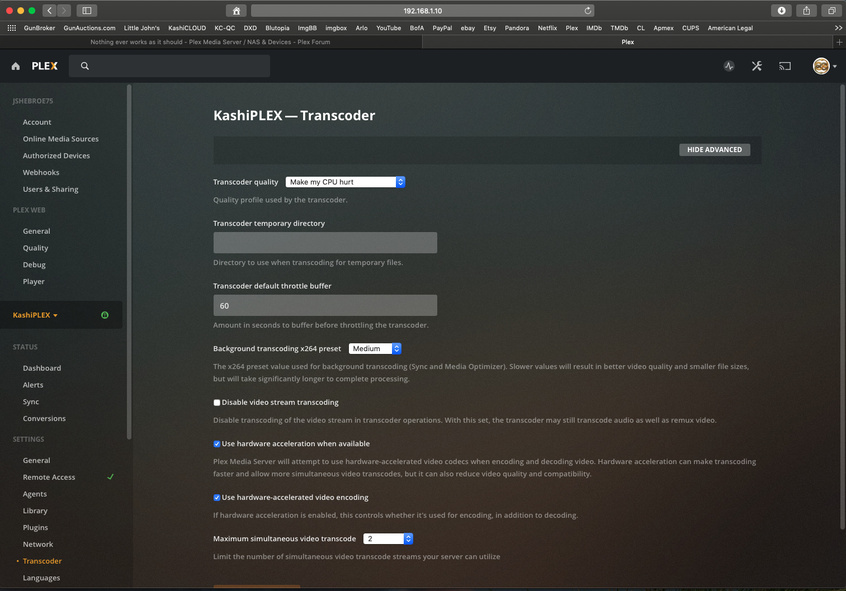
“Use hardware acceleration when available”
Check the box and save.
I once ran Ethernet cable through an attic, inside a wall, and into a nice wall plate to get a 4k Samsung TV to stop buffering high bitrate direct play. I just assumed the NIC could handle the bandwidth if the TV was designed for 4k. What a n00b.
The Hardward acceleration when available is already checked. Ill try unchecking, saving, checking it back on and saving and see if that works.
edit:
that did not help.
I’m actually doing the exact same thing. So what you’re implying is that the NIC on the TV is the culperit? Did you fix your problem?
May we please have ONE problem per thread without interruption ?
Would you please try the following:
- Play a different video
- Make certain to not use Subtitles.
- Let it start to play for 30 seconds
- Stop playback
- Wait 30 seconds
- Download and attach a fresh set of logs (ZIP file)
Plex Media Server Logs_2020-05-19_18-03-16.zip (4.6 MB)
Sorry about replying to the other User. I though he was mentioned that my issue was the NIC of the Television.
Here is the new log after the previous instructions.
thanks for the updated logs.
I’m sorry if I misunderstood about the other replies.
Sometimes people just jump into a thread and try to hijack it because their problem might be the same as the OP. It gets to be very interesting at times 
Please do the following:
- stop Plex
- Uninstall the package
- Restart DSM
- Reinstall the package
- Now test the hardware transcoding.
For some reason, it’s not picking up the hardware and I’m not seeing anything (like subtitles) which would suppress the use of hardware
This isn’t in a docker or VM is it? Logs don’t indicate any such condition.
Sounds good I;; try all that and get back to you. And no its not on a VN or docker. Another reason why im not understanding why there’s an issue. It should be pretty straight forward. Maybe but is as the other user stated and its the Samsung NIC.
Stand By for new logs…
Yes, it should be straight forward.
- Installer creates user plex.
- Installer writes udev rules so user
plexcan access the hardware. - Creates Plex share
- Launches
I went a little beyond…
- Stopped Plex on Samsung
- Uninstalled Plex app on samsung
- Unpluged Samsung from the wall
- Uninstalled Plex server package from Synology NAS
- Restarted the DSM
- Reinstalled Plex Package
- Went to turn on Hardware acceeltertion (it was already checked…see photo)
- Plugged the TV back in
- Reinstalled Plex on the TV
- Rechecked playback
Drumrolllll…
NOPE. Still the same Buffering issue. By itself and once I tried to fast forward.
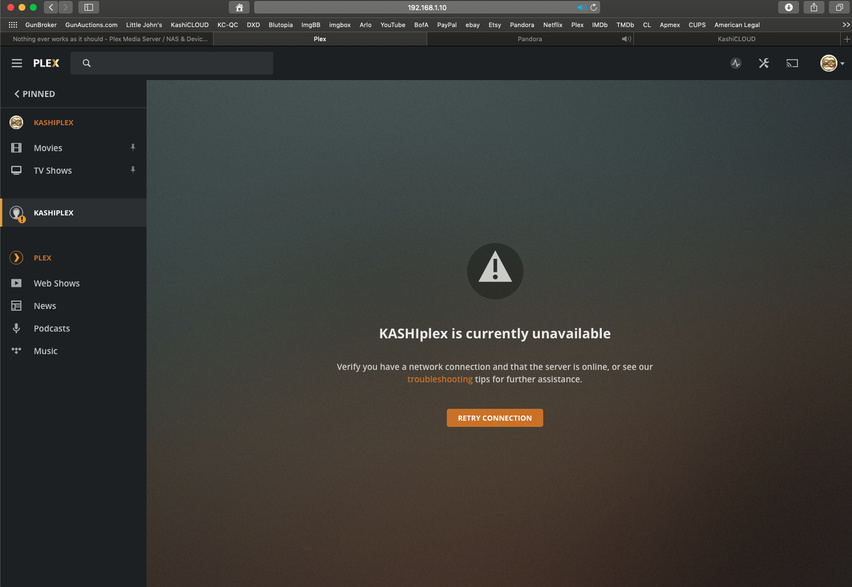
So I went back to Plex to get a new log, and on the home page there was a new issue. It showed 2 versions of my server, and that one wasn’t able to connect. Ive never seen that before. See the second photo.
Either way…heere are the logs.

I just read in another post about someone asking to transcode through Ram. Would this be an optinon for me? Could the ram transcode faster then whatever its doing now?
RAM is an option when the hard drive / disk io is getting overloaded.
We have a fundamental problem here with the hardware not being seen.
We first need to get that solved.
Now I’m going to ask you to get a bit more bold with it.
Control Panel - Users
Let’s examine where user plex is.
It better be a member of the video group.
It should look like this.


