Alright,
For whatever reason, user plex isn’t finding the hardware.
We can do some command line work if you’re willing.
You have a Mac?
Are you comfortable working in the terminal window?
Alright,
For whatever reason, user plex isn’t finding the hardware.
We can do some command line work if you’re willing.
You have a Mac?
Are you comfortable working in the terminal window?
Yea ive done it before with minor things. I’m not pro by any means. I also don’t mind signing over to a thing to Gove you control of the computer. Ans yes I have a Mac
Here’s what I’d like you to do.
admin a temporary password you know and enable it.ssh -l admin ip.addr.of.syno , sign in using admin password just assignedls -la /dev/dri
Please copy/paste that output back here with your reply.
Ok, it got a little messy for a second but ni think I got what your need:
Last login: Fri May 1 19:53:42 on console
Jefrys-MacBook-Pro:~ jefrymacbookpro$ ssh -l admin ip.addr.of.syno
ssh: Could not resolve hostname ip.addr.of.syno: nodename nor servname provided, or not known
Jefrys-MacBook-Pro:~ jefrymacbookpro$ ssh -l admin 192.168.1.10
The authenticity of host ‘192.168.1.10 (192.168.1.10)’ can’t be established.
ECDSA key fingerprint is SHA256:spLCohlvMV0Tkv43BSrP802oc2i1Uy2EtbOVq6kZ++4.
Are you sure you want to continue connecting (yes/no)? yes
Warning: Permanently added ‘192.168.1.10’ (ECDSA) to the list of known hosts.
admin@192.168.1.10’s password:
Connection closed by 192.168.1.10 port 22
Jefrys-MacBook-Pro:~ jefrymacbookpro$ ls -la /dev/dri
ls: /dev/dri: No such file or directory
Jefrys-MacBook-Pro:~ jefrymacbookpro$ ssh -l admin
usage: ssh [-46AaCfGgKkMNnqsTtVvXxYy] [-B bind_interface]
[-b bind_address] [-c cipher_spec] [-D [bind_address:]port]
[-E log_file] [-e escape_char] [-F configfile] [-I pkcs11]
[-i identity_file] [-J [user@]host[:port]] [-L address]
[-l login_name] [-m mac_spec] [-O ctl_cmd] [-o option] [-p port]
[-Q query_option] [-R address] [-S ctl_path] [-W host:port]
[-w local_tun[:remote_tun]] destination [command]
Jefrys-MacBook-Pro:~ jefrymacbookpro$ ssh -l admin 192.168.1.10
admin@192.168.1.10’s password:
Could not chdir to home directory /var/services/homes/admin: No such file or directory
admin@KashiCloud:/ ls -la /dev/dri
total 0
drwxrwxrwx 2 root root 100 May 19 18:32 .
drwxr-xr-x 12 root root 18960 May 20 00:35 ..
crw-rw---- 1 root video 226, 0 May 19 20:17 card0
crw-rw---- 1 root video 226, 64 May 19 20:17 controlD64
crw-rw---- 1 root video 226, 128 May 19 20:17 renderD128
admin@KashiCloud:/
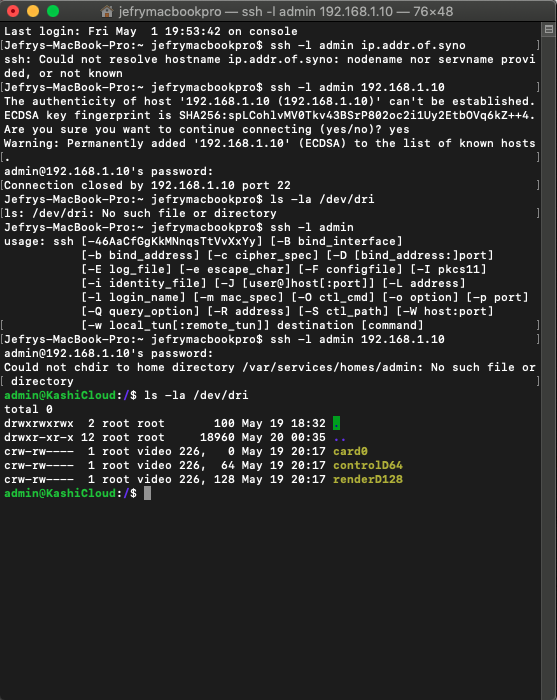
that’s exactly as I expected.
DSM sees the transcoding chip perfectly.
Now, we need to find out why PMS can’t access it.
While you still have that terminal session:
grep plex /etc/group
grep plex /etc/passwd
Please show me that output as well.
SO when I did that it seems to ask me for a password. Is it asking me for my Plex account password, or the password I just created on the Synology. Neither didn’t seem to do anything

I wasn’t trying to de-rail, you definitely need to get hardware encoding working and Chuck is obviously next level!
I was just relating to you that I could direct play that Doctor Strange file to my wired 4k Roku with no issue. With the 4k Samsung TV, it would direct play a file like this and then buffer at scenes that make the bitrate go up, like action scenes. I’m convinced it’s a hardware limitation but I’m not sure.
Getting the hardware transcoding working is priority. Sorry to interrupt.
when you type ssh -l admin ip.addr.of.host
It uses username admin because that’s what the -l option does.
It only wanted the Synology password for local user admin in the same way it would ask for that password logging in from the UI.
the grep command is of the form:
grep thing-to-look-for filename(s)
You didn’t need to specify anything after /etc/passwd or /etc/group (just as I wrote it)
I would like you to download this 30 Mbps, H.264 file from JellyFish
http://jell.yfish.us/media/jellyfish-30-mbps-hd-h264.mkv
It’s a known good test file.
Create a directory to place this in and then create a “Other Videos” library type which points to that directory.
This will allow you to test various “sample” files without worrying of matching names.
If you wish to download other files from the site for testing, please help yourself. They’re always good to have around.
I sort of understood what you said in the previous reply. But did you get what you were looking for? I think I did a version of just copy pasting what you wrote.
I downloaded the file, created a new directory, added it to a new library and played it. here is the log.Plex Media Server Logs_2020-05-20_10-30-53.zip (3.6 MB)
Also just for grins. I downloaded a 20mbs 10bit version, and the 30mbs HEVC version. {Played them and here’s the logs. Sorry if I’m jumping the gun here. Just thought it might help.Plex Media Server Logs_2020-05-20_10-41-54.zip (3.6 MB)
Also…I just tried watching the other 4k HEVC movie I tried the other day, and it plays fine. The only difference I can tell between the two is the audio., One is TrueHD the other is something else. I stoped it and fastworeaarded it, and it was playing normally. It never buffered by itself for over 30 minutes. Is it possible this whole thing is just because of a bad file? Or does this new log also not show that the hardware accelerations is not working?
whatever is now working… is working VERY well. (figures - haha)
Would you mind getting something much larger and then, the moment it starts to playback, manually force the bitrate (bottom of the window the ‘equalizer’ settings button)
Force it to video transcode to something lower.
When you say much larger, you mean a movie where the actuall file size is a lot bigger? Like a 100gb file?
Bigger == Higher bitrate 
The 50-75-100 Mbps samples should be more than enough.
Take those, start to play, force the bitrate down to 20-30 Mbps
The hardware transcoding will engage.
I couldn’t find anything above 80/mbs so here what I got:
How to train your dragon 4k / 79mbs (transcoded to 20mbs): Buffering problem
Plex Media Server Logs_2020-05-20_18-01-04.zip (3.8 MB)
How to train your dragon 4k / 79mbs (Direct Play) : Started off playing great. Skipping forward worked fine. Pressing pause to scroll forward…Indefinate Buffering.Plex Media Server Logs_2020-05-20_18-09-06.zip (3.9 MB)
E.T 4k / 59.9 Mbs (Direct Play) Started off playing great. Skipping forward worked fine. Pressing pause to scroll forward…Indefinate BufferingPlex Media Server Logs_2020-05-20_18-16-26.zip (3.9 MB)
E.T 4k / 59.9 Mbs (transcoded to 20mbs): Buffering ProblemPlex Media Server Logs_2020-05-20_18-19-27.zip (3.9 MB)
Spiderman SPiderverse 4k / 52mbs (Direct play). Buffering.Plex Media Server Logs_2020-05-20_18-23-53.zip (4.0 MB)
I didn’t even bother trying to force transcode this Spiderman
Better to use standardized files for testing I think.
At least you know exact what you are dealing with.
Thanks, got that above already 
Here are the following logs for the listed versions of Jellyfish files.NOthing played smoothly if I forced transcode.
For direct play:
120-200 wouldn’t play at all before it kicked me back to the menu page.
70-110 would play with buffering
50-60 played fine
 Plex Media Server Logs_2020-05-21_08-46-34.zip (3.8 MB)
That did it!
We have hardware decode:
May 21, 2020 08:23:44.623 [0x7fb34f159700] DEBUG - Cleaning directory for session a2ha23kopgbfcg2g112nsif6 ()
May 21, 2020 08:23:44.624 [0x7fb34f159700] DEBUG - Starting a transcode session a2ha23kopgbfcg2g112nsif6 at offset -1.0 (state=3)
May 21, 2020 08:23:44.624 [0x7fb34f159700] DEBUG - TPU: hardware transcoding: using hardware decode accelerator vaapi
May 21, 2020 08:23:44.625 [0x7fb34f159700] DEBUG - [Universal] Using local file path instead of URL: /volume1/KashiPLEX/Other Videos/jellyfish-200-mbps-4k-uhd-h264.mkv
May 21, 2020 08:23:44.625 [0x7fb34f159700] DEBUG - TPU: hardware transcoding: zero-copy support not present
May 21, 2020 08:23:44.625 [0x7fb34f159700] DEBUG - Codecs: hardware transcoding: testing API vaapi
May 21, 2020 08:23:44.625 [0x7fb34f159700] DEBUG - [FFMPEG] - Format 0x32315659 -> yuv420p.
May 21, 2020 08:23:44.625 [0x7fb34f159700] DEBUG - [FFMPEG] - Format 0x30323449 -> yuv420p.
May 21, 2020 08:23:44.625 [0x7fb34f159700] DEBUG - [FFMPEG] - Format 0x3231564e -> nv12.
May 21, 2020 08:23:44.625 [0x7fb34f159700] DEBUG - [FFMPEG] - Format 0x32595559 -> yuyv422.
May 21, 2020 08:23:44.625 [0x7fb34f159700] DEBUG - [FFMPEG] - Format 0x59565955 -> uyvy422.
May 21, 2020 08:23:44.625 [0x7fb34f159700] DEBUG - [FFMPEG] - Format 0x48323234 -> yuv422p.
May 21, 2020 08:23:44.625 [0x7fb34f159700] DEBUG - [FFMPEG] - Format 0x58424752 -> rgb0.
May 21, 2020 08:23:44.625 [0x7fb34f159700] DEBUG - [FFMPEG] - Format 0x58524742 -> bgr0.
May 21, 2020 08:23:44.625 [0x7fb34f159700] DEBUG - [FFMPEG] - Format 0x30313050 -> p010le.
May 21, 2020 08:23:44.625 [0x7fb34f159700] DEBUG - [FFMPEG] - Created surface 0x4000000.
May 21, 2020 08:23:44.625 [0x7fb34f159700] DEBUG - [FFMPEG] - Direct mapping possible.
May 21, 2020 08:23:44.626 [0x7fb34f159700] DEBUG - TPU: hardware transcoding: final decoder: vaapi, final encoder:
May 21, 2020 08:23:44.627 [0x7fb34f159700] DEBUG - Job running: EAE_ROOT='/volume1/Plex/tmp_transcoding/pms-5b98861b-d075-4701-bd25-6e6c176d8a87/EasyAudioEncoder' FFMPEG_EXTERNAL_LIBS='/volume1/Plex/Library/Application\ Support/Plex\ Media\ Server/Codecs/99c90e0-3095-linux-x86_64/' XDG_CACHE_HOME='/volume1/Plex/Library/Application Support/Plex Media Server/Cache' XDG_DATA_HOME='/volume1/@appstore/Plex Media Server/Resources' X_PLEX_TOKEN='xxxxxxxxxxxxxxxxxxxx' '/volume1/@appstore/Plex Media Server/Plex Transcoder' '-codec:0' 'h264' '-hwaccel:0' 'vaapi' '-hwaccel_fallback_threshold:0' '10' '-analyzeduration' '20000000' '-probesize' '20000000' '-i' '/volume1/KashiPLEX/Other Videos/jellyfish-200-mbps-4k-uhd-h264.mkv' '-filter_complex' '[0:0]scale=w=3840:h=2160[0];[0]format=pix_fmts=yuv420p|nv12[1]' '-map' '[1]' '-metadata:s:0' 'language=eng' '-codec:0' 'libx264' '-crf:0' '16' '-maxrate:0' '60000k' '-bufsize:0' '120000k' '-r:0' '29.969999999999999' '-preset:0' 'veryfast' '-level:0' '5.1' '-x264opts:0' 'subme=2:me_range=4:rc_lookahead=10:me=hex:8x8dct=1' '-force_key_frames:0' 'expr:gte(t,0+n_forced*1)' '-f' 'dash' '-seg_duration' '1' '-init_seg_name' 'init-stream$RepresentationID$.m4s' '-media_seg_name' 'chunk-stream$RepresentationID$-$Number%05d$.m4s' '-window_size' '5' '-delete_removed' 'false' '-skip_to_segment' '1' '-time_delta' '0.0625' '-manifest_name' 'http://127.0.0.1:32400/video/:/transcode/session/a2ha23kopgbfcg2g112nsif6/1037631b-9912-4d84-87a9-c47180b006b8/manifest?X-Plex-Http-Pipeline=infinite' '-avoid_negative_ts' 'disabled' '-map_metadata' '-1' '-map_chapters' '-1' 'dash' '-start_at_zero' '-copyts' '-vsync' 'cfr' '-y' '-init_hw_device' 'vaapi=vaapi:,driver=i965' '-hwaccel_device' 'vaapi' '-filter_hw_device' 'vaapi' '-nostats' '-loglevel' 'quiet' '-loglevel_plex' 'error' '-progressurl' 'http://127.0.0.1:32400/video/:/transcode/session/a2ha23kopgbfcg2g112nsif6/1037631b-9912-4d84-87a9-c47180b006b8/progress'
May 21, 2020 08:23:44.627 [0x7fb34f159700] DEBUG - Jobs: Starting child process with pid 9778
Doublecheck your options please (Settings - Server - Transcoder)
If both are checked, cycle then (uncheck & save then check & save again)
It should be using both Decode (which it is) but also encoding (when reducing the bitrate)
ay 21, 2020 08:23:44.623 [0x7fb34f159700] DEBUG - Cleaning directory for session a2ha23kopgbfcg2g112nsif6 ()
May 21, 2020 08:23:44.624 [0x7fb34f159700] DEBUG - Starting a transcode session a2ha23kopgbfcg2g112nsif6 at offset -1.0 (state=3)
May 21, 2020 08:23:44.624 [0x7fb34f159700] DEBUG - TPU: hardware transcoding: using hardware decode accelerator vaapi
May 21, 2020 08:23:44.625 [0x7fb34f159700] DEBUG - [Universal] Using local file path instead of URL: /volume1/KashiPLEX/Other Videos/jellyfish-200-mbps-4k-uhd-h264.mkv
May 21, 2020 08:23:44.625 [0x7fb34f159700] DEBUG - TPU: hardware transcoding: zero-copy support not present
May 21, 2020 08:23:44.625 [0x7fb34f159700] DEBUG - Codecs: hardware transcoding: testing API vaapi
May 21, 2020 08:23:44.625 [0x7fb34f159700] DEBUG - [FFMPEG] - Format 0x32315659 -> yuv420p.
May 21, 2020 08:23:44.625 [0x7fb34f159700] DEBUG - [FFMPEG] - Format 0x30323449 -> yuv420p.
May 21, 2020 08:23:44.625 [0x7fb34f159700] DEBUG - [FFMPEG] - Format 0x3231564e -> nv12.
May 21, 2020 08:23:44.625 [0x7fb34f159700] DEBUG - [FFMPEG] - Format 0x32595559 -> yuyv422.
May 21, 2020 08:23:44.625 [0x7fb34f159700] DEBUG - [FFMPEG] - Format 0x59565955 -> uyvy422.
May 21, 2020 08:23:44.625 [0x7fb34f159700] DEBUG - [FFMPEG] - Format 0x48323234 -> yuv422p.
May 21, 2020 08:23:44.625 [0x7fb34f159700] DEBUG - [FFMPEG] - Format 0x58424752 -> rgb0.
May 21, 2020 08:23:44.625 [0x7fb34f159700] DEBUG - [FFMPEG] - Format 0x58524742 -> bgr0.
May 21, 2020 08:23:44.625 [0x7fb34f159700] DEBUG - [FFMPEG] - Format 0x30313050 -> p010le.
May 21, 2020 08:23:44.625 [0x7fb34f159700] DEBUG - [FFMPEG] - Created surface 0x4000000.
May 21, 2020 08:23:44.625 [0x7fb34f159700] DEBUG - [FFMPEG] - Direct mapping possible.
May 21, 2020 08:23:44.626 [0x7fb34f159700] DEBUG - TPU: hardware transcoding: final decoder: vaapi, final encoder:
May 21, 2020 08:23:44.627 [0x7fb34f159700] DEBUG - Job running: EAE_ROOT='/volume1/Plex/tmp_transcoding/pms-5b98861b-d075-4701-bd25-6e6c176d8a87/EasyAudioEncoder' FFMPEG_EXTERNAL_LIBS='/volume1/Plex/Library/Application\ Support/Plex\ Media\ Server/Codecs/99c90e0-3095-linux-x86_64/' XDG_CACHE_HOME='/volume1/Plex/Library/Application Support/Plex Media Server/Cache' XDG_DATA_HOME='/volume1/@appstore/Plex Media Server/Resources'
The second box was not checked. It is now. I will try again.

