Don’t you love marketing?
Same drive - different label.
Don’t you love marketing?
Same drive - different label.
look at the warranty period. You want the 5 year
that’s what I thought. I read that “NAS drives” were a marketing tool. and that enterprise drives were the way to go. So I can get the WD Gold and be ok?
Copy about the warranty
Compared to Enterprise, YES.
Compared to Desktop drives , NO. Desktop drives have different internals and different firmware.
NAS drives are setup knowing the environment AND knowing the NAS will want control of bad sector management. You can’t have a Desktop drive retrying forever in a NAS - the box will hang.
NAS drives are rates for 24/7/365 with heads constantly going.
Desktop isn’t.
Correct. that I knew as well.
Backtracking a little, did you ever get a chance to look at the new log from the new remux I made?
It didn’t show as hardware transcode but the transcoder was sleeping most of the time.
Let me see if I have a file you can use as a sample to download
I don’t have anything there. I can make one and upload (will be slow )
SO was I at this point
Call it a night? We can resume tomorrow.
I will be up a while longer.
no im good for a while longer, I just mean getting bored watching the same 4 minutes of the movie
I’ve got about an hour or so before I have to go feed my horses and change one of their bandages,
but I guess at this point were at a stand still until I get your uploaded file?
read PM
Very interesting thread to follow. I have almost the exact setup (918+, Apple TV 4K, Samsung) and do not have any trouble with Direct Play or Transcoding.
As Chuck pointed out, the Subtitles are contributing to the issue, but is apparently not the only factor. Apologies if I missed it, but on Doctor Strange are you playing the TrueHD audio, or the AC3?
While it should work, I have experienced issues on the Apple TV where playback is very choppy and/or buffers because the HD audio source is being transcoded. Once I switch to the AC3 track it plays smoothly.
I do not think you will have luck using the player on the Samsung until the transcoding issue you and Chuck have been working through gets sorted. The 10/100 ethernet port just wont cut it when there is a bitrate spike, and will trigger buffering or stuttering.
A few more notes from what I’ve read here:
I slightly disagree with you switching to an Nvidia Shield. BLASPHEMY!! OFF WITH HIS HEAD!!
Put the pitch forks away… I only mean I would not switch just yet since you already own an Apple TV 4K. No sense in spending additional money if you don’t have to. Wouldn’t you rather buy storage with that money?? The ATV4K is actually a very capable box with it’s only drawback being a lack of support for HD audio (which the Shield does support) Thus why I suggested trying the AC3 audio stream.
Since it sounds like you are still experiencing issues after removing the PGS streams, I am beginning to wonder if you are having network issues, or if it’s an issue with the content itself (as mentioned earlier in the thread)
Bear with me, but I would try downloading Infuse for the Apple TV and see if Doctor Strange still gives you issues (If you get the free version, you will need to use the AC3 audio stream, the pro version supports HD audio) You can connect it to your Plex server, and it will sync everything up nicely.
Infuse can Direct Play Everything. If it does not play smoothly in Infuse, it is not a problem with Plex, but something with your media or network (Infuse has a cool file speed test feature we can use to determine if there is a bandwidth issue on a particular file)
I use Infuse Pro to play back my uncompressed 4K rips with HD Audio.
If it plays back fine in Infuse, it would be great to continue working through the issue presented in the Plex player. That’s how we make the platform better!
We took the conversation offline last night and discussed via phone.
Awesome, good to hear!
With all I shared and explained about how this “curation magic” works, He’s doing to do a few today on his own to see if he can repeat that same magic.
I explained the why & how as I clicked the boxes (we used teamviewer)
Fingers crossed he’ll be able to start working on the rest of this files and having a much better (as it should be) experience.
@ChuckPa, can you share some settings for example that would be good to use using the MKVToolnix on certain MKV’s ?
Of course. There’s no real Rocket Science to this.
Here is how I have it.
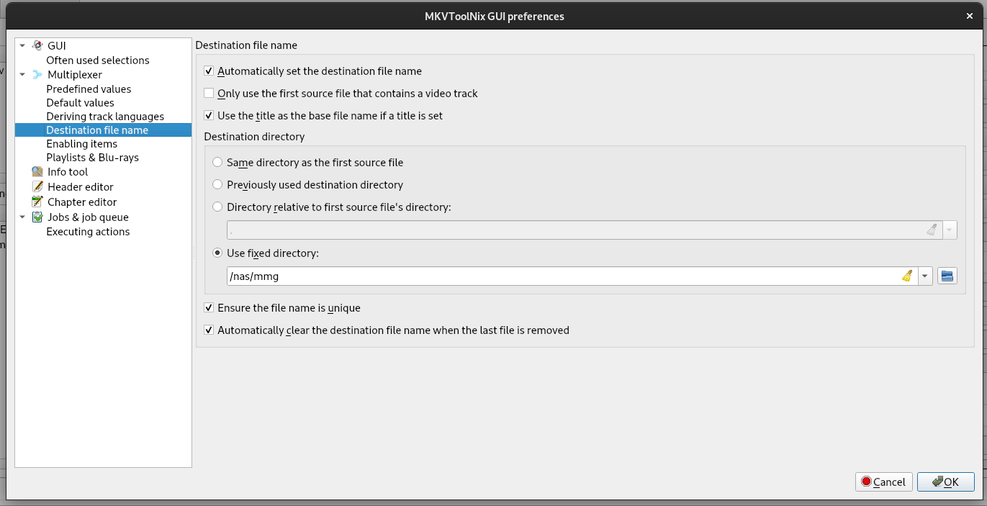
Default application settings. Notice default multiplexer command line flags.
Which tracks do I want enabled / disabled by default
Automatic naming setup
Added video file, notice what it disabled by default and mostly ready to go.
All done, ready to start (Don’t forget to check for unwanted ‘attachments’ if you download)
Using this setup, it takes seconds to add, check, and queue the remux job.
If I have a stack of them, I keep adding jobs. (most times, I’m still ripping the next disc – for as fast as that is over USB 3)
For my OTA television which I capture to MKV, I have a shell script which does the same job
ok I have news! Sorry for the late response but I had a very full day today.
First let me start by saying that MKVtoolnix is AWESOME! Super easy to use and very in depth. It brought up more information off the files I was trying to remux than MakeMKV did. AND it has the ability to load jobs into a question to star remixing automatically. Genius!
Second, here’s where I’m at with Doctor Strange. I remuxed a version with no subtitles, but I kept both the TrueHD audio and the AC3 audio file on the new file. When I played it back through the Samsung, the TrueHD version DID in fact buffer and skip at the same places as the original file. When I switched over to the AC3 version…BUTTER!!!
Everything played fine and worked like a dream. EUREKA!!!
Just for experimental reasons, I went back to the original file with all of the subtitles and switched the audio track to AC3. Not only did it not play well, but it pixelated the image almost every 5 seconds or so.
So it seem like all is well in London Town, EXCEPT for one (depending on how you look at it) minor issue. The AC3 vs TrueHD (7.1) debacle.
While I actually liked the AC3 audio better (which makes no sense to me), I have a 7.2 system set up, and I would at least like to have the option to use it since I spent the money for it. In this current configuration of solving of my problem, I would be able to watch my movies fine, but only if I play 5.1 audio. So while I’m happy with everything they way it is, and I will continue to curate my collections as such, I can’t help but wonder 2 things.
How can I get the system to support HD audio in case I ever specifically want a 7.1 playback? Is my only choice to go through the Nvidia?
A direct question about what @Scott-M mentioned previously about Infuse as an option for HD audio and uncompressed everything. If both the Samsung and the Apple TV don’t play well with HD audio, how does loading a different app (software) on the apple TV allow for HD audio to passthrough. It seems to me that the ATV4K’s audio issue would be a hardware limit. How would loading Infuse on a piece of hardware, that doesn’t support HD audio, allow for uncompressed audio to play? outdent the ATV just automatically reduce the audio to whatever it can passthrough?
So here another interesting piece of frustrating data. You’re not going to believe this…
This whole thing started because the image quality on the ATV4k sucked butts. So I tried direct connection to the TV which had great image quality but buffered all the time. The Apple TV never did. I tried, using the ARC, tried Nvidia, tried switching to an optical cable, and every combination imaginable of all ththose components, avoiding the ATV4k, trying to keep the good picture but not have buffering.
Well, now that all these new changes have been made to the media file, I wanted to do as Chuck recommended and see how the Apple TV would play. So I plugged it in and routed the HDMI through my Onkyo, like it was originally. As I was connecting the HDMI cable, I happened to look up at the Samsung and it had some text saying something like "we’ve detected a new device, were changing the UHD setting to match. This can be changed under general > external devices > UHD. I thought, ok cool it recognizes everything.
I started to watch the flick, and the image was sub par compared to the direct play to the Samsung Smart TV. Then I remembered the little message the TV gave me as I was plugging everything back in to the ATV4k. So I took the TV remote, and followed the path, and low and behold, there was a setting to revert UHD settings. I selected it and VIOLA!!! The image was outstanding.
So then I started watching the new remixed version of the file again, and everything played like a dream! I had the audio set to AC3 and I couldn’t be happier.
But of course as my brain starts to think, “Well what would happen if I play the original file? The one with all the PGS subtitles. It never buffered before though the Apple TV, only the image quality was bad”. Well since I seemed to find this hidden picture setting (I say hidden, because through all of my adjusting the image and quality through the TV menu…this one little setting to change the UHD back to the TV standard WAS NOT IN THE ACTUAL PICTURE SETTINGS PAGE) and the image was great now, lets see what happens.
The image and the playback on the original file was flawless. The audio set at AC3 was impeccable. I couldn’t believe it. So then I took it a step further and tried playing the original file, with TrueHD audio. Well the image quality was great but the audio was not. So since Chuck had shown me how to navigate the Plex Dashboard, I went to the computer to check what was happening in real time.
The apple tv was direct streaming the video, but it was transcoding the audio to FLAC. I dont know what it didn’t switch to the other available Audi track, instead of using power to transcode to a different format, but hey… like I said earlier, it played fine on AC3, and I really enjoyed the audio. So I set it back and everything is gravy.
I can’t believe that this WHOLE THING, was because of a minor automatic setting change that the TV made when I connected an HDMI cable to it. Once I turned off it’s ever so “SMART” decision to ruin the image quality, Plex worked fine, the Synology worked fine, the receiver worked fine.
So I guess hats off to Apple TV and Plex, but Samsung needs a freaking timeout in the corner!!! The original file plays fine with AC3 audio or transcoded to FLAC, even with all the subtitle stuff still lurking in the background. (This still makes me to wonder about the Infuse being able to play HD audio but that’s for later)
On the bright side, I did need to upgrade the NAS or it probably would not have played HEVC anyway, and I learned a ■■■■ ton of stuff about digital media, servers, and everything between.
Chuck, Thank you. Thank you for you patience and your tutelage. I could not have got through this without your help, and (in the name of Milton Waddums) I probably would have set the building on fire"