Thanks for the clarification. I’d rather have an ETA on fixing the bug in the current release rather than crossing my fingers on a future player anyways.
indeed
Like I said, if you still see this mis-rendering bug, please provide me a sample.
Do you need another sample? In an earlier post you verified that you received my sample (Afullmark provided) it and that the devs had used it to reproduce the bug.
Afullmark provided me a sample (I thought that was his) and that is what we were using. I still need to check if that sample creates the problem. I think I remember reading you gave him a sample and he was able to recreate. I never got that sample.
This is the file I sent: https://drive.google.com/file/d/18yd53h-mVs1vISWlHcuwAeNVsqAW6IzJ/view?usp=sharing Most of my anime DVDs that I ripped have the same vobsub issue, but not all. I usually spot check with every new release and no dice.
I just tested 7.21 stable and the issue still persists.
Checking in again and hoping for an ETA on when this will be fixed. Here is someone on Reddit that is, sadly, finding out for the first time that this has been an on-going issue for ages now
An update on this. I tested vobsubs on 7.27.1 on Android ( 1.18.6.2343 on Synology server) and all vobsubs appear to show without any misrendering BUT the subtitles that were causing issues are slightly faded. Not semi-transparent, you can’t see anything from behind the subtitles, just like the contrast has been cranked to wash them out a bit. Subtitles on shows that were showing fine before are still fine now. If you guys can figure out what you changed that affected image subtitles that fixed vobsubs and then just make them fully render then it would be perfect.
The app on Fire TV devices are all kinds of screwed though. It won’t show any subtitles, even SRT, without burning them in. Luckily you can install the armv7 apk for google play on a fire tv.
Huh. I don’t know of any changes related to subtitles recently. Can you provide a screenshot? I’m not clear on what you mean.
Did that work? The package for Fire TV devices use a slightly different video player. I’d be surprised if that worked better than the Fire OS version.

You can see with that picture how light the subtitles can get when the image behind it is light colored. The subtitles can have a real soft look to them. I’m seeing that in a lot of my ripped anime but not all so that is weird. I tested a bunch more of my issue anime and found some still have issues.
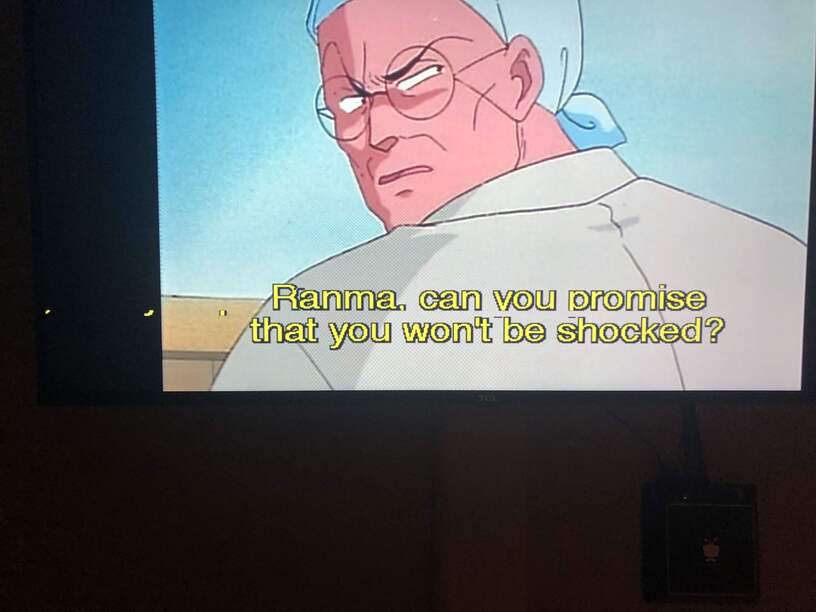
This one season of Ranma is the biggest remaining offender so far and I think it is the one that was sent as a sample a while back. Some scenes will render perfectly and then others will have the “hanging” parts of letters chopped off (y/g/q/commas/etc) and other weirdness. You can see in the glitchy image how much “brighter” the yellow is in the subtitles compared to the soft look of the ones at the top.
I can definitely vouch that at least 7.27.1 from the armv7 google play apk works fine on my firetv 4k stick. I did figure out why the firetv would not direct play any subtitles, even srt. It may be a glitch with the new test server builds but it will not direct play any subtitles unless passthrough is turned on. Once I did that I was able to remove and reinstall the fireos client. Some of the subtitle changes could possibly be related to the test server build, but hopefully you guys are still looking into why some subtitles glitch. All I can really tell visually is that the ones that still glitch are bigger (taller and wider) than all the rest. I was wondering if there was some kind of buffer or box you are rendering the subtitles to and they are possibly overflowing.
What type of audio are you testing? AC3, EAC3 and AAC are the only things it supports. Other audio codecs would need to be transcoded which will prevent direct play of subtitles.
I’m still not sure why your subs would look different depending on the video unless they are actually created that way. The letters getting cut off I think is still an issue. The coloring/transparency just might be that way. Have you tried with another player to see if they look different?
I watch content using the FireOS Plex client for non-anime watching pretty much every day and yesterday was the first time I’ve had to turn on passthrough and only because it was transcoding for everything with subtitles. It has never transcoded for DTS content for example but it was even transcoding with EAC and AC3 if vobsubs or SRT were playing unless I turned on passthrough. It shouldn’t transcode for H264 (about 10Mbit), AC3 and SRT with in-home streaming set to maximum but it was while passthrough was disabled.
I’ll have to double-check some other players with the faded subtitles later. I’ve never noticed it before though.
If you wouldn’t mind turning passthrough off then playing a file that causes the transcoding and getting me the log from the Fire TV. I’m not able to reproduce with my 4K stick so something else must be going on.
logging.txt (1.2 MB)
You can see the playback start right at 01-31 18:05
It looks like the video you tried playing has EAC3 audio. Android (the OS not our app) cannot decode EAC3 locally, so PMS has to transcode it. It will passthrough EAC3 which is why you can direct play with that enabled.
You said above that it supported AC3, EAC, and AAC. It is doing it with all audio types and subtitles, that just happened to be the first one I picked. I can send one with AC3 if that helps later. You can see in the log file:
1-31 18:05:30.240 i: [MediaDecisionEngine] Decision: CanPlay: true CanDirectPlay: true CanDirectStreamVideo: true CanDirectStreamAudio: true CanDirectPlaySubtitle: true CanTranscodeSubtitle: false CanDisplayVideo: true
The only “errors” I could find were related to “mimeType=application/x-subrip”
Honestly, the whole Android player has been trash for quite a while. I keep coming back to it here and there to see if they’ve improved but Kodi is still 1,000X better.
Sorry if I wasn’t clear. EAC3 is only supported as passthrough.
Kodi bypasses all hardware and does everything via software decoding, video and audio, so they can support more things. But depending on the device it runs on it may not have the processing power to handle the decoding. The Shield is powerful enough, but things like the 1st gen Fire TV might struggle relying on the cpu.
Keeping this thread alive since the vobsub issue STILL has not been fixed.
This topic was automatically closed 90 days after the last reply. New replies are no longer allowed.
