Server Version#: 1.41.3.9314
Player Version#: Plex Web 4.142.2
I have installed plex in a vnet jail with the hopes that I can get hardware acceleration to work using the Nvidia Tesla P4. This is on a Dell Poweredge R720 Server. Is Nvidia and FreeBSD supported? Does it work in a jail or do I need to install plex directly on the Server?
Steps I have followed:
- install Nvidia driver that supports my graphic card: sudo pkg -j plex install nvidia-driver-470
- add driver load on boot: sudo sysrc kld_list+=“nvidia-modeset”
After I reboot the server and try to select the graphics card in plex there is no option other than auto. I play a video and select a different quality to transcode it, then run nvidia-smi and there are no processes on the card. The transcode on plex information doesn’t show (hw) next to it.
Am I even able to get hardware acceleration working on FreeBSD let alone in a VNET jail?. Is this a lost cause and I am just wasting my time. I am using FreeBSD 14.2 fully updated to the latest patches. Thanks in advance for any advice or guidance any one provides.
I have a similar issue on trueNAS Scale v24.10.1 just installed (bare metal), no solutions that I’ve found yet for me either.
Thanks for the feedback, I guess there is no love for FreeBSD. I wonder if running a VM would work. I read on Plex that VM doesn’t work either.
Maybe this might be of some help, it’s what worked for me for TrueNAS Scale v24.10
Check to see if you have the following under:
Apps > Configuration > Settings
Check the box “Install NVIDIA drivers”
Wait for it to complete, then restart your trueNAS.
After restarting TrueNAS go to the plex App location
Select Plex, select Edit, scroll all the way to the bottom and check the box, “Use this GPU” (should show a description of your NVIDIA GPU)
Click Update
Personally clicking updating didn’t work for me and I had to uninstall the Plex App and reinstall it again for the changes to take effect. Then restart your TrueNAS again.
Now if you turn on plex hardware transcoding settings in the GUI it should start working (although it’s not a very smooth experience from what I’ve seen in the small amount of testing I’ve done). However the plex GUI will not have your NVIDIA GPU selectable in the list and will only have “Auto” as selectable (or at least that is how it is for me), this is with the Plex v1.1.10 app through TrueNAS.
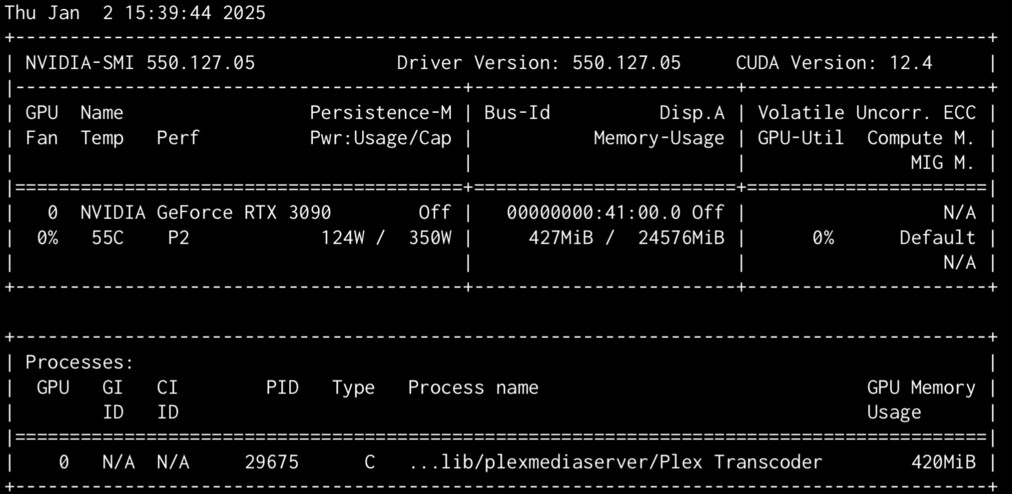
And to verify on the TrueNAS side, begin playing a video in Plex and have it begin Transcoding, then in TrueNAS open the Shell and run “nvidia-smi”
System > Shell
user@truenas:~$ nvidia-smi
And you should get the details showing it’s being transcoded
Something like:
It’s not a great experience but it kind of “works”
The GUI also states indirect playback (indicated by a “!” icon) when playing something this way.
Hi Michael, Thank you for the suggestion however, FreeBSD and TrueNAS Scale are not the same. TrueNAS Scale is based on Linux not FreeBSD. I believe TrueNAS Core is based on FreeBSD. I believe I can get this to work with a virtual machine, since I have Nvidia hardware that I can passthrough to the guest OS. Will report back how I got it to work.