Have you tried connecting your box to the AVR then to the TV? This way the capabilities of your AVR will have more influence on what is supported.
1 Like
That’s not really a good option because my AVR (Denon AVR 3312) is not 4k compatible. So I prefer to have best video quality with audio limited to DTS-HD
Can you check your TV and see if it has any type of surround audio setting? If it does, then check if any of those are supported by your AVR and use that setting. If it has optioned for multiple codecs, try just enabling 1, AC3 if possible. Then in the Plex app, make sure that pass through is enabled.
Try a movie with DTS audio. PMS should transcode that to AC3. If not, get me new logs.
The audio settings of the Panasonic is quite simple. See page 95 of the attached manuel. If you choose Home Cinema (the setting to use ARC), you have no other audio settings available.
TQB0E2741U-E.pdf.zip (1.5 MB)
Plex app is already set to hdmi passthrough.
Still no help from support !
Could you please escalate my request to next level ?
I bought a optical fiber to connect the Mi Box directly to the AVR. In this configuration the TV settings is completely excluded.
First Plex was set to optical passthrough without AC3 and DTS encoding settings. When playing a DTS 5.1 movie the AVR received a 2.0 signal 
Then, after setting AC3 and DTS encoding for optical passthrough, it was impossible to play something. I had an error message, that the connection with the PMS was lost 
Trying again with Kodi, everything works like a charm 
So using HDMI or optical fiber is the same mess with Plex app.
For sure there is something wrong with Plex app.
What do you suggest ?
When using HDMI passthrough your TV becomes the limit regardless of what your AVR supports.
When using optical with DTS disabled we can only passthrough stereo, as we decode the DTS on your local device. Looking at your logs things seem to be behaving correctly and there’s no way for us to send 5.1 audio out of your device.
It could be that we are incorrectly applying the TV limits to the optical connection. You could determine this by connecting your device directly to the AVR and seeing what happens with optical or HDMI passthrough.
When playing via Kodi, what sound does your AVR get? Is it DTS 5.1 or PCM 5.1?
Logs for when you experience no playback with AC3 + DTS enabled for optical passthrough would be good, that sounds like either your AVR can’t support AC3 / DTS via optical or something is breaking on our side.
Hello @sixones , thank you for your help to solve this issue
I agree, and that’s the case
I posted no log with optical connection. All was done when using HDMI connection.
When playing with Kodi (using Plex plugin) I always have the right sound format using Optical or HDMI connection. The AVR displays
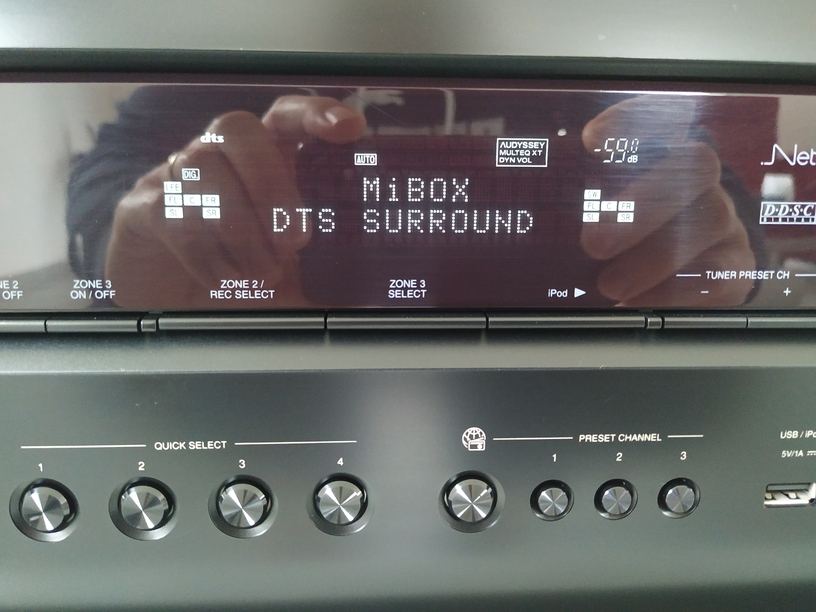
Ok let’s focus on this configuration, if we solve it, we’ll focus on the HDMI one, perhaps it’s the same issue.

1/ Plex is set to optical without DTS and AC3 encoding
The movie is playing in stereo, which is normal
2/ Plex is set to optical with DTS and AC3 encoding
The movie doesn’t start, Each time I have a popup message error saying that the connection with PMS has been lost. Below is the Plex app log
Plex app log (optical with DTS and AC3 encoding).txt (52.1 KB)
Thanks for the logs and information, they are very helpful! Using your optical setup does the same issue happen with AC3?
Looking at the logs we failed to configure the passthrough decoder for the audio format for some reason. I will need to have a dig and send you a build with some extra logging.
Yes, same issue with AC3.
Could you grab the logs from an AC3 attempt as well?
Here it is.AC3 Plex app log (optical with DTS and AC3 encoding).txt (62.3 KB)
@sixones Have you check the logs ? What’s new ?
I’m using a known good receiver that used to get multichannel and hi-res passthough and it has been broken for months. Very similar to the OP. PLex plugin for Kodi works fine in exact same configuration. Hi-res and multichannel flac has worked for years on Plex, but has been broken for quite some time for me, and it appears others.You shouldn’t need an optical cable to make this work.
I know but Plex support suspect my TV and ARC settings. So I decided to simplify the connection and show that the issue is still the same. So now only Plex app can be suspected.
@anon18523487 @sixones do you give up ?
Huh. I’ll need to check with sixones but I don’t know if we can output video to hdmi and audio through optical like this. Typically, you use hdmi to the TV then optical from the TV to the receiver.
This makes no sence, what the optical setting in Plex is supposed to use to ?
To check the optical connect from the TV.
Jesus ! Are you serious ?
Typically, the connections used are
Android Box -> hdmi -> receiver -> hdmi -> TV
Android Box -> hdmi -> tv -> hdmi (arc) -> receiver
Android Box -> hdmi -> tv -> optical -> receiver
I’m not saying what you have won’t work, just not something I’ve typically seen.
