Running PMS on Windows Home Server 2011 for a five years. I have tried the above workaround to update my iTunes playlists imported into PMS and only 5 of the 171 playlists. are actually imported.Is there another workaround until this is fixed or that Plex informs us that this functionality is no longer supported?
Try using the chrome plex app instead of the web interface. I have been able to import playlists from Itunes this way.
Any movement on this?
Pretty sure as long as their are workarounds we will not see much change. Interestingly, syncing playlists options in the web app also disappeared; however as with the import from Itunes option, it still works on the Chrome Plex App. Perhaps Plex is trying to force users towards the apps? Not sure why there doesn’t seem to be any response on this. I realize that a bug report have been created for this, but that doesn’t really seem to be addressing the fix. How long is the reasonable time to address this?
See this other thread… looks like a Plex employee finally noticed the complaints…
I have been using the Chrome Web app as a workaround for this but just noticed the Chrome web app has now been removed from the chrome app store. This thread and https://forums.plex.tv/discussion/comment/1543632#Comment_1543632
included Plex employees responding that this will be corrected in the next updates. There have been multiple updates to updates to Plex Media server and this issue has not been addressed. Syncing playlists is also now broken. What is going on? This is a paid service after all…

It seems like I should eat humble pie and retract my previous post. This feature is available on the plex web app, just in a different place than before. See screenshot below.
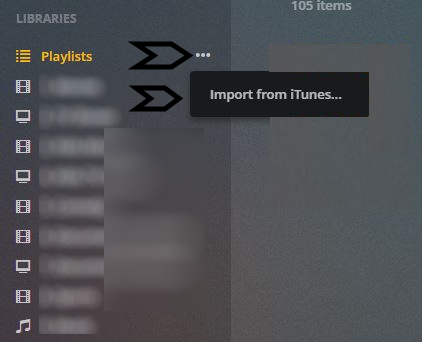
@starbelly33 said:
It seems like I should eat humble pie and retract my previous post. This feature is available on the plex web app, just in a different place than before. See screenshot below.

Save me a slice been really pissed since last update I missed this too. Made my evening.
@Stromos said:
@starbelly33 said:
It seems like I should eat humble pie and retract my previous post. This feature is available on the plex web app, just in a different place than before. See screenshot below.
Save me a slice been really pissed since last update I missed this too. Made my evening
Happy to hear. The playlist sync option does still seem missing though. But who knows, perhaps its also hidden elsewhere.
Feature is not available for me in Plex web app (version 1.9.6.4429). No ‘Import from iTunes’ in 3-dot menu on playlists. In fact ‘Playlists’ item doesn’t even HAVE 3-dot menu (libraries have it)
@vikarti said:
Feature is not available for me in Plex web app (version 1.9.6.4429). No ‘Import from iTunes’ in 3-dot menu on playlists. In fact ‘Playlists’ item doesn’t even HAVE 3-dot menu (libraries have it)
Are you sure its the latest version ? The version number you referenced seems to be the server version. Also, just checking but the three dot menu only shows up when hovering your mouse over the playlist.

Yes, it’s was server
Web app one is 3.27.1
When I hover over ‘Playlists’, I see dot menu above it (even with English localization) but it doesn’t contain ‘Import from iTunes’ or Sync with itunes
@vikarti said:
Yes, it’s was server
Web app one is 3.27.1
Not sure why it doesn’t show up for you? I just noticed it earlier by chance and figured I would post here. Perhaps others have a similar issue than you? We do have the same versions of the server and web app (1.9.6.4429 and 3.27.1)
You need to
- have itunes on the same computer the server is installed
- In iTunes have Settings > Advanced > Share iTunes Library XML with other applications enabled
- have path to XML filled out in Settings>Server>Channels>iTunes library XML path
- have Settings>Server>Channels>Enable iTunes channel enabled
- restart the server if you just did #2 #3 #4
Checkbox ‘Enable iTunes Channel’ was not active. After changing and restarting, it started to work as on Starbelly33’s screenshot. Thanks for advice
I was also wrong footed by this but have now found the Playlist three dots option. But I notice an odd side effect of the new iTunes management. I have TWO iTunes music databases. If I follow the five step process as defined by @BigWheel for my first music library then all is good. I can also import my iTunes playlists.
However if I now remove the iTune channel completely, perform the Plex dance for good measure, then repeat @BigWheel five step process with the alternate music library, then the original iTunes library reappears in the iTunes channel.
It seems that there is an invisible persistence recorded somewhere which remains faithful to the first iTunes library which is included as a channel.
Still can’t get mine to import. After I click Import from iTunes I see it creating the playlist behind the popup but then it disappears.
I’ve seen those symptoms as well. I rebuilt my library and the problem disappeared.
@Amoleo I retract my statement that all is good. I have two iTunes Music Libraries and I mount both as Plex Libraries.
- For one of them when I enable the iTunes channel and view Channels/iTunes/Playlists I see “My Top Rated” + “Top 25 Most Played” plus all of the other iTunes playlists.
- However if I mount the other iTunes channel and view Channels/iTunes/Playlists I see “My Top Rated” + “Top 25 Most Played” plus “Playlists”. In this case the iTunes playlists are inside the “Playlists” folder.
Subsequent import of iTunes playlists using “…” work with 1. but not with 2. When you say that you see “it creating the playlist behind the popup but then it disappears” this is what happens with 2. The iTunes playlists are imported but as they are inside a folder they cannot be accessed.
I cannot fathom out what is causing 1. and 2. to be different.
Thanks to all of you fellow users - despite Plex’s many ‘charms’, I would have given up by now - what with the all too frequent functionality that changes, and as in this case, ‘disappears’ - most times without warning or subsequent explanation as to workaround, …
Following BigWheel/StarBelly33 et all suggestions, have managed to restore Playlist>Import from iTunes functionality and is currently chugging away. I couldn’t find an .xml file in my iTunes library, which I have in D:\iTunesMusic but I just put that in as the XML path - and without quotes. Just wanted to draw folks attention to the following - which I’ve followed and restarted iTunes but still don’t see an iTunes library.xml file
From: https://support.plex.tv/articles/200289536-channels/
Note: From iTunes Version 12.2 and later the library XML file is not created by iTunes. You must enable it in iTunes advanced preferences. https://support.apple.com/en-us/HT201610
