I have several Rokus and I’m already a PlexPass subscriber. I have a Netgear Nighthawk X10 as my Plex server.
I decided to cut the cord and switch to Sling. I thought I had done my research and opted for the SiliconDust Quatro for my OTA. (DVR is not a requirement, yet.) I have found that my live OTA video sticks, stutters, and hangs over Roku. After some researching, I think I figured out it’s because Roku doesn’t play well with mpeg2.
Question: Will switching to an HdHomeRun Extend that transcodes to H.264 fix my problem with Roku?
Or should I transition to FireTV and hope the FireCube goes on sale for Prime Day?
Thanks for your input!
Personally I would move to the Amazon devices. There is the debate about how Plex looks and works between the Roku and Amazon devices, but I haven’t had much trouble with Plex on my newer Fire devices.
I have 2 old HDHomeRun Duals that I use with Plex on a 2nd Gen Fire TV stick and the 4K Pendant. They both work really well. There is also an HD Homerun app in the Amazon App Store from Silicon Dust. I use it for live tv on the Fire TV devices and it works really well too.
If you’re running Plex from your router, that could be the issue. I highly doubt the router has enough processing power to keep up with transcoding live TV streams. I believe any OTA broadcast is going to need transcoding in some way. You might avoid this in some scenarios with the HDHomerun Extend… but even that isn’t directly compatible with a Roku.
I have the Extend/Roku setup myself, and transcoding happens. I’m not sure offhand how intensive it is, but it does happen.
Yeah, my thoughts exactly,…
If the router is your Plex Media Server then that is likely the issue right there full stop.
Something like an nVidia Shield, NAS (QNAP, Synology with Intel CPU check list) or full server should yield a much better experience.
Update: The issue isn’t the Nighthawk X10 as the server. I ran Plex through my Synology 416Play, which admittedly, has a better processor for transcoding and ran into the same sticking/jitters issues over Roku. No sticking over my first gen FireStick.
I am going to try the HDHomeRun Extend as a last-ditch effort. I know people rave about FireTV, but I bristle at the thought of Amazon pushing their content first. If I must suck it up to save a few bucks I shall.
I looked up the processing power of the Synology 416, and that Celeron chip scores 991. A Passmark score of 2,000 or better is recommended for a single 1080p transcoded stream. You might be trying to compare apples to apples with that, and your router…
If you’ve got an old PC laying around with a QuickSync compatible Intel chipset, I bet you’d see an incredible difference. Also, Google your testing chipset Passmark score to see if it’s over 2,000 before you begin.
Mine scores around 11,000… and I have zero complaints that aren’t software related.
There are a couple causes for your problems.
Your client is your limitation. Most OTA channels are MPEG2 Transport Streams. For reasons I don’t quite understand, Roku does not support MPEG2. Different people have different theories, from licensing costs to chip/development support. Doesn’t matter. If you use a Roku, OTA broadcasts will need be transcoded.
Most modern FireTV products also do not support MPEG2, the last time I checked.
Now, what clients do not need to transcoding for OTA streaming? Plex Media Player for a PC (and I presume Mac), and the Plex client on the Nvidia Shield. They both support native MPEG2 decoding and deinterlacing. However, you’ll need a wired connection. OTA MPEG2 is tough to stream over any wireless connection that is less than ideal. (There may be other clients I missed, btw. Those are the main two.)
Your server comes into play too: Since you have Plex Pass, you can enable hardware accelerated transcoding, but it doesn’t work on many routers I believe (a limitation of their chipsets), and it’s a bit buggy if you run PMS on Windows.
The HDHomeRun Extend should indeed help you, because it will transcode those MPEG2 streams to h.264/AVC before they ever reach the Plex server. That way they’ll get saved in a format that is compatible with every device in your house (I don’t think any device exists that can’t direct-play AVC).
Your alternative is to optimize the recordings after they’re done. That’ll automatically transcode them to a compatible format. However, I don’t know how well it works (if at all) on a router, and how long you’d need to wait to complete it. And it won’t work with Live TV.
Short version: If you want to use Roku, you’ll want to transcode your OTA Live TV and recordings, and the HDHomeRun Extend is your best bet to try (just choose a place with a good return policy). If you’re open to changing your client, a wired HTPC with PMP, or a wired Nvidia Shield, will play them natively.
1 Like
@Cafe_Diem gave you a really good explanation of why the Roku might it be streaming Live TV well. The only thing I will add is that some broadcasts will also be interlaced instead of progressive. If you still have issues if you try the Extend you may need to change the Transcode setting in Plex settings for the Extend from Highest Quality which converts from mpeg2 to h264 to High Quality which does the same conversion to h264 but also removes the interlacing before sending to Plex.
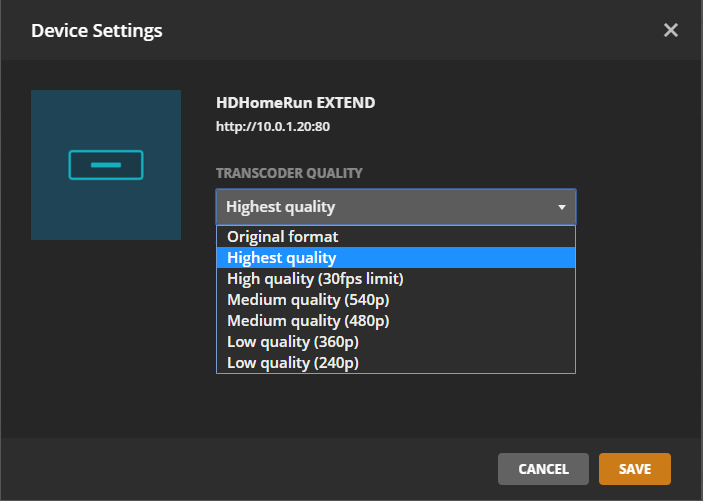
Since I don’t have an Extend, perhaps you can answer a question I’ve wondered: What kind of deinterlacing does it use? Do they Bob it to 59.94 frames per second, or use a different deinterlace style (one of a couple) to 29.97?
Thanks for adding this detail btw, I forgot it was a problem with the Extend. I still don’t understand why they don’t deinterlace at all quality values, unless it’s a limitation of their chip.
Reply from an email I sent to SiliconDust Tech Support asking about an additional option to sit between Highest Quality and High Quality. Response below was specifically for the High Quality setting.
It drops one of the fields and resizes to 1280x540 with a flag to decode as 16:9.
They also replied to a followup question that I can’t find in which they basically said the processor in the Extend could not handle deinterlacing the video but leaving it at the original resolution of the incoming stream.
I personally use Highest Quality with my setup. All my devices have no issue with interlaced content so are able to Direct Play Live TV.
Eek. Not my first choice.
Completely understandable. In my case, I like to archive some recordings, and want them deinterlaced, since I have some devices that either can’t handle it, or handle it poorly (such as my Android phone). Looks like the current Extend isn’t the choice for me. But it’s been out for years. Perhaps a possible Extend 2 will be perfect.
Speaking of “perfect”, I want to make sure I don’t lose perspective: Perfect is the enemy of good. The Extend isn’t perfect, but it’s still very good for purposes like @Branan discussed at the top.
Just to update everyone. I received my HDHomeRun Extend. Unfortunately, it didn’t work. My Roku just doesn’t play well with live TV. It works like a charm on the first gen fire stick. I’ll keep watching on my first gen fire stick and hope it grows on me. Thanks for the input everyone.
Perhaps later down the road I’ll invest in a quality NUC and see if that helps. For now, cutting the cable has saved me money and I’m more than happy with that outcome. It’s fun to tinker with live TV settings, but I don’t really miss it either. Thanks again!
1 Like
I have mostly ROKU devices (Ultras, Sticks and Stick+) and one AppleTV. I’ve helped my neighbor with his FireTV and other assorted devices.
While I like the fact that you can control recordings from the AppleTV (HATE the remote) and other devices, I’m OK using the web interface on my PC. I do wish the grid guide would hurry to the ROKU.
That said, I still like the ROKU the best for the simple fact that the remote has both a power button and a volume control giving all locations in the house a one remote interface. CEC takes care of the rooms with AVRs and for the bedrooms I power the sticks via the TV USB port. They boot at about the same speed as the TV so it’s not an issue. Plus when you use the sleep timer at night the streaming gets suspended when the device powers down.
Once the ROKU receives the Grid Guide and Recording control it will easily be the top of the mark for me. Many of us have also requested a sleep timer/suspend streaming on power button as a native feature for the ROKU clients.
This topic was automatically closed 90 days after the last reply. New replies are no longer allowed.
