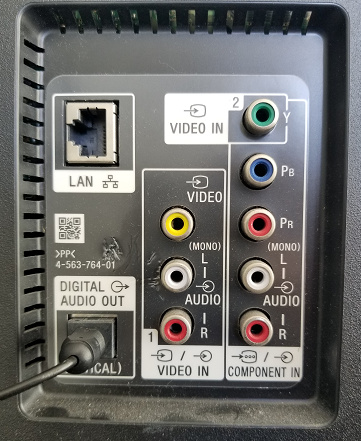
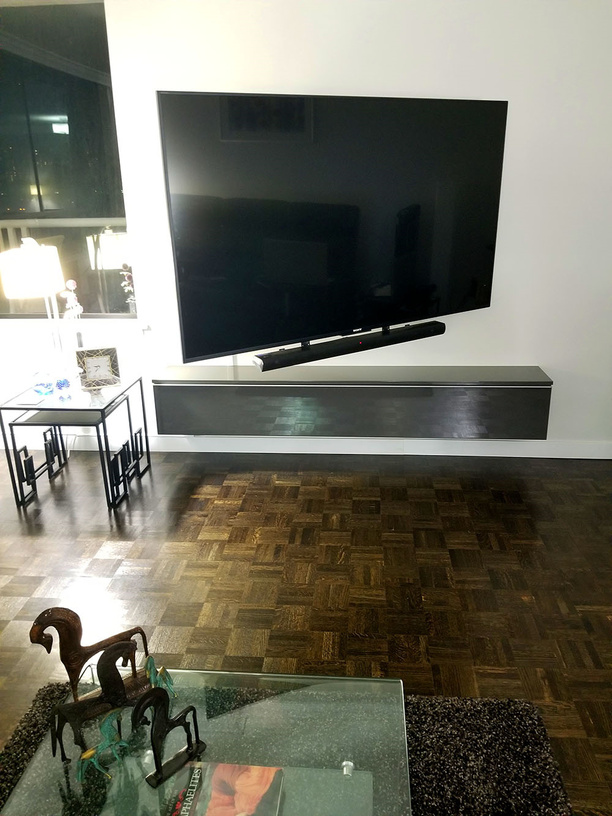
My parents have Plex on a computer, which casts to their wall-mounted TV.
They’ve got a Chromecast 4K plugged into an HDMI port on the back of the TV, and the Chromecast is hardwired via Ethernet straight into their modem/router (which is concealed in the unit below the TV):
This setup works beautifully but, unfortunately, they can’t remember how to cast from Google Chrome to the Chromecast. The TV literally hasn’t been used in weeks. Instead, they’ve resorted to watching their Plex content on the laptop Plex is installed on because they find using the Chromecast too complicated - even though it’s literally just two mouse clicks!
I’m looking into alternatives and have some questions about the Roku:
is Roku easier to use than Chromecast when it comes to Plex?
is Roku as good as Chromecast when it comes to the YouTube experience? (i.e. ease of use, playlist history support and the ability to hard wire to router via Ethernet.)
I don’t live in the same city as my parents or own a TV myself, so it’s hard for me to really test out a Roku myself at the moment.
I’m currently writing up some instructions (with screenshots) that they can print out and use every time they want to use the TV but I feel like an ideal solution would be something they could use without needing instructions in the first place.
My mother is 72 and has gotten the hang of a Roku, never having used any streaming device before. She had a DVR from her cable company in FL before she moved up north w/ me. Other than a few minor setbacks (EG: Not recorded TV shows into the TV Series folder (using the Recorded TV folder), Having Plex updating the interface to UNO and having to reset her Home screen up the way she had it before, etc). Now she’s a pro.
As to the YouTube experience, my mother doesn’t use it but my Teenage daughters have no issue with it and will occasionally cast right from the YouTube app on there phones to the Roku’s (we have one in every room). But she does use the Roku for Hulu and Pluto (she loves the WSoP channel to fall asleep to )
They have one Roku with Ethernet it’s the Roku Ultra I like the "Programmable Shortcut Buttons could have it set to Plex ). [ short video showing the set up for those buttons ]
It seems like both the Ultra and the Premiere+ have an Ethernet port. I’m thinking that not having features they won’t use (such as voice command support and a few more buttons on the remote) will make things easier for my folks to get used to, so I’m actually learning towards the Premiere+ right now, although this depends on how much of an issue the lack of optical output turns out to be.
One thing I’m wondering about though is changing volume. The Ultra has an optical output and the Premiere+ doesn’t.
With the Chromecast Ultra that they currently have, the audio goes from the Chromecast to the TV via HDMI, and is then sent from the TV down to the soundbar via optical.
The volume right now is controlled by a combination of the soundbar’s remote control and the volume level from the device (in this case a Windows 10 laptop) which is casting to the Chromecast.
Does it make it any easier to adjust the volume if you have an optical connection direct from the Roku to the audio system? I’m guessing that wouldn’t really affect how the volume is controlled? Right now, they struggle constantly with changing volume as it’s controlled by the laptop (which occasionally stops letting the Chromecast control the volume, requiring a disconnect/reconnect to the Chromecast) as well as the remote for the audio system itself.
I like the idea of the Roku allowing them to change the volume using the Roku’s remote, instead of having to change the volume in Windows. I’m guessing you’d have two places to adjust the volume: Roku remote + sound system remote?
It sure is nice to change the volume with the Roku Remote.
Never used that voice button - doubt the parents will either - since NONE of it works in Plex and that’s not what you buy the Roku For - you buy it for the Plex Uno app, then you are amazed by it’s performance.
The Ultra will outperform the Premier - every day of the week.
I always recommend Roku for parents. Very simple and bland apps launcher interface which equals less confusing than say android. Fire sticks for kids who need content limited. Shield for movie buffs who want all the great stuff and willing to put up with Android bugs and issues that seem to pop up in every new version released.
Just curious what TV that is? Does it have a Plex app already? You might not even need another device.
I personally hate using YouTube through any app or device that has a remote. Using a phone/tablet or computer is just easier to search and find what you are looking for. If your parents think casting from the browser is hard, I’m sure they will be like me and hate trying to type something using the remote.
The only thing they need to do is simply press on the little “screen icon” on the top right within the Plex (web) app on their laptop ? I don’t think it can be more simple, you can print 1 sheet of paper with screenshot for them how to do that so they never forget.
Normally the Chromecast will be in the list and they simply select it.
That’s it. When you play content the Chromecast is then instructed to fetch the content and starts playing.
I think being able to see their Plex library on the TV, rather than just on the laptop, will be a massive improvement. Pretty much sold on the idea of the Ultra now!
Good to know!
Sony Bravia: XBR-65X850C (4K resolution)
Manufacturer: June 2015, so it’s already five years old now. I’m thinking the age of its hardware would impact Plex performance, even if it supported it.(which I haven’t noticed that it does).
It has both WiFi and Ethernet but we noticed that the TV’s internal Chromecast struggled with 4K 60fps YouTube content while the Chromecast Ultra didn’t, so I figured the Chromecast Ultra was an improvement on its native functionality - didn’t really think about the Plex experience when making that decision though (which I think might’ve been a mistake!)
I was thinking about that too but I think the struggle they’re having with remembering how to cast to the Chromecast (to the extent they don’t even bother using the TV with Plex right now) is worse as it’s proven to be a total deal breaker for them!
I was going to write instructions (for this and many other things) anyway, but occasionally, the volume on the laptop casting to the Chromecast will fail to control the volume, even while casting continues to work. I know that this can be resolved by stopping/starting casting, or controlling the volume from my Android phone, but glitches like this make my mom think she’s doing something wrong and she can’t figure it out.
Overall, I’m pretty sure the Roku Ultra will provide a smoother Plex experience for my parents than the Chromecast Ultra. Now I just need to figure out how to help them to set up a Roku remotely, despite never having used one myself!
You can probably still buy a non-smart TV, but you’ll really need to look for one.
However - at NO TIME should you EVER consider using a TV’s App Collection - you should buy a Good Device and plug that into whatever you buy. It’ll live longer and work better.
The LAST thing you want is turn one of those loose in your parents house to run amok.
Yeah. I figured a TV is trying to be a bit of a jack-of-all-trades with its own internal apps, while a dedicated device would be specialized (particularly from a hardware perspective) and would do a much better job.
I always felt it’s better to get a good external device to do all the heavy lifting, which can then spoon-feed the video to the TV through its HDMI port, so less is being asked of the TV.
That TV appears to be running Android TV, so the TV should have the Google Play Store and you can install the Plex for Android TV app. Even on this older TV, playing Plex content should be better than the built-in Chromecast and maybe even better than using the Chromecast Ultra.
You should also be able to install the YouTube app through the Play Store. Your parents can then use the app directly on the TV, cast to it the browser, or from the YouTube app on a mobile device.
I have to object here. Depending on the Smart TV, the Plex app works pretty well.
A TV will NEVER get the updates/upgrades and have the shelf-life of a Good Device with the active support of it’s manufacturer. In this case Hardware rules the day and a TV’s Hardware is compromised by the time you get it.
That’s the problem with this TV: it’s already 5 years old and I was able to confirm that, even when wired via Ethernet, it stuttered when playing some YouTube content which the Chromecast Ultra plays smoothly.
I’m a minimalist and would’ve gone for using the TV’s internal hardware if the performance was the same!
A TV is nothing more than a Display Device, more so now than ever.
Buy it for the picture/resolution/whatever.
If something horrible happens and you have to upgrade the device - you can do that, usually, for under a $100 bucks at Amazon… You can’t buy a new TV for under a $100 bucks at Amazon…lol
Do people ever stick Roku Ultras to the back of their TV or would it be too bulky for that?
This TV is often pushed fight back against the wall when not in use, so I’m thinking I might be better off housing the Roku in the cabinet beneath the TV rather than having it behind the TV - which the Chromecast could pull off because of its tiny size.
Those black threads tied to the cables are actually pieces of elastic. I managed to rig it up so that all the dangling cables get pulled up and out of sight when the TV is pushed all the way back against the wall lol.
Heat
Noise (RF - The Killer Of All Things WiFi) <—but ur gonna wire this one, right?
So
Don’t mount it on a hot-spot.
(you can mount it to the wall - unseen - with some microscopic drywall fastening hardware (I love buying that stuff at Home Depot, don’t you?) and use a good 3’ HDMI cable so the TV can move about freely)
I love that they even have a mount specifically for that model!
With the Chromecast Ultra, the mini-USB cable that provides the power also carries the Ethernet signal (with the Ethernet jack itself being on the power brick). It’s a very narrow and flexible cable - much more so than either HDMI or Ethernet.
With the Roku Ultra, I notice that the Ethernet port is on the device itself, so I think my decision to mount it on the TV vs in the cabinet underneath will ultimately come down to cable management: i.e. do I want Ethernet + DC power cables running up through the conduit on the wall or just an HDMI cable running down the conduit to the Roku?
Either way, it will work great, I’m just thinking about cable flexibility etc.
Drill a hole in the back of the cabinet, fish the wires from the box to the excavated hole in the dry wall and mount the ring, stick the wires for everything through the plate with the fuzzy thingies that form fit around the cables and screw the plate on (shouldn’t be that hard, cut the hole for the ring and stick your arm in there).
Your Parents will look at one another and say:
“He’s a good boy - we are so lucky”
I forgot to mention that their router already lives in the cabinet below the TV, so if I put the Roku in the cabinet, then I could run a short Ethernet cable between the router and the Roku and they would both be out of sight.
It’s not very clearly visible but in my first photo in this thread, you can see the white plastic conduit my dad already installed on the wall a few months ago. It runs up from the cabinet (hole already drilled!) to behind the TV. The top of the conduit slides off and you can change the wires inside it as necessary.
This is going to make life much easier for them I think!
 )
) ). [ short