This is a shame! I also have this frustrating and annoying issue on all iOS devices and nothing is getting solved. Plex is absolutely useless in this state!
I paid a lot of money for the Plex pass and we all need a solution asap!
OK everybody. Thanks for adding your voices and problem descriptions so Plex will finally fix this problem for slide show users on iOS. Despite all of you adding your support and urging Plex to fix this high-school level programming bug problem that should be fixable in a day, here we are, a year later and it feels like we’ve been talking to a stone wall. Many of you have written to say how angry and frustrated they are with Plex’s inexcusable neglect.
So today, I took decisive action to make sure they heard us and force a prompt fix. I don’t generally like to do this but I feel the problem had gone on long enough. I wrote a 1-star review for posting to App Store app reviews. I explained our collective loss of faith that Plex would ever do anything about the problem. I was at a boiling point and had zero faith Plex would do anything about this. I was angry and frustrated, but tried to be fair and respectful as much as possible. I was also typing furiously on my tiny iPhone keyboard, so there are probably lots of typos, missing sentence fragments and other sloppy aspects. But i was at my wits end and was too frustrated and annoyed to worry about other people being annoyed by my writing. It is what it is.
Software companies hate harshly negative reviews, and sure it may not be fair to criticize them so openly. But they really are the ones who begged for this. They have virtually zero customer support and cannot be reached by any traditional means offering genuine help.
Note to Plex marketing department: instead of offering insignificant “benefits of Plex Pass nobody uses—offer a real Plex Pass benefit: Exclusive, to members such as real one-on-one communication, ideally by phone, or at least text. That would be a real Plex Pass advantage and would likely both improve customer relations and sales.
Yes, you are approaching this correctly. I’ve tried a few times to repro this, but can’t. Some logs from the iOS app would be much appreciated to help track this down. It doesn’t seem to be a very widespread issue (there are only 34 participants in this thread, for example), so has been a bit trickier to track down. If you could provide some logs from the iOS app after reproducing the issue, I’ll pass them along to our Apple team, however, please bear in mind that there are a lot of folks out for the holidays at the moment. 
I think there are a lot of people with same problem, me too. Just people tired to talk about the same. I think, many people just stop to use ios plex, or remove it from system, because it useless
Man, there are already 34 users in this post and there might be thousands out there that they either don’t want to use Plex any more for this function or just complain somewhere else.
I would have to agree with Dave on this one, I have not seen this issue on iOS. I have tried many times to replicate without any success. To me this sounds like a WiFi issue, can we confirm which band this is occurring on.
Dave and SE56: happy to send a log, but I don’t see anything obvious, either by date or with “Plex”. What should I be looking for?
I using WI-FI, or I dont using WI-FI, anyway always the same problem!
1 Like
A wifi issue that prevents Plex on iOS from showing more than a dozen or so slides before the images become completely blurred and Plex eventually freezes? Come on. Give me a break. I can view slides indefinitely from Plex on my MacBook Pro on the same network without a hitch indefinitely. I can even view slides on my iPhone 11 Pro Max by using using the Safari browser on the phone, like the MacBook does, without a hitch. Except that it’s ridiculously frustrating to view my photos via browser because the iOS apps don’t work on either the same phone or iOS app on my Apple TV 4K, which is WIRED to my network with 1 GB Ethernet? Sorry, try again. As I spelled out when I opened this topic: the only common factor experiencing this problem is Plex iOS app, while my MacBook Pro, Mac mini and two different models of the NVIDIA Shield TV, all perform slide shows flawlessly—all on the same network. Only Plex on iOS is incapable of handling photos, while there is no problem viewing 4K Dolby Vision/Atmos files with even the slightest hiccup on the same network.
So It’s iOS, iPad and TvOS, I have tried and tried to replicate this issue on iOS/iPadOS and nothing I do results in blurry images. Test unit 2019 iPad WiFi only. Sorry my informal hypotheses of sounds like, was just that. In truth I remembered reading an article on an issue with WiFi on iOS14 iPadOS.
There are other variables with WiFi, Channels, Band, Hardware, Location, Interference, congestion, overlapping and Channel width. Selection is far more important than most believe. So it’s no surprise different hardware with similar software have different outcomes.
So to finish up, sorry I woke you up. 
Hi Dave
I’m a 30 year experienced dev.
This is not a connection issue, wifi problem or so. There is a blurried backgroud that “fills” the gap in the screen if the image doesn’t fit the whole screen. This is for decorative pourpose only. Above will then be shown the real image.
As i wrote many times, the “blurry” background works everytime, when you continue to click “next” in the UI, the blurried decorative images are loaded and shown in the background correctly.
For some reasons, at some point, i think of a lazy loading of big images, you see the foreground image like “taking a step backward in the z axis” and hiding behind this blurried decorative image.
I see this behaviour. It’s a matter of milliseconds. The foreground image appears correctly, then it goes behind and either stays here forever, or is not even loaded anymore.
Next time you press “next”, you see only the blurry decorative background images, that loads and changes correctly everytime you skip forward or backward.
Hope this helps.
Updated with the latest server and app, the issue is still there. After 20- 30 pictures, it starts to show only blur background/pic. And even I scroll back, all the previous correct pictures turn to blur also.
It’s Jan 1st 2021 today and hopefully, Plex team can get this fix this year.
1 Like
Firstly, Happy New Year! 
We can rule out WiFi and connectivity issues as the issue happens to images synced and stored locally on device whilst the phone is in Airplane mode. Same m.o. - as you’re swiping through the cached images, eventually they will stop showing, leaving only the blurred background to be seen.
Thanks for your thoughts on getting some logs to the team to have a closer look. Is there a set of instructions I should follow to get those to you? I didn’t see anything obvious, and only only phone ones I could find were for app crashes (which Plex hasn’t don’t for me).
Thanks again in advance for your help. 
For iOS https://support.plex.tv/articles/201636593-ios-logs/
For tvOS https://support.plex.tv/articles/212639598-apple-tv-logs/
Hi @DaveBinM
Here, the log of an Apple TV after the issue is appeared.
(File removed)
I can said this issue only on iOS devices, I use google tv read same Plex Server don’t have this issue, please fix it.
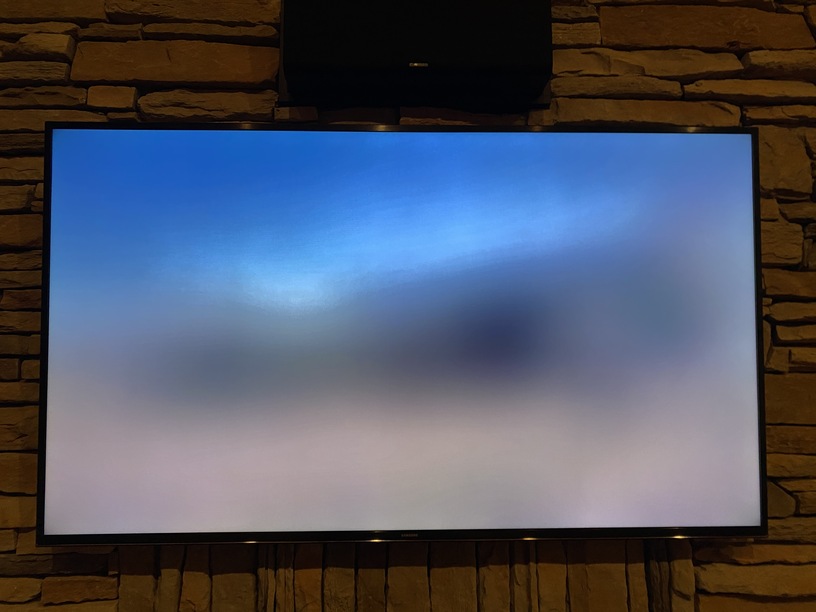

This is the problem on the Apple TV app. After presenting 20 or so pictures in slide show the screen goes blurry. Please fix this. I love Plex.
Same thing here on either iPhone or iPad of getting blurry only images after 20+ photos are shown. I have nothing new to add besides sharing the same problem since Plex commented that there are only a handful of users on the this thread it really is not a wide spread issue. I also think it is more of people just not finding a thread and saying “me too” if they find a thread talking about an issue they are dealing with. I usually look for a thread similar to my problem, look if there is a solution and then move on if not.
Yes shooter71, another one.
I currently use another “competitor” APP only to view my photos.
Hope this will be fixed soon, as i have sent the LOG during the blurry issue.
Here’s a log from my iPad after getting the blurry photo after about 25 photos. plexdebuginfo-fredauch26@gmail.com-7.12-22721 (2021-01-30 12.44.40 -0700).zip (1.1 MB)
