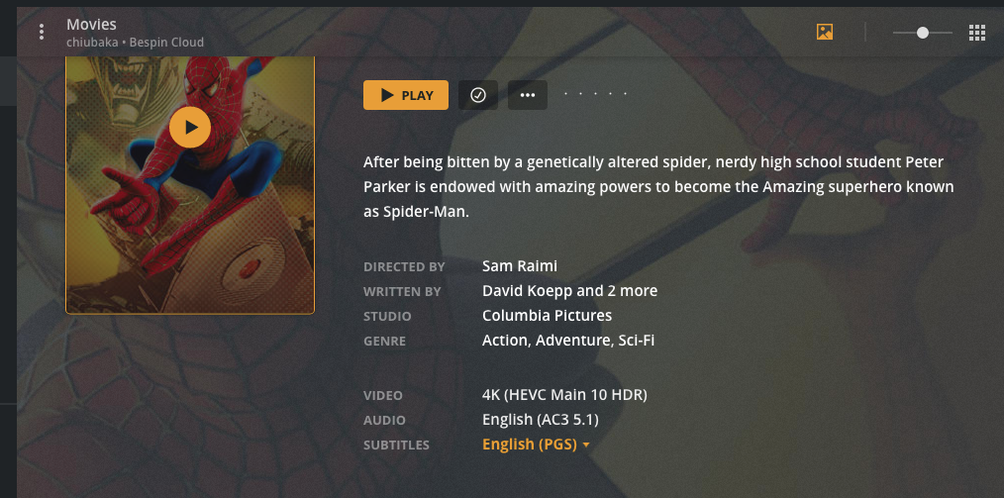
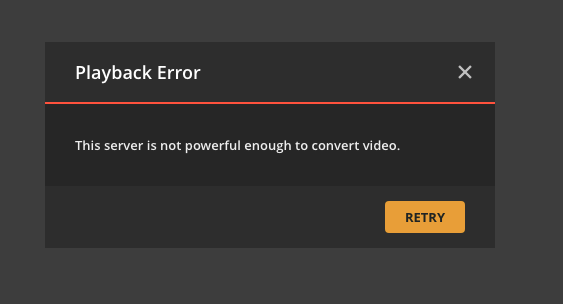
It does appear that these are HEVC encoded and very large files. 8-9GB. So far, don’t seem to have issues with files in the 2-4GB range, but perhaps that’s because I haven’t tested very many of them yet. Even when I select NO subtitles it still won’t play.
While I have a Plex account and the server is on my SYNOLOGY NAS at my house, my son set it up. Therefore, my understanding is that I am technically a shared user on my own Plex server, because he claimed the account under his name. Therefore, I don’t know how to find the logs, unless there is a search that I can do on the NAS server itself.
I don’t see the actual software on the server only the PLEX folders that he named there. I added a few names like TV shows, but they don’t appear to link up because I guess something else needs to be done.
Are you saying that I DO NOT have to reduce the size of the file or even convert it from MKV to MP4, All I really need to do is to re-encode the file in the H.264 format instead of the HEVEC format.
So what if anything would be the advantage of having all my video files as MP4 vs MKV? My son seems to feel that MKV is a better format to use.
You’re going to need his assistance in several ways.
First, I mistakenly thought this was a DS218+ (which has hardware transcoding capability) when, unfortunately, this is a 32 bit DS218j (entry level model) which doesn’t have the capability.
That having been said, The files will need be pre-processed (MKV or MP4 is fine) to convert them from HEVC -> H.264 format so everything can play it. (Newer televisions can play HEVC , most mobile phones and tablets also can, but web browsers can not).
I believe it’s best for the two of you to decide how you wish to proceed.
Upgrade the NAS (purchase a replacement and use this as storage only) to a model which can handle HEVC work (a 64 bit model like the DS918+ or better)
-or-
Use a tool such as HandBrake or FFMPEG to convert the videos, This conversion will need be done in an ‘offline mode’. The files converted, verified everything converted ok with acceptable quality, then replace the originals with the converted versions.
So now I’ve re-encoded files so that the are H264, however, in some larger files they do not seem to play again. Here are some screenshots. Can you suggest what I might do to make them work properly and what might be wrong here. I DO NOT wish to purchase a new server just so that a few files will work properly and so would prefer to simply re-encode them in the format that will work.
I am also wondering if the problem might be simply that these files need to be smaller?
With only a 32 bit CPU, without hardware assisted transcoding,
You’re going to have to re-encode it yourself.
H.264, AAC audio.
I am sorry but that is an entry level NAS. It was never intended to be a media server.
You will need to strive for “Direct Play”. Then, and only then, will it reliably serve you
Are you saying for limited CPU power MP4 will work better than MKV?
Also, I am observing that some movies which are sized at 3-4 GB will play without subtitles, but won’t if I try to select play with subtitles. This doesn’t happens with movie file sizes in the 1-2 GB range. I’m guessing that the adding of the subtitles also takes more CPU power and may exceed the limit.
However, and this might seem a silly question. Once I set a movie to play with subtitle and it stops playing, how can I get it to try to play WITHOUT the subtitle. Because at this point it doesn’t have enough power to get me to the play menu where I can choose to disable the subtitle. Do you have any idea how to deal with this. I suppose watching without subtitles would be okay too. I am observing this when playing on my computer a MacBook Pro using Chrome, but I suppose this would happen anywhere.
What do you mean by “hardware assisted transcoding”? Are you saying that a 32 bit CPU doesn’t have this or that there is a way to add some additional power to an existing 32 bit unit so that it would have “hardware assisted transcoding”. If the latter how is that done?
Finally, what do you mean by “direct play” and how do you ensure that this is what you are doing with this limited functionality.
However, I find when I am choosing subtitle encoding options that the options vary depending on the DVD and/or file I am working with and I am often unsure what type of subtitle requires the LEAST amount of processing power. I usually have the subtitles burned into the file, but have been hesitant to choose burn in options, because I want to be able to turn off the subtitles at will. So how do I get English subtitles as an option with MINIMAL or NO transcoding required?
While I understand the direct play concept as being a video that can just play and needs no additional processing or minimal processing, what I don’t understand is what to look for in my encoding options to ensure that the video is actually direct play.
Finally, if and when I activate subtitles and they end up requiring TOO much power from my CPU, how do I turn that option off again. It seems that once it happens I can’t get to the video menu that allows me to turn the subtitles off. Sort of a catch 22.
I am finding that many of my videos will play subtitles just fine on Plex. I have the distinct impression that when it doesn’t work that the actual file size is larger usually 4GB or more. However, it sounds like from what you are saying that the constraint is likely something other than the file size, but might often be associated with larger file sizes.
I would like to retain the quality with the larger file sizes and still have subtitles be an option without causing PLEX server to run out of power.
It’s still often unclear what the options are and the ideal choices to encode.
Can I assume that text based format consumes less CPU memory than a graphic based format so that if you can choose a text based format that would be preferable? Dunno? Are we then also to say that if you really need to conserve you are better off having “burned in” subtitles, but then you give up the ability to turn them off.
However, it is not that clear if and how you can control these options with Handbrake or DVDFAB. It does appears that if you choose in DVDFAB to have the text extracted to a file it almost always comes out as a .srt file, however, when it is remuxed into the file it seems like it is often a graphic file. (Does that make sense or is it my imagination).
Where I get confused is in the Display only forced subtitle. A forced subtitle is the translation of a foreign language sequence in an otherwise normal language audio, but if you click display “only” forced subtitle does that eliminate the other subtitles (doesn’t seem like it). Or perhaps eliminates them when there is a forced subtitle? Who knows? Moreover there seems to be an option of include forced and normal or forced only, which I would guess means. Even more baffling is what is the impact on CPU usage of how I handle forced subtitles?
In DVD FAB there are a number of options for saving the subtitles of which it’s far from clear to me which options would create a file that is least likely to require more encoding and CPU power?
-Remux into file (seems to give you the option to turn on and off)
-Direct render into file (would that be burn into file? so it’s on only?)
-extract to idx/sub file (which seems like it always gives a .srt file)
I am guessing “direct render to video file” means it’s actually burned into the video file? But I don’t know. If so then you can’t turn them off, which begs the question about all the other caption options for languages which seem to be independent of this.
Handbrake options! are also confusing. If I choose foreign audio there is a forced only and burned in option. I’m assuming that if I don’t also choose the English subtitles that I am out of luck and won’t get them. But I don’t think I have as many options of how the subtitles are done and you’ll notice in this upload that I often see the burned in option pre-checked for English. Does that mean that if I choose English that all of these subtitles will be truly burned in and I won’t be able to turn them off? I’m not sure that’s what I’ve seen in practice and so I find it pretty confusing. However, I have no way of determining if the subtitles are text or graphics and not clear as to whether one is really better than the other.
You are correct that the extraction of subtitles often leads to an IDX and SUB format which is graphics based.
You are also correct that my lower powered NAS will not play graphics based subtitles, no matter the file size.
However, the larger the file size which appears to be correlated to video quality settings that affect the number of bits per pixel in DVD FAB and perhaps other programs the longer it takes to load the movie initially and when you skip forwards or backwards in the movie. I am assuming that at some point too many bits per pixel will simply be too much for a low powered NAS like mine.
However, as you also point out TEXT based subtitles .srt files which are easily found on the Internet and can be downloaded and placed in the same movie folder (with the same name designation) will work even on lower powered NAS.
I’m guessing that .srt files can be packaged into the movie just like IDX and SUB files and that typical DVDs with subtitles may have either graphic or text based subtitles depending on the movie.
I suppose if you want to have maximum control it will be easier to know what you have if you extract the subtitle files rather than embed them into the file. This way you can easily see and delete what you can’t use.
I will be blunt. You will not get what you want out of the 218j
Whoever suggested the 218j as a Plex server has NFI.
Do not spend hours /days/weeks converting your media !
One more time “The 218J will not work as a PLEX server.”
2 options I see.
Buy a much bigger Intel CPU NAS.
or buy a NUC (or small PC) with a i3,i5,i7 and use that as a server and use your 218j for what it is made for i.e. storage.
You say the 218j will not work but I have been successfully using it for a a couple years now with zero issues. No settings have changed and until this last Plex update, everything worked fine and now I get this same error. No videos will play.