Server Version#: 1.21.0.3616-d87012962
Player Version#: 8.9.1.21593 (Fire TV 4k)
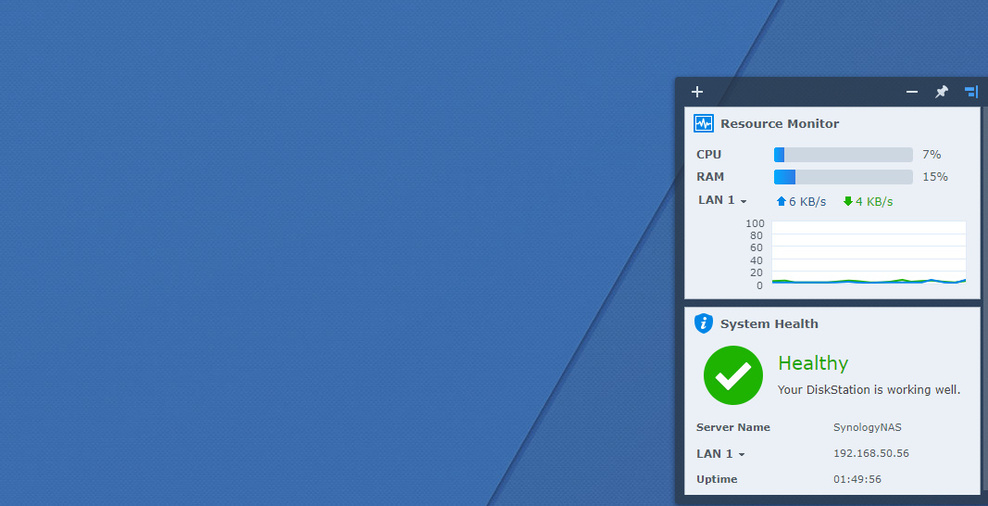
Recently changed ISP and replaced router with ASUS RT-AX86U/AX5700. Playback has been stopping at random points in time (usually after 10-15 min of playback). The only thing that I’ve changed is the router and I’ve gone into the plex client and dumbed all the settings way down to 720p and seems to make no difference. Checking the Synology performance and ram never stays roughly 15% or less aside from the occasional spike when initially launching plex etc… Watching the plex dashboard I see a pretty standard graph (see attached)
. After a few minutes of playback I get the spinning circle on my Plex client (Fire TV 4k) and it will just hang there see graph when the playback hangs -
.
I’ve made several client changes to the transcode quality which seems to make no difference. Tried several different sources and all seem to crash without much rhyme/reason. This issue is driving me nuts- cannot get through 30 min without a crash. I can simply cancel playback and instantly resume from where I left off and it plays fine for several more minutes. I’m thinking there may be some network config on this router that I need to look into. This is the Synology dashboard while this crash happened.
Any ideas? I can post log - just not sure what you’re looking for- thanks for the help!
I’ve attached the last bit of the debug log when it locked up as well -
Thank you so much for the quick response! I’ve made another observation, all other clients fire tv stick, television running plex app and xbox one w/plex installed play these video files fine with no client-side changes (even concurrently). This means that something is specific to the firetv 4k client (I have cleared data/cache and uninstalled/reinstalled and same result). For some reason I had assumed all clients would act the same and got tunnel-vision on this one client. This issue also seems to effect different video filetypes (mp4/mkv) etc… Also of note, when the playback freezes I don’t seem to get an error such as playback failed etc and I’ve let it sit for upwards of 45 min with the spinning circle (unsure if it’s logging anything on the server but I’m no expert). I believe I’ve attached what you specified- thank you again!
It appears as if you’re absolutely correct. Unfortunately, with these Amazon devices I am somewhat limited in the available clients as I have to rely on their store/approved clients. I’m looking into the possibility of sideloading a newer Android client but the fire 4k happens to be our main playback device in the treater so I’m reluctant. I did stumble on to several folks stating that they have had success in going into Settings>Advanced>Enable new video player (set to “OFF”). I did that and I no longer get the spinning circle but rather an abrupt stop that I can escape and easily restart the video. What I found interesting is that now I’m seeing a difference in the log as it seems to be reporting some new information. Could you possibly look at the log and see if this sheds any light? Thank you again!
(File removed)
After trying several older versions I seem to be hitting the issue right at the 10:00 mark regardless of what client I’ve been using. This last test was using android client 7.27 and right at 9:56 I got the message for a quick second that my network connection could not support playback (sorry, I couldn’t capture the error). I reviewed the log to see if I could find the exact verbiage to no avail. When watching my Synology network monitor I do see a drop in speed for about 30 sec before playback fails. I’m assuming this is just an issue with the fire 4k client and my new router. I had not had these issues at all in the past with the same exact setup aside from new router. Log attached should you see anything I missed. (File removed)
Tried different file to ensure I wasn’t dealing with a corrupt file even though other clients play Belushi just fine. This video (Nacho Libre) got through to 23:58 before freezing. Still using older Plex client to test. Daughter is concurrently streaming TV shows and no signs of freezing (Xbox One S). (File removed)
**Update: replaced cat5e patch cable with new one… Working so far no issues. Wow, thank you for your help. Patched FireTV 4K back to current version and seems to be working. Appreciate the assist!