Server Version#: 1.30.2.6563
Hello,
Using Plex on a fire TV Stick 4K Max, connected on a Samsung TV. 5.1 Optical audio set and optical passthrough enabled.
When, I try to play a video with incompatble audio, the audio is transcoded to AC3 and the video direct plays. It works fine but if I turn on the subtitles, the stream doesn’t start and the app waits forever.
Is this a known issue ?
I
I’m seeing a similar issue, but it seems to happen with all HEVC streams regardless of subtitles as long as audio is being transcoded. It seems like a bug since you can select the same file with Play Version, and it’ll play without issue. I’m seeing this same issue on CCwGTV 4K, FireTV 4K Max, Sony Google TV, and Android 12 on Pixel 6.
I thought the issue at first was related to subtitles as well (because I feel like so many issues historically have been), but then I tested 1080p, 2160p, HDR, and SDR versions and found the common thread was HEVC and Audio Transcoding. Playing an AVC version with Audio Transcoding doesn’t seem to present this issue.
Can you test again on your end and confirm?
Are these .ass or .ssa subtitles? On most players they’ll have to be burned into the video so you’ll find if the video is pretty massive with those subtitles it’ll no longer direct play the video and attempt to burn the subtitles into the video. If you have a video that direct plays audio/video but has to transcode when you select subtitles then chances are the player doesn’t natively support those subtitles.
If you are using software transcoding your system will cave under pressure. And you’ll need really powerfull system to seamlessly do it anyways. For my most troublesome 4K videos I have external srt subtitles so that I use those. The smoothest experience I have with those subtitles is for 1080 HEVC videos that have embedded .ass subtitles.
I watch on an Xbox Series X most of the time and my server has an i5 processor with intel embedded graphics. If I try to burn these subtitles to a high bitrate video it ends up reducing it to 1080p if I’m lucky or buffers if I keep it at 4K.
[EDIT] In your player settings, under subtitles you’ll probably find the setting for “Burn Subtitles” is either “Always” or “Automatic”. The text under the opton reads: "Burning subtitles reduces server performace. ‘Autotmatic’ burns formats the app can’t render accurately (e.g ASS/SSA). ‘Never’ avoids burning if the app can render it.
This is with SRT subtitles. I don’t have any other subtitles formats.
I did many tests and the issue only appears when the audio is transcoded with subtitles on. The same video plays fine with audio transcoded and subtitles off. As soon as I turn on the subtitles, I get the dreaded infinite spinner.
If I force burn the subtitles, the issue disappears but then i lose 4K (i3 CPU…) and HDR so this is not an option…
Do you have a different audio codec? I have some 4K HDR movies with Dolby Atmos audio. If I play those without subtitles on the Xbox, audio is transcoded and the video is at 1080p. All my videos with Atmos audio also have another audio track. If I choose that audio codec I get 4K direct play.
If I add SRT subtitles to those while transcoding Atmos audio, performance is affected but on my setup it buffers for a second or two then it’s smooth going forward. If I choose PGS or .ass subtitles then there is a lot of buffering. I think it was better when I was running PMS on an i7 but I don’t recall what setup I had. It was then I decided that I would get/make srt subtitles for any 4K media that didn’t have them. See the screenshots below
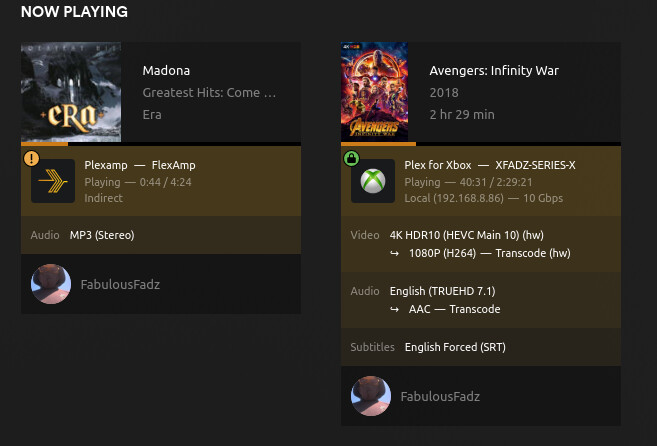
Results of chooseing TrueHD 7.1 audio with SRT subtitles. Video converted to 1080p, audio to AAC

Changing audio track to AC3 5.1 direct plays both the audio track and the 4K HDR video with subtitles on.

Choosing PGS subtitles forces burning of subtitles resulting in the video stream being transcoded to 1080p H264. And a lot of buffering. I get same results with .ass/.ssa subtitles
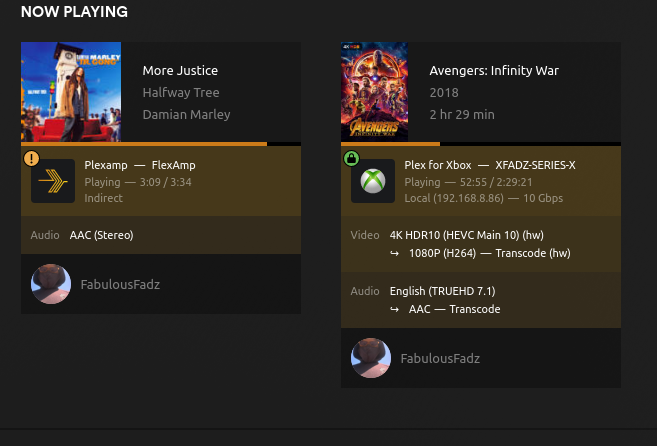
Choosing TrueHD 7.1 audio without subtitles results in both the video and audio being transcoded
And making these screenshots just alerted me that my phone is running a VPN. This answers why something elsenot Plex related) didn’t work earlier when I tried it on my phone.
The problem appears when any codec is transcoded to AC3 which is required by the optical pass-through.
I mean… Of course I could reencode myself every non-AC3 video but that would be avoiding the bug, not squashing it. And one of the key features of Plex is transcoding on the fly so…
Exactly. Better to have it fixed than to change you entire library to avoid it. Fixing it will help those that don’t have their own library or the ability/time to re-encode their videos.
