Why do people persist with local music collections still? Rare tracks? Quality? Poor web connection?
I persist with local movies but conceded to a Spotify subscription a while back.
Why do people persist with local music collections still? Rare tracks? Quality? Poor web connection?
I persist with local movies but conceded to a Spotify subscription a while back.
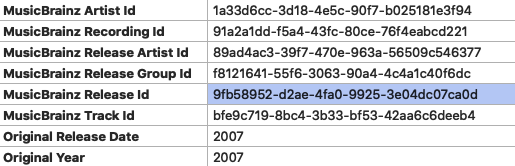
If nothing else I hope Plex will look at using any MusicBrainz GUID type tags Picard may have put in there. It’s not ideal but it should be safe for the dev team to assume if I went through the trouble to add those tags it is the ultimate “Fix Match…”.
This is very ignorant. Some people still purchase their music, whether that be through online sites or actually buying a CD. Furthermore, people may still have a collection of CDs that they’ve bought that they’d rather listen to over a transcoded, objectively worse version.
As a lurker can I thank you all for a fascinating insight into Plex and music. As a Foobar user I hadn’t really considered adding my music to my movies and TV shows in Plex and thus making them easily available across the house.
Now I understand how Plex works, that it plays FLAC files etc. I will give it a go, in the knowledge that I already had my metadata pretty sorted.
Agreed. Although generally the following works well:
Artist
Album
Song name exactly as released
Things still missing:
Ie at best Plex is an absolute PITA to use in 99% of real-world cases for music. And you can’t interop with another player or devices to make up for it because of all of the other limitations. And that’s true even with tidal.
Please take music seriously Plex. Look at real world use cases:
Ie every single access point to music in Plex has major issues that need to be addressed to fix basic use cases. You say that most users don’t use music in Plex. But you’ve dropped causality. The reason they don’t is because Plex is awful at music, no because people don’t want to use it for music so there’s no point in making it not awful for music.
I find this focus on folders very odd, if your files are tagged right then the folder structure shouldn’t matter at all right?
Plex could indeed be better for music, but it also has some pretty unique features, such clients on most platforms, and 3rd party apps like Prism, and support for indirect connections. As far as I know Emby and the other competitors don’t work behind CG-NAT, which completely rule them out for me and probably millions of others.
I have confirmed the following:
Albums tagged as “Compilations” in Itunes, that are m4a format, no matter the AlbumArtist, the individual artist information is preserved / shows up in plex.
Albums tagged as “Compilations” in ITunes, that are in mp3 format, with a blank AlbumArtist, the individual artist information does not show up in plex.
If you add “Various Artists” (or probably anything else) to AlbumArtist for mp3 files, then refresh metatdata, Plex will then show the artist tag properly.
As this worked for m4a files but not for mp3 files, I reckon this is a bug, the behavior is bizarre. Could we get a developer response on this?
Additionally, if you do the fixes above (e.g. explicitly make “Various Artists” the AlbumArtist tag, then plex will show the actual track/album artist
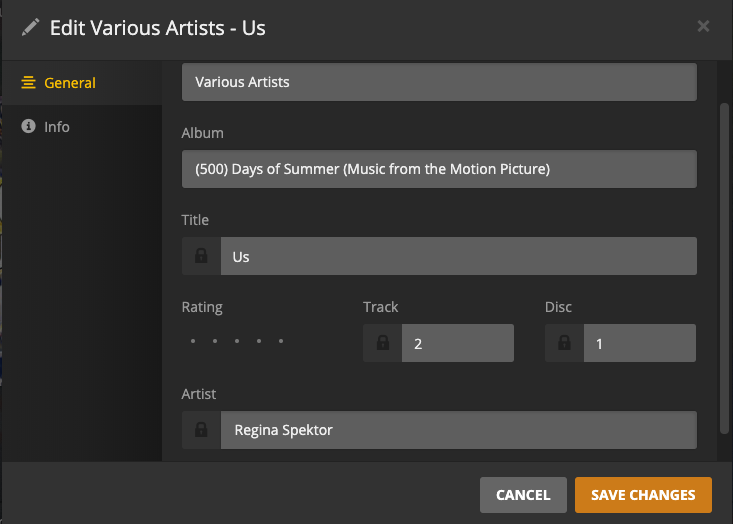
However, when playing the song (in web or IOS), either the artist doesn’t show up correctly, or it does show correctly but clicking on it brings you to the “Various Artists” page. That is a bug that should be able to be fixed - can this be passed to the developers?
In the screenshot above, you can see ‘Regina Spektor’ is identified correctly as the artist; however clicking on “Regina Spektor” while the song is playing brings you to various artists. I think on iOS the behavior is similar - “go to artist” brings you to the “Various Artists” page.
well, for one I don’t have to pay $10/month for the rest of my life to listen to music I’ve already bought.
Additionally, not all music is available on Spotify. There is a whole world of music out there…
Plex does not support the Part Of Compilation (TCMP) tag for MP3 files unfortunately, so the scanning agent has to rely on various fuzzy criteria to identify various artists compilations, which as you’d expect is a hit and miss affair.
It’s been a source of much frustration for years and by now the devs should know that adding support for Part Of Compilation is how to fix it, it’s just not high on the priorities list.
I have struggled with Plex for far too long. I have meticulously maintained my music data base for years. I have maintained the Metatags to the highest degree and know that every song that is located on my server is exactly the way I want it and the tags are correct. Unfortunately, When Plex loads the tracks in it changes the tags and creates it’s own tags. I have looked at every track and know they are correct before Plex loads them. It changes the album/album artist/artwork to something that doesn’t exist in my data base. I would like to know how I stop Plex from changing my Metadata when loading the tracks. I don’t want it to do anything to the data except load it into the artist folders that are located on my server.
Could not agree more, @powerplaytwo
The amount of time I have spent rectifying metadata which I have carefully tagged is something I would prefer not to do.
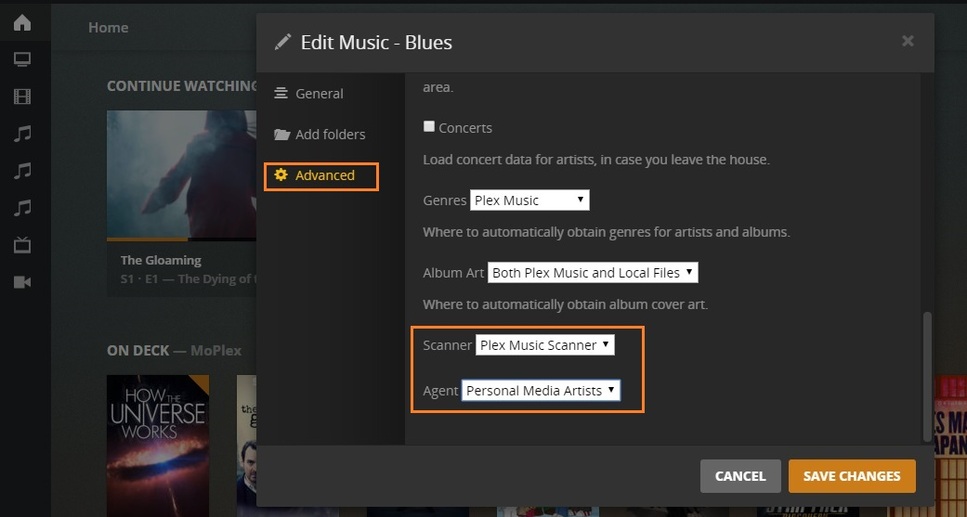
When importing music into Plex that is already tagged the way you’d like you need to set the music agent for the library to “Prefer local metadata” and it will not overwrite your tags. There are also settings to turn off generation of artist bios, album reviews, and track popularity. You can also set Genres to use embedded tags and use only your embedded album art. Also set the agent to Personal Media Artists. That’s the best you can do, but it goes a long way to what you say you want.
Unfortunately, even if you do set “prefer local metadata”, Plex will still overwrite your tags with matched data from Musicbrainz.
With the new “Plex Music” scanner, the “Personal Media Artists” setting doesn’t do anything anymore, that was for the old scanner.
I’m still walking on egg shells, but using the Prefer Local Metadata and Personal Media Artists - I am having no issues. I never had a ‘Premium Music Library’ and maybe that’s why (I have no idea).
I have no endless scanning. I have instant Artwork (embedded) and instant listings (Embedded Metadata) and instant access (Hit Play - It Plays).
I even have Local Media Assets at the bottom of every active agent - anywhere.
I don’t have a Musicbranz agent. For music I have Personal Media Artists and last.fm Tabs - and that’s it. <—years ago, last.fm was ‘de-activated’ when I ‘preferred local metadata’ and haven’t heard a peep out of 'em since.
My music is as Rock Solid now as it’s ever been and I can’t explain it:
Edit Music Library - that’s how mine is and has been set for ever. Nothing changed (I pray thee oh lordy - keep up the good work. Smite down these Plex Developers that would make my music painful)
Thank you and I have changed my settings to conform to yours Juice.
Jason, my settings were already set as you indicated. There is so much metadata missing (artwork, years, genre) that the data base is almost unusable from a filtering stand point. With 30K+ tracks you have to save playlists in order to make best use of the music. I know that the music stored on my server is spot on and contains every thing I need. I have checked the metadata track by track to make sure it is all correct. I have been doing this for over 15 years.
Fordguy61, another extremely unuseful reply. Does plex really think this is a good strategy?
My take on it is, Plex has no Media management functions - even the most basic thinkg like the idea that a “Library” can’t be virtual and must reflect the logical directory structure. They should come straight out and say “yeah no one with any brains was managing development of the program and you will have to make separate directorys and duplicate files if you want to use our program”.
This topic was automatically closed 90 days after the last reply. New replies are no longer allowed.