I have a collection of media (movies, DVD rips, TV series) in folders on two drives. For 99.9% of the files, it works flawlessly. But sometimes Plex will randomly combine files into a single file, from all over the collection, and replace them with the single combined file in each location in Plex, with the title of one of the files in the “combination.” I did not ask Plex to do this, and as far as I can tell there is no way to make these files not like this.
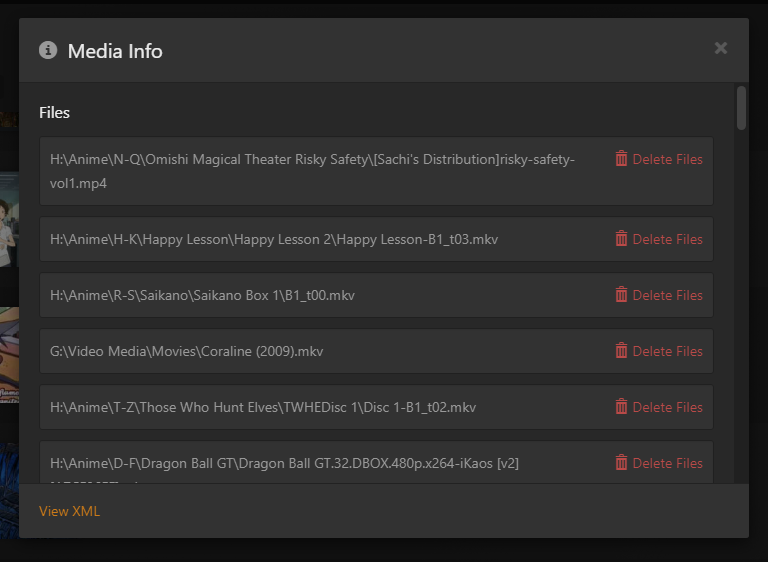
A screenshot of the randomly combined files is below:
This file is supped to be Coraline (2009). It instead shows Happy Lesson-B1_t03 as the title in the folder in Plex, which is one of the random files it threw into this package. The thumbnail is from another one of the files. The other files are DVD rips and fansubs, all unrelated to each other, with other stuff in their respective folders. In those folders, this same combined file is shown instead of the file that is supposed to be there.
You have multiple problems. Read and follow the documentation.
No mixing movies and TV shows in the same library. This is not supported.
Make sure you add the correct folders to each library.
With H:\Anime\...., do not add Anime to a TV show library. You must individually add N-Q, H-K, R-S, etc.
The same with movies. Add G:\Video Media\Movies to the Movie library, not G:\Video Media.
Follow Plex naming requirements for TV shows.
Wrong: \Saikano\Sailano Box 1\B1_t00.mkv B1_t00 is not a valid name in Plex.
Correct: \Saikano (2002)\Season 01\Saikano s01e01.mkv (or whatever the correct season/episode).
This is a lot of work and so far Plex has played the files without issue. Is there no way to fix this without renaming every file in my huge collection?