@ChuckPa Here you go!
@ChuckPa Here are today’s logs! OS logged errors between 3:27am and 5:30am. I received the OOM email at 5:30am, so I bet you should start there.
It sounds like you found the culprit on my last upload. Should I keep uploading these though? Just want to check.
Thank you
Do you need the database too?
I used the one above. I’ve linked this thread for our team member who specializes in these type issues. If anything is needed, I’m sure he’ll reach out to you.
Ok, thank you!
@SuperDragonite Thanks for making the database available
The cause of the problem is a very high clips (extras) added for this movie:
AKA Jane Roe
We have 524,289 extras for that one movie
These were added during the periodic metadata refresh as part of the scheduled tasks
These additions stopped on the 15th of October 2021
So I would be interested to know the history of your server updates or changes you made to scheduled tasks
At this point in time I do not know if the bug that causes this repeated extras additions has been fixed or not - Up to now the last I saw from other users were additions made 31 August 2021. So your example is a more recent example of the bug happening - up to 04:07 am on the 15th October 2021
If you happen to have kept any copies or downloads of the server logs for the following times - they may shed some light on the cause of this happening - we are adding the same extra over and over and over again
2021-Aug-04 2am
2021-Aug-07 2am
2021-Aug-10 2am
2021-Aug-13 2am
2021-Aug-19 2am
2021-Aug-28 2am
2021-Sep-06 2am
2021-Sep-24 2am
2021-Sep-27 2am
2021-Sep-30 2am
2021-Oct-09 2am - 3am
2021-Oct-15 3am - 4am
What is needed is to get all these extras for that movie purged
One way to remove them is to disable adding extras and trailers for the library and save the change and then refresh metadata for that movie and after that completes then to re-enable adding extras and refresh metadata again for the movie
I am worried that the server may crash as the movie metadata gets processed
It may be safer to move the movie out of the library path and then scan the library and empty trash and then move it back again and re-scan the library
Current Path
/volume1/plex-media/Videos/Movies/AKA Jane Roe (2020).mkv
What I need to establish is if we still have a bug adding same extras over and over again - so really need to understand why we stopped adding the extras after 15th october
@sa2000 Thank you for the info!
I do not recall making any changes to the scheduled tasks during the time period (or ever since I set up the sever over a year ago).
I unfortunately do not have any downloaded Plex logs from before I started reporting this.
I just tried to load that movie in Plex, and it looks like I can’t load the information and cannot play it. Seems like that helps confirm what you’re saying.
I can remove the movie, scan the library, empty the trash, and then add the movie back (and scan). Am I good to go ahead and try this now?
Edit: Ok, it looks like when I tried to open the movie in Plex, this initiated a metadata refresh on it. Now my library is stuck trying to update the metadata. So I’m going to do the above now. Just so you know, I had to force quit Plex in order to scan or do anything because it was stuck at 50% updating the metadata for the movie.
Ok thanks - do you know the dates of the PMS version updates and versions ? From 15th October onwards
Alright quick update. I removed the file, and Plex is scanning. I thought Plex was stuck scanning, but I just checked the console. Looks like it’s deleting the data. Here’s a screenshot; hopefully this is what I should be seeing?
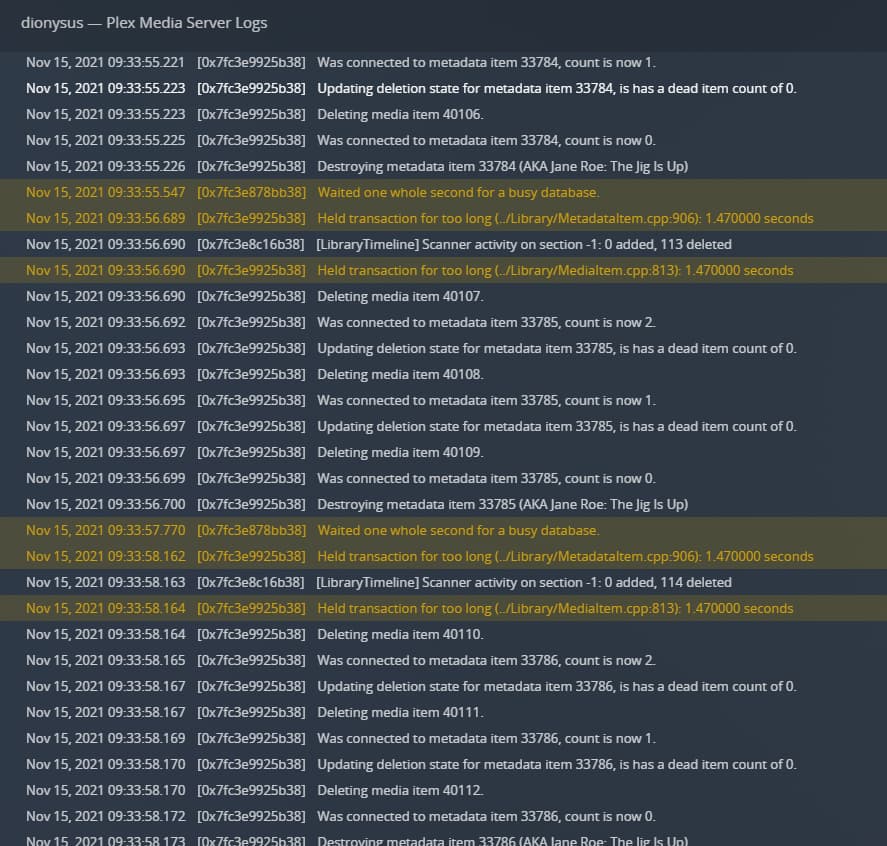
And if ok after the steps you will follow - give me debug logs and database download a week later to see what extras got added
Perfect - a slow process - may take many hours as there are half a million metadata items and a million media items to purge
I updated 10/12 and 10/27 according to my OS logs. These would be the newest public releases at the time.
Also, just want to make sure these errors aren’t anything to be concerned about? I assume they’re part of all of this. (Note I did post above with the update dates. Want to make sure they aren’t missed!)

Yes I have seen these whilst the database locks are in place during long purges.
I believe it is ok - I will mention it to the devs - I don’t think the activity history updates are vital
OK thanks -
The Scheduled Tasks Refresh Metadata task started adding extras on 26th June 2021 and was running every 3 days. Picking few dates
26th June 2021 - extras were being added by scheduled tasks (runs every 3 days)
. . .
Gap between 17th July and 4th August - may be PMS was down?
 . . .
9th October repeated additions of the Extras was happening
12th October update to 1.24.4.5081-e362dc1ee
15th October repeated additions of the Extras was happening
27th October update to 1.24.5.5173-8dcc73a59
So the last addition was 15th October
Is it possible that on the 15th we reached a level where every refresh overnight was crashing ? and that is why we stopped adding?
It will be good to see what happens when we start afresh and capture the database a week later
Yeah, I don’t recall changing that scheduled task around June. I could be misremembering. I do know that library item was added last year, so it definitely doesn’t coincide with the item being added.
PMS was up during all of this time; weird that there’s a gap.
The first crash according to the OS logs was on October 18, so what you’re saying makes sense to me.
I set a reminder for next week to upload those logs and database!
@sa2000 I noticed my memory usage was at about 80% last I checked during this process.
I just tried to access Plex, and I’ve now discovered I cannot access my NAS at all. My SMB mounts aren’t responding, and I cannot get to the interface through the browser. I figure I should wait and hope that the process finishes?
Are you able to get into Linux command line and tail the Plex Media Server.log to see that it is being written to ?
Sorry, I never interface with my Synology via SSH. I only use the web interface or SMB. (I know, I’m a monster.) I figure I’d have to enable that before this? Let me know if I can get into Plex another way though.
I did ping the IP, and it responded. So that’s nice.
