Following tests by @heygaul on a Synology DSM 7 NAS, we are going to make a change to the fix to avoid first startup taking 50 minutes before the server is available - this was on a server with 5.7Gb db and just over 1.5 million duplicated extras
Waiting to hear back if there will be a new development build with this change before the new year
Thanks - I can see there were crashes on the 6th January - the main server logs do not get back to that time - would need to capture the logs zip on restart immediately following a crash
The crash data does not appear to the crash reporting system - we do make a copy of these crash reports into $TMPDIR after attempting to upload
Do you have this area available on a network share outside the NAS to look through ? or do you have linux shell access ?
The directory that $TMPDIR points appears to be /volume1/Plex/tmp_transcoding
Would like to know if you can see files in this directory through a network share or directly in linux shell - the dump files of the 6th January were named
If you find them - please zip and send me zip by Private Message - of course would most likely need matching server logs - but at least you can confirm if you can access this directory and get the dump files for any future crashes that you would also have corresponding server logs for
I have analyzed one of the dumps and it looks similar to one that is fixed in latest Plex Pass beta
(Hubs) Fix potential serialization issue of CW hubs (#13237)
Would need matching server logs to confirm if same issue
So either wait for the beta to become public release and try it or get me matching server logs and dumps (new zip of the $TMPDIR directory with the server logs zip after next crash) and I can then confirm it is this issues - fixed in 1.25.3 or a new issue
I as well am having a concern I cannot pinpoint where my plex server (W10) crashes randomly. The application remains open in the system tray and needs a manual restart to resume functionally. This seemed to happen after I upgraded all plex libraries to the latest agent. Before then I had no issues at all.
Version 1.25.2.5319
Is there a possible solution to this or things that I can try to resolve this? I have not been successful with any input from my initial thread
i use this code to auto restart my plex when plex crash . i found it on this web site Auto Restart Plex on Synology it’s works for me !! perfect!! ps:i use synology DSM6
my plex crash 3-5 time a day . this can fix my problems
i setup every one minute check 32400 port … if plex crash it will stop & start!!
i did it as a Task Scheduler . Every one minute run this code work perfect!
hope this code can help everyone!
#!/bin/bash
echo Checking if plex is running...
#if /usr/syno/bin/synopkg is_onoff "Plex Media Server" > /dev/null
if echo > /dev/tcp/127.0.0.1/32400 > /dev/null
then
 echo Plex is running.
 exit 0
else
 echo Plex is not running.  Will attempt to start it.
 echo
 echo --------------------Last 20 log entries--------------------
 tail -20 /volume1/Plex/Library/Application\ Support/Plex\ Media\ Server/Logs/Plex\ Media\ Server.log
echo --------------------End of log--------------------
 echo
 /usr/syno/bin/synopkg stop "Plex Media Server"
 sleep 60
 /usr/syno/bin/synopkg start "Plex Media Server"
 exit 1
fi
Appreciate this.
However I do believe it is pertaining to another concern. It seems plex update agent hangs and always states ‘checking for updates’
I want to say it is something related to this but cannot pin point why all the sudden plex is having this concerns (Windows 10 Server)
Hello,
Thank you for your response.
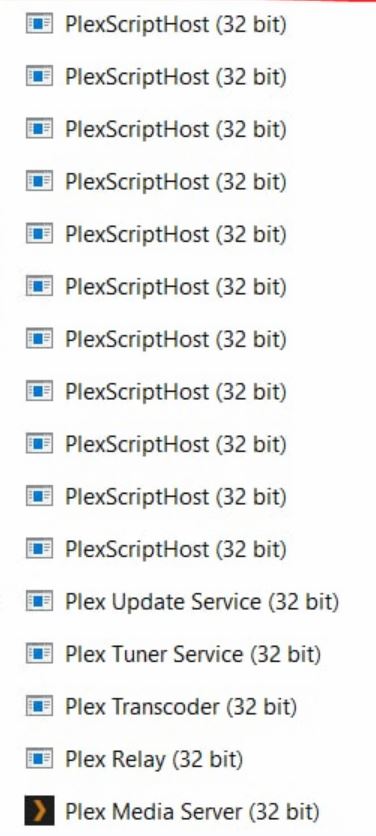
I have made some progress eliminating some of the PlexScriptHost processes manually. I am going to see over the next few days if this was the occurrence that was the concern. This also occurred on a close friend of mines system. We have been attempting to troubleshoot together. I will look into the post you suggested to see if it relates to what is happening.
At least now that I have cleared these processes my plex update agent in the GUI is showing up to date and not hanging on ‘checking for updates’
Thanks for your work on this issue, I think I have the same problem. Please see a screenshot of my database files (just after a fresh crash/reboot of the app) as requested below.
I would be prepared to trial your alpha build. I am running a DS1019+ Synology NAS. Let me know if you need any more information.
sent you DSM 7 intel spk for latest alpha version 1.25.4.5412
Also with instructions for confirming you have the extras issues and also for getting me logs after the server launches on the alpha release
Still and issue here. Please crashes randomly with 503 service unavailable, and a restart fixes it. This is getting to be problematic and looking at alternatives now.