Plex for Apple TV 8.21–8.24 AGAIN Dung—Can't Watch TV, nor HD Content; Useless like 8.6

Plex for Apple TV app 8.22 [Apple TV 4K (2nd generation) 64GB, tvOS 15.6]
PMS for Mac 1.32.5.7349

Plex for iOS 8.20 [iPad mini 4 16GB (very little free), iOS 14.8]
Plex player for Mac 1.74.1.3913 [Mac Studio (2022) M1 Max, macOS 12.6.6, 4K display]

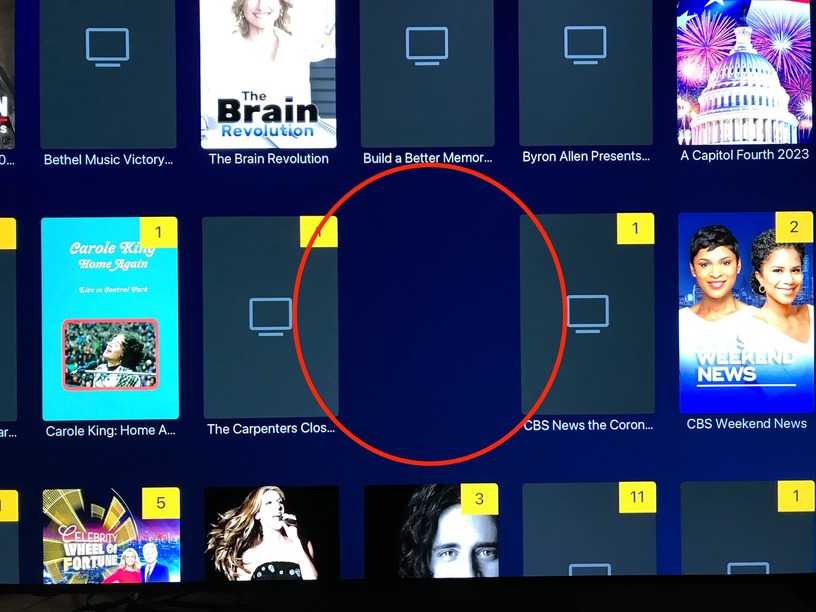
Repeatedly, when initiating OTA Live TV > Browse, the Plex for Apple TV app took several tens’ of seconds, perhaps even 60 seconds, to render the screen (ie, Plex appeared completely non-responsive for a significant part of a minute) served via a 1Gbps Ethernet connection to the otherwise idle PMS server.

In contrast, repeatedly, Plex player for iOS on an old iPad mini with very little free memory over WiFi rendered Browse instantly while the PMS server was busy actively serving content to the Apple TV with significant UI activity. (Plex player for Mac, not surprisingly, similarly rendered Browse instantly.)

.
On newer, much faster hardware, for Browse at least, the Apple TV app is 2 orders’ of magnitude slower than the iOS app.

Wow!

Such dramatically worse performance suggests, yet again, that something fundamental seems very, very broken in the Apple TV app architecture.

10 Aug 2023 (47 days!): Plex for Apple TV app 8.21 – 8.23.1 still dung—no improvement whatsoever, however, it appears Plex has made things significantly worse with 8.23.1. (Can’t know if 8.23 has the same new bugs as 8.23.1, since 8.23 crashed 100% immediately upon launch.)

  1. Can not watch current TV (without disabling current audio engine), nor play HD content, sound fails completely (ie, no sound whatsoever);
  2. The scrub bar playback position UI become dysfunctional within a few minutes, typically less than three (< 3!).
  3. (New?) Old Video Player is dysfunctional and can no longer be used reliably.
  4. (New?) Watching TV (ie, OTA Live TV > Guide > watch show) abruptly fails.
  5. (New?) TV Shows posters disappear (grid view).

.
Plex for Apple TV app 8.22 [Apple TV 4K (2nd generation) 64GB]
PMS for Mac 1.32.5.7349

Use Old Audio Engine" set to [On] still seems to be a temporary workaround (ie, disabling current audio engine) for dung failures 1 & 2 above.

.
.

It appears the Plex for Apple TV app 8.23.1, yet again, has newly added bugs:

3 ..The Plex for Apple TV app has abruptly exited multiple time while watching an OTA Live TV show, reverting to Live TV > Guide. (Unfortunately, I have not been able to capture Plex for Apple TV app logs before the logs rolled.)

We had not seen this bug in 8.22, nor before—it appears to have been introduced with 8.23.1

.
.

4 .. It appears the Old Video Player is dysfunctional and no longer reliable.

**9 August 2023 5:24pm – 5:30pm PDT [-0700], the Plex for Apple TV app 8.23.1 failed attempting to play a 1080i OTA Live TV show successfully previously recorded, “CBS Evening News With Norah O’Donnell (2019)” S2023E157, recorded 8 August 2023 6:30pm – 7:00pm PDT [-0700] with Use Old Video Player [On].

Both Plex player for macOS and for iOS successfully play this episode.

We had not seen this bug in 8.22, nor before—it appears to have been introduced with 8.23.1

Playback was successful after setting Use Old Video Player to [Off].

.
.
5 ..OTA TV Show posters have been buggy for many PMS versions. Now, among the fraction that have been displayed, TV Shows (grid view) posters disappear upon playback exit. (Since OTA TV Show posters have been very, very problematic for many PMS versions (PMS 1.32.1.6999 or earlier), I can’t be sure that this is a new bug.)

Before playback:

Immediately after playback exit:

After exiting TV Shows to Live TV, then back to TV Shows:

27 Aug 2023 (64 days without any apparent remedy attempt, nor even acknowledgement of the FU!): Plex for Apple TV app 8.21 – 8.24 still dung—no improvement whatsoever. To add insult to injury, Plex may have made things significantly worse with 8.23.1. (Can’t know if 8.23 has the same new bugs as 8.23.1, since 8.23 crashed 100% immediately upon launch—clearly no one bothered to test this dung.)

  1. Can not watch current TV (without disabling current audio engine), nor play HD content, sound fails completely (ie, no sound whatsoever);
  2. The scrub bar playback position UI become dysfunctional within a few minutes, typically less than three (< 3!).
  3. (New in 8.23.1 ???) Old Video Player is dysfunctional and can no longer be used reliably.
  4. (New in 8.23.1 ???) Watching TV (ie, OTA Live TV > Guide > watch show) abruptly fails.
  5. (New in 8.23.1 ???) TV Shows posters disappear (grid view).

Hi

I don’t understand why you are repeating issues that have got resolved

The crash on 8.23 was fixed in 8.23.1
Then issues introduced by the new Audio Engine were resolved by enabling the old Audio Engine on the Plex for Apple TV

I would prefer if you just report the current issue rather than re-specifying old issues that either got fixed or a way round the issues was identified - as in the case of enabling the old Audio Engine on Plex for Apple TV

No need to repeat this

  1. Can not watch current TV (without disabling current audio engine), nor play HD content, sound fails completely (ie, no sound whatsoever);

We know about it - you have a way round the problem - problem solved and the development team will look into why the new Audio Engine caused the problems

Please only report new issues with diagnostics.

sa2000,

Thank you for your consistent respectful, helpful and timely communication. I very much appreciate your time and personal efforts on my and other users’ behalf.

Please do read my response in that context.

.

The issue of this topic is not resolved. A new version, Plex for Apple TV 8.24, was released without fixing the severe bug introduced in 8.21.

One would think that Plex development would want to know that yet another version was released still impacted by a severe bug for 65 days.

Are you saying that Plex doesn’t want to know such information?

I have no awareness that Plex has reproduced the bug—has it?

My experience with all other software companies is that they always want bug regression testing of all subsequent released versions.

.
Regardless of whether Plex wants or needs to know, certainly, all Plex users need to know that the current version of the Plex for Apple TV app, version 8.24, does not work as installed.

If I did not update this topic to include 8.22, 8.23.1 and 8.24, how are other Plex customers to know these versions are all broken or learn of a workaround?

Plex has a terrible support model. Instead of Plex maintaining known-issues listings by product/platform, users are expected to find and notice random forum topic postings that may be pertinent to problems or merely use misunderstandings.
.
.
20 July 2022, Plex released the Plex for Apple TV app version 8.6 that, similarly, rendered all of Plex software, PMS, effectively absolutely useless for my family. For 33 days, I wasted dozens of hours reading a trying to understand piss-poor, vague “documentation,” randomly worded user topics, enduring disrespectful, useless Plex employee postings, testing, and trying to submit requested logs and sample content. For 33 days, my family could not watch TV, nor recorded TV content.

Plex Useless; Apple TV 8.6 & 8.7 Player FUBAR—Can’t Play TV; iOS Player 8.5 Can’t Play Shows Being Recorded

As a new Plex user, but by no means a technically inexperienced, I struggled for an entire f’ing month trying to enable my very ill wife to watch live TV and the content she recorded. She hates Plex.

It appears that the ONLY reason we have EVER TO THIS DAY been able to again use Plex (ie, to watch current TV content) was due to my laboriously continuing to post findings that happened to catch the attention of a random user, NOT Plex, that discovered a workaround, disabling the default setting “Auto Adjust Quality.”

At no point did Plex ever respond to my topic with any assistance, nor with any meaningful information.
.
.
By the way, 13 months later, that severe 8.6 bug is still evident in version 8.24, despite Plex release notes claiming it was fixed in 8.8—WTF?

Version 8.8 is now available.

“Auto Adjust Quality” still breaks watching current TV (ie, HD)—I just tested 8.24.

(It could be that there was a Plex for Apple TV app version between 8.6 and 8.24 released in which “Auto Adjust Quality” did not break Plex. Until today, I had not re-tested, since Plex never responded to my topic with any remedy, nor even a bug-reproduced acknowledgement.)

.
.
.

[quote=“sa2000, post:25, topic:845404”]
Then issues introduced by the new Audio Engine were resolved by enabling the old Audio Engine on the Plex for Apple TV
[/quote] [emphasis mine]

An undocumented workaround posted by a user (me in this case) does not resolve a bug that renders Plex useless for watching current TV (ie, HD).

How are paying Plex customers supposed to know that one has to change a default setting?

.
Must all Plex user individually waste hours of their lives tediously combing through random forum postings, most of which are horribly obsolete, hoping to use search terms that will yield current bug pertinent workarounds?

.
.

I referenced the 8.23 crash-immediately-launch bug as to why I could not report whether the bug(s) reported in this topic were present in 8.23.

.
.
sa2000,

Again thank you for caring.

PMS for Mac 1.32.6.7557
Plex player for Apple TV 8.27

(We can’t run PMS 1.32.7.7621, as PMS 1.32.7.7621 instantly completely breaks Apple TV scrub bar UI when watching OTA Live TV 1080i HD broadcast (ie, most current TV) being recorded—see:

PMS 1.32.7.7621 Completely Breaks Apple TV Scrub Bar UI
)

As I’ve posted multiple times herein since 24 June 2023, eventually, with use, the scrub bar UI eventually fails with repeated use, especially for Plex player for the PoS Apple TV app 8.21 – 8.27.

To restate, even though disabling current audio engine is a partial workaround for the problems posted in this topic, the Apple TV app scrub bar UI become partially or completely dysfunctional with repeated use (eg, FF-ing past commercials several times in 30 minutes show).

.
.
BTW, why the does the Apple TV app scrub bar UI FF-control only advance 10seconds, whereas the iOS app FF-control advances 30seconds?

This is really a pain in the rear, even for the time before the UI fails.

The horizontal progress bar just needs , swipe down, (Progress line appears) then swipe << or >> the surface of the control button left or right. Return button to commence. The only prerequisite, the ATV settings must be set for Click and Touch surface. Not just click.

If your Local Terrestrial TV channels, example 1080i /interlaced will at times freeze the ATV Plex UI, then yes it is a real pain. Normally a pull the power cord from the back of unit will resolve the issue.

I have found using the Home page recent channels a better way.

PMS Version: 1.32.8.7639 at present and reasonablly happy

SE56,

Thank you for taking the time to make suggestions.

A simple tap with also cause the scrub bar to appear. Unfortunately, after only a few scrub bar UI actions, the Plex for Apple TV app scrub bar UI becomes dysfunctional and, bizarrely, frequently displaying the local time-of-day instead of the playback timeline position.

Clearly, there is no one in Plex engineering that actually “eats its own dog food.”

.
.

Our settings have always been such.

Again, I do appreciate your suggestions.

This topic was automatically closed 90 days after the last reply. New replies are no longer allowed.