Server Version#: Latest Win 10 Home
Player Version#: N/A
On the server or player I find that when I…
Select Guide
Select ‘HD channels only’ from the top drop down menu I am missing multiple HD channels
For example - UK Freeview
101 BBC 1 HD
102 BBC 2 HD
103 STV HD
104 Channel 4 HD
105 Channel 5 HD
but with ‘HD Channels Only’ selected only get (of the above examples)
101
102
105
— 103 and 104 are missing?
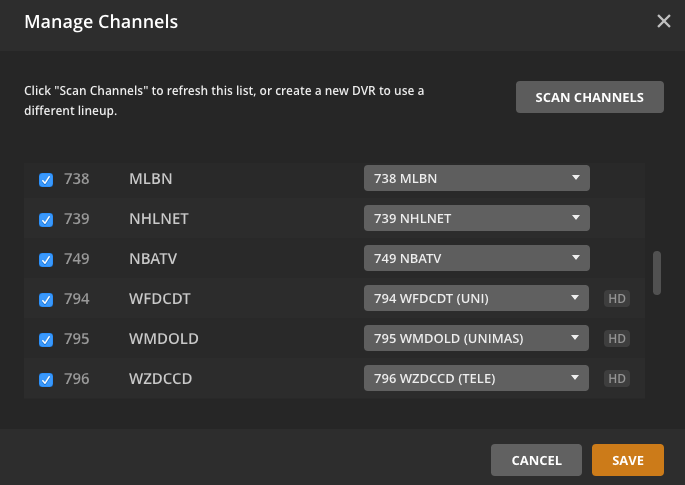
I then went to Settings > Live TV & DVR to look at the enabled channels. All 5 channels are enabled and identified as HD by the HDHomeRun Connect device.
It should also be noted that SD channels are also incorrectly seen in the list.
This guide drop down menu item does not work.
Would be nice if Plex prioritized this as an issue, instead of adding things like [BETA] versions of Web Shows, which I will never use, or in this case even acknowledged that it is an issue, and could be fixed in the future if they get time from developing more new [BETA] items.
Would need some diagnostics - like to see what the EPG XML data is
The way the channels are selected in this filtered view is not by channel type but by what is being streamed now / in next period. So if a channel broadcasts in 720, it would be included even if it is an SD channel. Similarly an HD channel that is streaming only 480 in this period may get excluded
It was done this way to ensure all HD shows would get picked up and in some countries the channel categorization of HD/SD does not exist
If you do not believe that this was the reason for the omission of the channels, please provide logs with debug enabled covering time when the grid filter is used and I will see what the request is so you can try it in a browser and let me have the xml
Well, that’s just plain dumb. In the UK (certainly) and maybe other countries some channels are not 24x7 and will be off air for some of the time. For example, “BBC FOUR HD” (and the SD version) are only on air 7PM to xAM.
How about trusting the broadcast flag from the applicable tuner instead - let the tuner / country specific data decide what is HD and what is not. Or have an option. But stop assuming.
I’m experiencing the same thing in my zip code. It seems that most of the OTA broadcast channels are showing up as HD, but for some strange reason, my ABC affiliate, though broadcasting in 720p according to every TV in my house, isn’t being identified as HD by my HDHomeRun and/or Plex, so when I want to view HD-only channels, my ABC affiliate is omitted.
I’d love a way to set up a “favorites” list in the guide, so that I don’t have to look thru all the channels I don’t really care about, but when I may want to live-tune at some point, but having to scroll around to set recordings is slightly annoying. My cable DVR lets me select Favorites to filter my guide with, as does my old cable companies app, but Plex doesn’t seem to have this exposed. It’d be nice to be able to “edit” the properties of a channel, if they’re known to be wrong.
In this case, the channel “properties” aren’t the issue because Plex isn’t looking at the channels, it’s looking at the “content”. Which in real life where you have channels that broadcast in HD no matter the content others that broadcast in SD no matter the content, makes NO sense.
I can look at the channel listing for the HD Homerun and see that it has a flag on HD channels indicating that they are HD. If I can see that, I’m pretty sure the Plex software can see it too. Why doesn’t it use this flag to determine the HD channels?
Yes I am. Maybe Plex doesn’t use this because the flag doesn’t exist in other countries? I just know that I select “HD only” and the Plex guide still lists all the SD channels from my cable provider. The only solution that seemed to work for me was to go into the DVR settings and manually remove all the SD channels. This Live TV / DVR thing from Plex has proven to be buggy in many ways.
Typical for a new service though I’m not sure if “new” still applies to Plex or not at this point There are a lot of “missing” features that those who have been using DVR for ages are certainly noticeable.
Probably shouldn’t list all but I’ve explained why SD channels to show up.
Yeah I know - and it doesn’t list all SD channels - but it does list quite a lot of them. Look at this screenshot from Plex’s own DVR settings - it clearly lists which channels are HD right in its own software, then blithely ignores that information when you select “HD Channels only” in your guide.
Just a question - in the countries where the HD flag does exist, why not use that information to make the list, and if the info is not there, then use the content detection as a backup?
We do have this registered as a problem and I have just added your suggestion.
It is not just countries. Some tuners do not return an HD indicator for channels

 There are a lot of “missing” features that those who have been using DVR for ages are certainly noticeable.