Hi @Mental_Moose, no sorry I don’t think so. It’s a case where PMP was the behavioral outlier.
Are there hardware requirements for this?
My 2011 Mac mini HTPC looks like it’s nearing end of life as it can barely run the 1.2 update - 1.1 was actually running a lot more smoothly. I had to revert back to PMP 2.58 which runs perfectly. Sad because I was really enjoying the Plex HTPC experience.
Ah, I’ve found another bug (on Mac OS Mojave, with Plex HTPC 1.2.0):
When playing movies with a DTS-HD MA track, if DTS-HD Passthrough is selected in the options, playback freezes straight away, the video doesn’t start (both AVRs I’ve tested this with support DTS-HD MA : Pioneer VSX-922 and Yamaha RX-A1080).
Playback will work if I uncheck DTS-HD Passthrough but leave DTS(DCA) Passthrough checked. This downgrades the signal to DTS to the AVR though.
This is new to Plex HTPC since PMP had no DTS-HD passthrough option.
Track info :
Format                                   : DTS XLL
Format/Info                              : Digital Theater Systems
Commercial name                          : DTS-HD Master Audio
Codec ID                                 : A_DTS
@MediaHorder %AppData%\Local\Plex HTPC\mpv.conf works for me. I:
- exited the app
- created an
mpv.confcontainingvf=vflip - started the app then played a video; confirmed it was upside down
If the vf=vflip trick works for you then it could be we’re overwriting keepaspect through normal app operations. We’re not setting monitoraspect.
If the app’s zoom setting is at its default value then we set these values:
video-aspect=-1keepaspect=truepanscan=0.0
Please restart the app then test just this case before shutting it down. Lastly posting Plex HTPC.log will be helpful.
Sure, here it is.
Plex HTPC.log (147.3 KB)
Would love an option to change the skip ahead from 30s to 10s.
Would love to have screen calibration option back.
My Pioneer Plasma is much better at handling moving content than being used as a PC monitor via HDMI. If I set my HDMI input source as being a PC it shows true 1080p, but when I set it to Movie it cuts off top and bottom now. Both OpenPHT and PMP let me calibrate the Plex output to match the screen.
If you are serious about this release being for Home Theater PC functionality, this is a must-have due to all the variances of displays/beamers/projectors etc.
I’d like to echo this.
I was running the original release of Plex HTPC and updated to version 1.2 last night. Using a 2010 Macbook here and UI performance seems a lot worse verses the initial release. Haven’t tried playing anything back yet but I doubt I will be pleased.
The UI on the plain Plex app is a whole lots better and Plex Media Player is fine, too.
Plex HTPC.1.log (10.0 MB) Plex HTPC.2.log (10.0 MB) Plex HTPC.3.log (10.0 MB) Plex HTPC.4.log (10.0 MB) Plex HTPC.5.log (10.0 MB) Plex HTPC.log (4.2 MB)
just had a black screen again.
Thanks for this. How do you add multiple options to the mpv.conf please? I’m sure it worked using the following before… (but now does not seem to with 1.2.0)
vf=vflip
keepaspect
monitoraspect=21:9
vflip does work here but the aspect ratio is still not zoomed in so I think something in Plex HTPC has disabled this function like you say. Any chance of reverting the behaviour that causes this?
I really would prefer not to have to constantly turn off and on the zoom setting or press the Z key all the time.
EDIT: I also tried this which also did not work.
monitoraspect=21:9
keepaspect
video-aspect-override=-1
I have upgraded to v1.20, but am still getting a half-working remote control.
Here is the log file.
Plex HTPC.log (149.3 KB)
Plex HTPC.1.log (218.5 KB)
Plex HTPC.2.log (7.0 MB)
Same error as previously submitted:
Apr 24, 2021 00:27:53.132 [9996] DEBUG - [InputManager] Initializing.
Apr 24, 2021 00:27:53.134 [9996] INFO - [InputManager] Loading inputmaps from: C:/Program Files/Plex/Plex HTPC/inputmaps
Apr 24, 2021 00:27:53.143 [9996] INFO - [InputManager] Loading inputmaps from: C:/Users/Media3.FAIRSEA/AppData/Local/Plex HTPC/inputmaps
Apr 24, 2021 00:27:53.144 [9996] INFO - [InputManager/Keyboard] Successfully inited input
Apr 24, 2021 00:27:53.144 [9996] DEBUG - [InputManager/QHotkey/QHotkeyInput] Initializing.
Apr 24, 2021 00:27:53.144 [9996] WARN - [InputManager/QHotkey/QHotkeyInput] Unable to map shortcut to native keys. Key: Qt::Key_MediaPause Modifiers: QFlags<Qt::KeyboardModifier>(NoModifier)
Apr 24, 2021 00:27:53.144 [9996] WARN - [InputManager/QHotkey/QHotkeyInput] Unable to map shortcut to native keys. Key: Qt::Key_MediaTogglePlayPause Modifiers: QFlags<Qt::KeyboardModifier>(NoModifier)
Apr 24, 2021 00:27:53.144 [9996] INFO - [InputManager/QHotkey] Successfully inited input
Apr 24, 2021 00:27:53.229 [4316] INFO - [Input/SDL] Found 0 joysticks
Apr 24, 2021 00:27:53.229 [9996] INFO - [InputManager/SDL] Successfully inited input
Apr 24, 2021 00:27:53.229 [9996] ERROR - [InputManager/LIRC] LIRC Socket Error : 2
Apr 24, 2021 00:27:53.229 [9996] WARN - [InputManager/LIRC] Failed to init input
Apr 24, 2021 00:27:53.229 [0472] INFO - libCEC was successfully initialized, found version 262151
Apr 24, 2021 00:27:53.230 [9996] INFO - [InputManager/CEC] Successfully inited input
Hope someone can help with how to overcome those two QHotkeyInput WARN messages that seem to be stopping my [Play/Pause] key from working properly.
Also, the [Info] key doesn’t work to bring up the info overlay.
Cheers,
G.
Incorrect. PMP does have DTS-HD passthrough. It is possible that the Mac itself doesn’t support DTS-HD passthrough. There have been many models and OSs that don’t allow it and is one of the myriad of reasons why I tell people don’t use a mac for an HTPC.
In looking at your logs there is this line:
Apr 23, 2021 00:11:04.548 [0x1028265c0] ERROR - [MPVEngine/mpv] cplayer: Passthrough format unsupported.
So you may very well be in this case where the OS or hardware is blocking DTS-HD passthrough.
This is despicable behavior for a display. Usually there is a way to turn off overscan on a TV in every mode and you should really look into a way to do this. We’ve had at least a decade where there is no excuse for ever overscanning content in a display.
I think you are misremembering here. OpenPHT did have this but PMP does not.
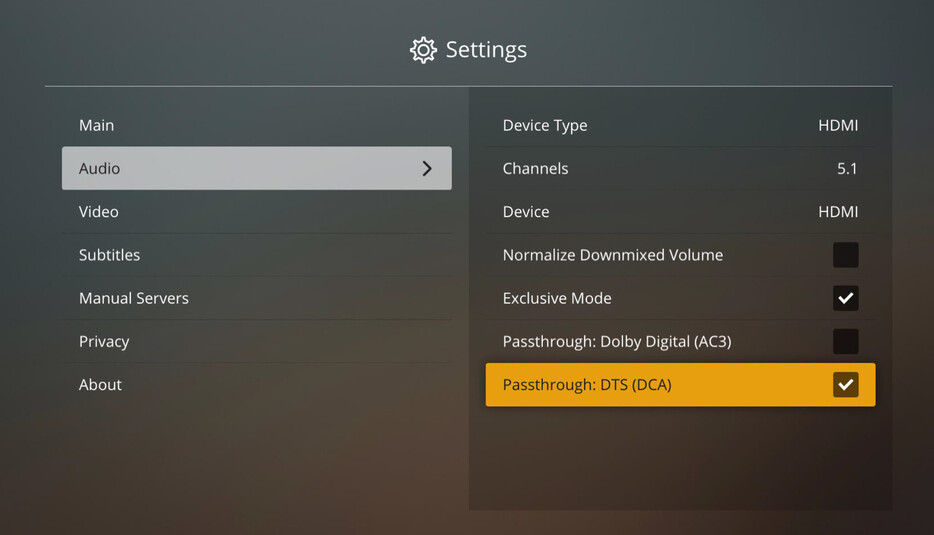
Perfect, this works
@nx6, @yelloz will you please run this 1.2.0 alpha build then let me know if its smoothness is better than the 1.2.0 build you’re running now? Is it more 1.1.0 like? You can unzip and run directly from your downloads directory but please make sure your normal Plex HTPC app is closed first.
For others, I don’t recommend you replace your 1.2.0 with this build. 
Looking. For future reference, a new Plex HTPC.log file is created each time the app is run or after the previous one reaches a certain filesize. The log files with numbers in their name are older files, higher the number, older the file.
So, when you run into something strange it works out pretty well to quit the app right away and grab Plex HTPC.log.
Edited, the “impossible log sequencing” was definitely possible. 
@deactivated Yes! This works wayyyyy better. Still a bit choppy with the interaction animations, but it was like that in 1.1 also. It also just might be this old machine and the fact that I’m running a patched version of Catalina on this unsupported Mac.
Yes. That is a lot smoother and more responsive for me. 
Also, I don’t know if this has been mentioned by anyone before, but when the app launches in full screen mode I am still getting the menu bar at the top, and Plex HTPC is not the active window (I still have the Finder’s menu at the top). Having the “on top of other windows” preference set to “Always” has no effect:

If I click the interface Plex is now on top, but the menu bar is still visible at the top:

If I launch into Windowed or Maximized mode, and then hit the green window control to go to full screen the menu bar gets removed, but not when launching in an already full screen state. I’m on High Sierra 10.13.6
