How guys any feedback on the above? Sorry if I’m missing something.
I’m not seeing that - 1.6.1 on Windows 10
Not seeing that issue - 1.6.1 Win 10
Edit - have you checked Settings-Appearance.
Hi JohnAlex Yeah I’ve gone all through settings, including the Apearance with no luck. I’ve aslo triend it on three different computers and it’s the same on all three. Did you see the screen shot I posted?
I’ve uploaded a screen shot above in another post.
Thanks again.
Are you still on 1.4 ?
Current ver is 1,61
Hope it gets sorted. All good here on two machines (one is the PMS client running Plex HTPC as well) and the other is a Win 10 laptop running Plex HTPC.
@gbooker02 would it be possible to implement the “resolution switching to match content resolution” feature, like seen on the shield, now where so much of the Plex HTPC base gets rewritten? This would definitely bring Plex HTPC one step closer to the ultimate player and in my opinion, this feature is essential for enthusiasts. 
What is the use case for this? Generally you run a PC at the display’s native resolution and let the player do the upscalling.
Today’s TV screens are typically better at upscaling, because they can be tuned to the specific panel.
While a software player only uses generic filters.
Some people have even invested in external upscalers for their home cinema projectors etc.
I agree, and there is a distinct difference from a Display panel vs. Projector, requirements for the setup. and @Mitzsch note “resolution switching to match content resolution” could be helpful pending everyone specific setup, if it is possible to add in the future for users.
So nice to hear there might be a solution to the occasional stuttering issues.
Thanks again for all your effort.
Can’t wait to try the next Windows HTPC release.
So, changing resolutions works already. I have a 1080p set that is sorta between 1080p and 4k (yes, it’s weird; it has 2160 vertical but 1920 horizontal so it interpolates across the RGBY colors in the horizontal). Anyway, it does not advertise a 25 or 50Hz mode in 1080p but does advertise a 25Hz mode in 4k. I normally drive the TV in 1080p but when I play some British content, it changes to the 4k@25Hz mode.
So, the key is that the source resolution just isn’t weighted in display mode selection. In fact, keeping the current resolution is weighted. So only when there’s no good match in the current resolution does it consider other resolutions (like my example above).
Opening this box does bring with it a few questions:
- What resolutions should be acceptable? Should it just whitelist SD, 720p, 1080p, (1440p?), 4k? Some TVs will have a huge laundry list of resolutions of which many would not be acceptable.
- This would need to be an option because some cases a TV’s may be using something as poor as bilinear where as the computer could use ewa_lanczossharp.
- Other things I’ve not thought of yet.
Update: Putting this as a separate post because it’s unrelated to my last.
- Linux is working decently well. It doesn’t support the power options (restart/sleep/shutdown) nor disabling the screen saver yet, but it’s being tested some internally. It’s also having issues accessing the
/run/lirc/lircdsocket for LIRC. - Layering is being tested by some internally. This is likely going to have to wait until after Linux because it will specifically break Linux until the equivalent Xwindows code is written.
- D3D11 GPU context was only crashing because of an incompatibility in libraries that was the cause of my testing mechanism (the new MPV lib I built and the app were using different versions of FFmpeg because we recently bumped it in MPV but not the app yet). After resolving this I was able to play using it … BUT it was performing badly. I was seeing dropped frames in content that plays fine with the angle gpu context. It also ballooned the size of the MPV library to about 20x its previous size. It’s possible to ship with both and allow selection between the two but the performance makes me think that something is seriously wrong (I expect it to preform better when talking to D3D11 directly instead of through ANGLE).
- Newer ANGLE doesn’t work without making Qt also use the same ANGLE. When MPV is built with a newer lib, it compiles but ends up using the code from the library that Qt loads (which is 4 years old). Perhaps this can be resolved with Qt 6 as it doesn’t use ANGLE anymore so we can control what version of the lib is used for the angle gpu context.
It’s already been said, but thank you for these updates. They’ve been tremendously helpful to better understand where things are at with the HTPC project.
I’m eager for D3D11 GPU context as HDR support is the biggest need in my setup. Sounds like hurdles remain, but as Qt is updated, some of these might go away.
Well, this sounds okay for this situation (newer heard of such a tv or I´m not understanding it correctly?) but not the feature I´m after and probably many others here or well it´s part of the feature we want. For example couldn´t this be done with a proper weighting mechanism? (e.g. weigh the refresh rate higher, so in the example mentioned it would use the 1080p@25hz mode instead of a 4k mode?)
In my opinion, it should weigh the source media resolution in display mode selection, so 1080p content is played in a 1080p mode and 4K in 4K. (plus matching refresh rate of course if activated)
SD, 1080p, 4K should be included but whether 720p or 1440p should be included - I don’t know. Well, the best option would be a user selection, like seen in Kodi, so everyone can decide which resolutions should be used. (No idea how easily this could be implemented, maybe only list common resolutions?)
What resolutions are “enabled” on the Nvidia shield?
One thing I was thinking about is what happens when the tv/projector does not support a resolution. => 1080p tv and 4k content → so no 4k mode ==> should not switch to any resolution, keep the current one.
If possible include all options, from SD to 8k , 23.976 to 120. or if possible a way the user can configure, as we may all have different home theater or main viewing displays or projectors.
Good point, i can say that between my 3 displays with HTPC, they are all config differently from the OLED 4k to LCD 8k and to the projector. so i agree user selection maybe the best if it is a possible option.
I think you missed the point I was making in that the fact that the source resolution isn’t considered is the only thing missing in this.
That’s up to the display to advertise only the modes it supports (and if it violates this, that’s a broken display). No consideration will be given refresh/resolution modes that aren’t advertised.
Refresh rate matching is already in place and thus irrelevant to this discussion.
I don’t think you’ve considered the implications of this statement. Perhaps an example will serve. These are the resolutions advertised by one of my TVs:
320x200p
320x240p
400x300p
512x384p
640x400p
640x480p
720x480i
720x480p
800x600p
1024x768p
1152x864p
1280x024p
1280x600p
1280x720p
1280x768p
1280x800p
1280x960p
1360x768p
1366x768p
1400x050p
1440x480p
1440x900p
1600x900p
1600x1200p
1680x1050p
1792x1344p
1856x1392p
1920x1080i
1920x1080p
1920x1200p
1920x1440p
2048x1152p
2048x1536p
2560x1600p
2560x1920p
2560x2048p
2880x480p
3840x2160p
So, do you really think that 800x600, 1024x768, 1600x1200, or even the 2880x480 should be considered? Displays can have a lot of weird resolutions and a lot of them shouldn’t be given any consideration.
There’s also another point to consider: If the content doesn’t match one of the advertised/whitelisted resolutions exactly, what resolution should be used? For example, say the content is 576p on a display that supports 480p, 720p, 1080p, and 4k. The best resolution to use is very likely not 720p but rather the max resolution of the display. Otherwise there will be two scaling operations performed (576p->720p in the computer, then 720p->4k in the display).
Appreciate the time and feedback, hopefully everyone will share their feedback to help give a good range of what users would like to see for this specific topic.
I think based on the product of plex htpc, every user may have a specific way, they feel gives them the best picture quality of there content. either in the home theater or main viewing display (mine is different for each of my 3 displays - 4k, 8k, and ust projector)
My thoughts would be if possible to have it user configuration for this topic, as all of our needs and or preferences may differ.
hope that helps from a point of view and other share as well.
Well, good question. In this case, I would not switch to any other resolution and just keep the current one. How does the Nvidia Shield handle these situations?
That´s why I suggested only list common resolutions, like SD,720p,1080p,2160p or 4320p. (although I think 4320p/8k is not that common for movies or any other videos - except some demo files)
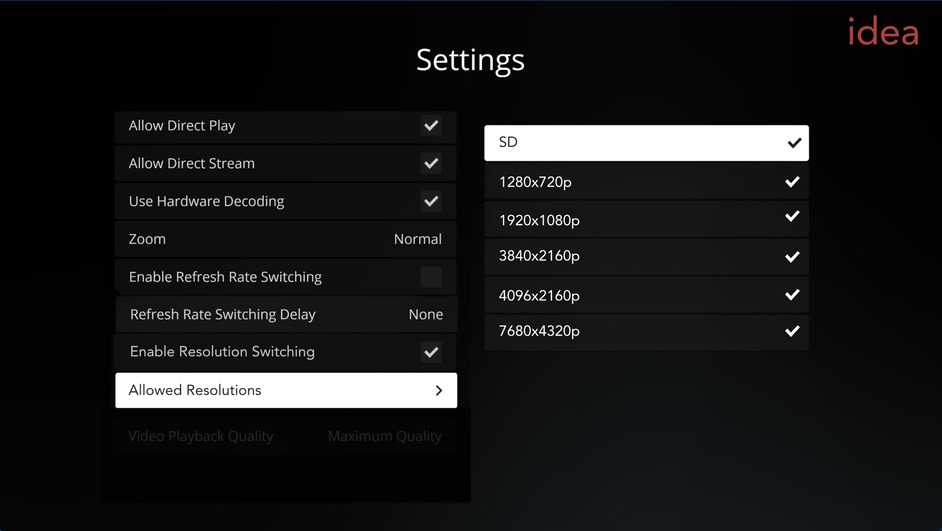
I have made a visualization of how I would imagine it. So always list those resolutions regardless of what the display supports, but when for example you would play a 3840x2160p movie on a 1080p TV set it would ignore those settings and just uses the current resolution. (Like a fallback). Perfect would it be of course if those resolutions appear when the display also supports them. I´m not a programmer, no idea if this could be done or is sufficient.