Ah OK, I thought so, just wanted to ensure there wasn’t a single option that said “Enabled passthrough” or something.
Anyway, as per prior post got audio and video playback working OK now once I disabled the GUI sounds!!
Problem now, looks like mpv uses too many resources on my Kaby Lake HD 620 to playback 4K - just drops massive number of frames - I tried the EGL setting as per the Linux EGL forum thread but no better with that
Pitt really, if I playback the same 4K video with VLC it plays fine - yeah it uses a ton of CPU and 50% Render/3D from intel_gpu_top but does not drop any frames.
mpv uses low CPU but hammers the GPU, 100% Render/3D and 80% video.
The split window thing happened again for the first time in a while. I am using the latest build of PHTPC so hopefully that extra error catching you built into this version might have caught the reason for the problem?
So that’s a relatively low power GPU. Was this HDR content? If so, you may want to try adding hdr-compute-peak=no to your mpv.conf since this defaults to on and can be expensive on a GPU. Also, try reducing the quality settings since HTPC defaults to a quality setting that’s higher than MPV and VLC.
The logs contained:
Apr 07, 2022 01:14:43.106 [23720] DEBUG - Setting up MPV with parent window 0xffffffffa7f40076
Apr 07, 2022 01:14:43.106 [12748] DEBUG - [MPVEngine] Property 'wid' set to '-1477181322'
This confirms what I expected this value to be (the first line is the new one). Looks like MPV will need to be corrected to handle this circumstance.
I’ve consulted them but there may be a workaround that solves this. It has to do with the odd way that Windows treats the HWND as a pointer in some cases and not in others and the fact that it’s always a 32-bit value even in 64-bit code. I sent you a build in a DM to test out and see if it fixes the issue. Try running it and checking the logs to see if you reproduce the symptoms and whether it fixes the problem.
At start up, Plex splash screen jittery.
Start or resume a movie, movie does not play, it’s frozen so i fast forward or rewind the movie a little and the movie begins to play but very jittery and there’s no sound.
There is clicking sound when i navigate within Plex, so Pulse Audio is on, and sometimes the clicks echo.
There are a LOT of selections in the Audio Device menu, i have no sound when ALSA (Default) is selected so i have it selected to HD-Audio Generic HDMI 4 / HDMI Audio Output, but sound output is hit and miss, sometimes works, sometimes doesn’t.
(I’m testing as i type) I select AutoSelect Audio, and audio worked but there’s echo. NOTE: There is echo when i navigate or play anything within Linux Mint as well, so it must be a LM/PA issue.
I will now restart my system with PulseAudio disabled.
No clicking sound
No sound with Auto Select audio device.
No Sound with Alsa (default)
Select HD-Audio Generic HDMI 4 / HDMI Audio Output, sound works including Atmos (compressed), video play is jittery (frame rate slow).
True HD Atmos is really bad, sound cuts in and out, video even more jittery.
To me, it seems as though it is a Linux Mint/PulseAudio and Plex issues, and if i knew what i was looking at when reading log files i would definitely help, but that stuff is beyond me as i am completely new to Linux.
Let me know if there is anything else i can do to help.
Thanks, changing those has helped but looks like I’m borderline on the hardware resources.
BTW, sorry if I missed it but should HDR work OK on Linux with PlexHTPC out of the box or do I need to do extra config changes somewhere (noticed my projector didn’t detect a HDR signal).
I ended up doing a fresh install of Linux Mint, updated all my drivers etc… and then installed Plex-htpc.
Happy to announce that video play rate is as it should, nice and smooth and looking great.
There are times when i still need to either fast forward or rewind a little to get the video to play, otherwise the screen is frozen.
In the audio section in setup, i have a list of approximately 40 devices listed starting with Autoselect, the Default (Alsa) and then a whole heap of other choices. When i was finally able to select the correct sound device where sound was working, Dolby and some Atmos content played reasonably well but Atmos True-HD continued to break up as before. So as i stated in my earlier post sound is still hit and miss.
.
some of the GPU resources are spent tone-mapping from HDR → SDR. There are some ways to reduce the resources required for the tone-mapping as well but this GPU really is borderline in terms of capable of playing 4k HDR → SDR. Check mpv.io for the list of all the possible options you may be able to apply. I did find the hdr-compute-peak=no when searching elsewhere for ways to improve performance on low power GPUs. It is worth noting that MPV does have some defaults set which are higher quality (and thus more GPU intensive) than other players.
I previously did some testing with the a later generation GPU (Intel NUC, Comet Lake, UHD Graphics 630) on Windows there it couldn’t play 60fps 4k HDR content without stutter when it was having to tone-map to SDR. It could play when it was not tone-mapping (outputting HDR) but I believe I had to disable the peak computation there as well.
It’s also worth noting that on Linux Plex HTPC is still rendered in the Qt pipeline because we have yet to figure out a way to get the compositor to composite child windows together (the layering mechanism I’ve mentioned many times before). While the Qt render pipeline performs much better on Linux than on Mac/Windows, it still is an additional step imposed on video rendering. There are some rumblings that this may be solvable in the future with Wayland but I haven’t seen information on how to do it or whether it even works yet.
That’s a setting for the transcoder in the server. The transoder is not used when you are direct playing.
There are some other options which can reduce GPU usage. I’d suggest trying those out. Additionally we recently built in lua support which means you can use the profile support so you can disable options or change them only in specific circumstances. Something like
[4k HDR]
profile-desc=4khdr
profile-cond=((width ==3840 and height ==2160) and p["video-params/primaries"] == "bt.2020" )
# I'm not absolutely certain about the mechanism of detecting HDR here but this should lead you down the correct path if not
hdr-compute-peak=no
cscale=bilinear
# other options to reduce load
You’d likely want to test with the standalone MPV just because it’s faster to iterate there and you can set options directly on the command-line to test them out.
I’ll dig into mpv options to see if there is anything that could move some of the load off the GPU which is typically 100% pegged and onto the CPU which has plenty left!
For those who also have the problem with Dolby TrueHD passthrough, where audio breaks after a seek, there is a lua script for mpv that solves this!
I originally opened the feature request there to solve another problem with passthrough in mpv and an awesome user suggested a peace of code that should solve the problem - it indeed solves the original problem but also helps with TrueHD on seek! It reinitializes the audio driver after a seek and triggers the truehd-passthrough-logic to be in sync again!
(I modified the delay a bit (from 0.2 to 0.4), as it seemed to yield better results on my system)
require "mp.msg"
require "mp.options"

local options = {
	enable = true,          -- enable or disable the functionality
}

read_options(options)

-- just load forced subs
function control_audio()
	if options.enable then
               --disable the sound for a short while ... then re-enable

		local aid = mp.get_property("aid")
		mp.set_property("aid","no")

		local time = mp.get_time()
		while time + 0.4 > mp.get_time() and mp.get_property_bool("eof-reached") == false
		do end

		mp.set_property("aid",aid)
	end
end

mp.register_event("seek", control_audio)
Just paste the code into a textfile.lua, put the file somewhere safe and paste scripts=C:\path\to\textfile.lua into your mpv.conf
#EDIT: should also work on linux!
#EDIT2: only works in the standalone mpv.exe player! - Sorry for the misinformation!
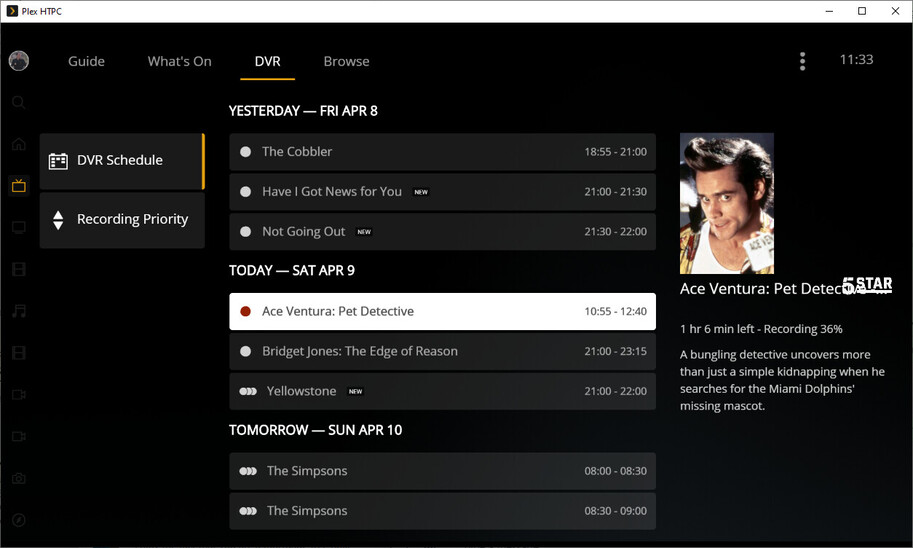
Whilst I love the new DVR section of Live TV & DVR and it was a welcome return (especially after waiting so long for it in the Tizen and Xbox apps) but I have noticed a few quirks /rendering issues over the last few weeks that I thought I would mention in case the development team wasn’t aware of them:
Long TV programme or movie names overwrite/are overwritten by the channel logo - perhaps the logo would be best located under the title or next to the movie/show image and an ellipse could be added to a truncated title.
Current recordings don’t show the start time and channel text (such as 032 5 Star).
Past recordings loose all details that was shown from the guide, apart from the title (in the case of a movie) or episode number and name (in the case of a show).
The following screenshot highlights issues 1 and 2 with Ace Venture: Pet Detective currently recording:
Also, and I appreciate this is subjective but, the DVR Schdule and Recording Priority buttons seem a bit large (height wise) compared to others in the app, such as the Side Bar, Top Bar and TV Guide buttons.
Quick correction on this.
There is some HDR support, depending on your GPU, desktop environment and compositor.
See HDR video playback - ArchWiki
I’m not sure how correct this information is, but
TLDR; Requirements:
An HDR-compatible graphics card (Integrated graphics cards work, but the video playback has framerate drops)
X11 as the display server (There is a lot of work to get HDR working on wayland, but I’m unsure how mature it is, afaik weston and sway should display HDR content)
On NVIDIA graphic cards, it seems like only mpv is able to playback properly an HDR Stream, Chromium has coloring and depth issues. AMD and Intel cards are not limited to mpv.
X11 seemingly only pushes up to 600 nits peak brightess. Anything above is not taken advantage of.
You might want to try a HDR10 video file using MPV directly first, at least then you know if your system can play HDR or not, and whether there are any issues regarding configuration or plex-htpc
As mpv uses too many resources on my Intel NUC I think I’ll stick with my Vero4K. This runs Linux and does HDR no problems for me and just works, I’d prefer the Plex GUI but at the end of the day that’s secondary to me actually watching the media without any issues.