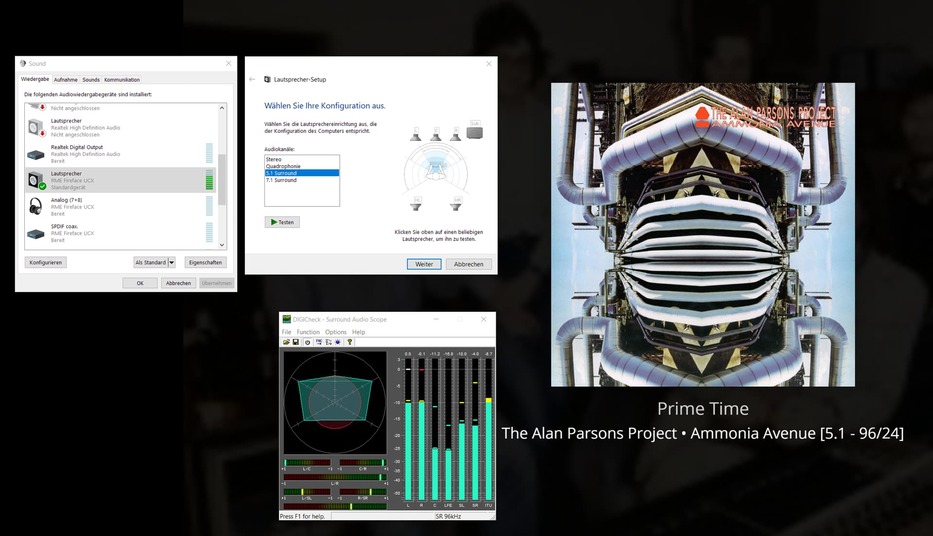
Windows 10
Player Version#: Version 1.44.0.2981-e2d72ac2
The version above, when played from a PC hooked by HDMI to an AV receiver, will activate multi-channel PCM on an as-needed basis when playing multi-channel music
The newest version of HTPC which I jus installed does not have this ability. All other functionality, including multi-channel music playback, is good.
Admins, please work on bringing back multichannel music playback to the windows app.
Admins, please work on bringing multichannel music playback to PlexAmp in Windows too.
I want to elaborate a little more:
OLD WINDOWS APP
Windows 10 setup for 7.1 audio in settings… receiver shows 7.1
Plex set for “AUTO” for number of channels
- Plex app, play stereo music, STEREO signal activates on AV receiver
- Plex app, play 5.1 FLAC, 5.1 activates on AV receiver
HTPC PLEX
Windows 10 setup for 7.1 audio in settings… receiver shows 7.1
Plex set to “AUTO” for number of channels
- Plex app, play stereo music, STEREO signal activates on AV receiver
- Plex app, play 5.1 FLAC, STEREO stays activated on AV receiver, sound is not not great
HTPC PLEX
Windows 10 setup for 7.1 audio in settings… receiver shows 7.1
Plex set to “7.1” for number of channels
- Plex app, play stereo music, sounds fine, 7.1 stays activated on receiver
- Plex app, play 5.1 FLAC, 7.1 stays activated on receiver, the music playback is in multichannel and sounds good
The programmers have done something with how PLEX HTPC handles multi-channel music playback versus in the old Windows app.
You should set Win 10 as stereo and feed HDMI to the receiver and let it decode. Don’t set multichannel on Win 10.
Also, passthrough works perfectly fine on Plex HTPC.
I have Plex on Win10 Pro running via HDMI to my AVR.
Plex is set up to passthrough with all codecs checked.
AVR processes as expected.
Thank you for your comment.
I can see what I wrote could be confusing. We are not talking codecs, per se, imho, here (eg EAC3 etc). Passthrough works for me too. We are talking multichannel PCM in music playback, of multichannel FLAC files eg. I can have the Windows PC set in stereo, 4.0, 5.1, or 7.1, and when playing music in the music section of Plex, even when the music file is 5.1 FLAC, Plex will “kick” the PC into stereo mode and STEREO will engage in the AVR. In the old version of the Windows Plex app, this did not happen; 5.1 PCM engaged properly. So it doesn’t matter if the PC is set to multichannel in Win10 for this “bug” to rear its head or not. ( I merely wanted to point out that EVEN when Win10 set to multichannel, the AVR engages “STEREO” when playing multichannel music in Plex HTPC.)
Again, TL;DR… Plex HTPC has lost a functionality the old app had. (I reloaded the old app just to be sure. On the same PC, it plays back multichannel music in the AVR correctly, whereas Plex HTPC does not).
I assume when you say “Plex” you mean Plex HTPC. I loaded the latest version of Plex for Windows also, and it doesn’t work either; only old version of Plex for Windows works. Have you played multichannel music in Plex HTPC? Is it working for you?
Yes and yes.
On a side note, never allow Windows to interfere with audio or video. Pass it through untouched to your AVR.
Ok, that is good to hear, what are you doing different that I am not. I can have Windows in stereo or 5.1 or 7.1 and it doesn’t matter (and it shouldn’t matter!). I can’t find a single setting in Plex HTPC to make multichannel FLAC activate 5.1 on the receiver. Playing a stereo music file, as I said, kicks 5.1 off (as you would want). But playing a multichannel music file doesn’t activate 5.1 PCM (so I have to keep Windows in 5.1 or 7.1, and play music, and never play a stereo music file, or it borks the AVR so that multichannel never re-activates.). I have the settings the same in the old Windows app, and it is working fine/as expected. I just can’t get Plex HTPC to yield the same correct behavior on the same PC/AVR.
Set the properties of the HDMI audio device in Windows to 7.1 speakers and leave it so.
If an app uses bitstreaming, it will communicate with the AVR and make the necessary changes.
However, playing multichannel flac files is not using bitstreaming (at least in the majority of cases). It will just send a multichannel PCM stream to the audio interface.
I don’t use an AVR, but have the multichannel audio interface connected directly to the PC. Multichannel flac files play normally in Plex HTPC 1.23.2
Than you Otto. I will retry my setup and see if I can get it to work. (And, again, old Windows Plex is working for me: plays stereo/activates stereo on AVR, plays 5.1/activates 5.1 on AVR.) If I have to, I can just keep using that I guess.
I am not saying, of course, that the files won’t play. If I am just listening and not eyeballing the lights on the AVR… they play “fine.” You can dance to the music lol. It’s just that the receiver doesn’t “light up” in 5.1 mode (playing “Ammonia Avenue” e.g.) if I have “forced” stereo back in to play with playing of a stereo music file.
ALSO… Otto do you think the HDMI is somehow making a difference vs the SPDIF which I think you’re using.
I am not using SPDIF. My sound interface is connected directly to the PC.
There might be a communication error between the app and your AVR after you played a stereo file. It may not switch back to the default multichannel PCM.
Does it make a difference if you close Plex HTPC and restart it before playing a multichannel flac file?
Thanks again for replying Otto. I rechecked everything and here is what I found.
I needed 7.1 turned on Windows 10. Then, in Plex HTPC, I turned on exclusive mode.
Once I had this set up, Plex HTPC, when playing either 2.0 or 5.1 FLACs, would activate either 2.0 or 5.1 on my AVR over HDMI.
This issue is solved, for me. Thank you as well @JohnAlex.
(I also now notice, Otto, you’re using the RME Fireface over USB… nice interface.)
Good to hear it’s sorted
Strange how I just have stereo on Win 10 set and it plays as expected on my AVR.
The mysteries of WINDOWS and HDMI 
Not strange. If bit streaming is engaged, the Windows sound mixer is completely out of the game. The data stream is simply forwarded to the AVR – unaltered. As long as it fits within the bandwidth of the HDMI connection, it could (theoretically) contain 20 channels and Windows wouldn’t care.
In the case of FLAC music though, bit streaming is not used. The Plex player is expanding the FLAC format to up to 8 channels of PCM audio. So the Windows sound mixer and its settings do suddenly matter.
My AVR is receiving 7.1 with Windows set to stereo (Flac)
If I do set Win 10 as 7.1, the AVR won’t display the correct format and just says multi channel in.
I assume that in the latter case, the Plex player is decoding the audio to multi-channel PCM. While in the first case, the flac file is bitstreamed to the AVR, so the AVR is decoding it.
Sonically, there should be zero difference between these two signal paths. (unless the AVR is applying a different signal processing to audio which it decodes itself.)
Question:
I have Windows in 7.1 over HDMI, and I also select 192 kHz/24 bit (don’t know if that matters). As mentioned I have Plex HTPC set to 7.1 channels (not “AUTO”) and exclusive mode. The AVR shows 7.1 channels coming in when not playing anything. When I play a stereo FLAC, the AVR changes to 2.0; when I play a 5.1 FLAC, the AVR changes to 5.1. (Some of the FLACs I have are 96/24, but most are 192/24.) In addition, the volume control on the PC “doesn’t work” (as would be expected with bitstreaming the FLACs to the AVR?).
Yes, volume cannot be changed when bitstreaming. Because that would require changing the datastream. But the whole point of bitstreaming is to not change it.