Plex HTPC - Issue with Video switching

Server Version#: Version 1.40.0.7998
Player Version#: Plex HTPC for Linux, 1.57.100
OS: Ubuntu 22.04.4 LTS 64-Bit
Hardware: Intel NUC 13 NUC13ANHi5

Having an issue with Plex HTPC and switching Resolution und Framerate… I think the issue is something about with Video switching…because Audio is running good

When i Watch Movies or TV-Shows sometimes an issue happens that the Playback Starts but the screen is black, audio is running good. Press Stop i see the Plex Screen… the only think works is to restart the Computer

Disable Resolution/ Refresh Rate Switching don´t help

What can i doo to collect information to fix this issue?

Thank you
Massaguana

Do you mean, when hitting stop the progress bar pops up or does it exit to the main movie overview page?

Have you tried to increase the delay after video mode switching?

Can you please post the Plex HTPC logs?

What Linux are you running?

##Edit:
My bad. Should have read more carefully. The issue with the black screen is also present with switching disabled?? Then we definitely need the logs!

I have update the first post with more details information about what i use.

I test the setting to wait during switch… but the setting to switch resolution or fps re off

i have enable logging an see if the issue happens again

Okay, the issue happens again yesterday at 20:54, after that i do an restart and it works again

here are some logs for you
Plex Media Server Logs_2024-03-27_14-57-18.zip (2.1 MB)

We also need the Plex HTPC client log, please also attach these.

Here are the Plex-HTPC logs for you
Plex HTPC.zip (418.3 KB)

Your system is using software OpenGL:

Mar 28, 2024 21:31:06.876 [139649318123264] DEBUG - MSAA sample count for the swapchain is 1. Alpha channel requested = no.
Mar 28, 2024 21:31:06.876 [139649318123264] DEBUG - rhi texture atlas dimensions: 2048x2048
Mar 28, 2024 21:31:06.876 [139649922103040] DEBUG - [MPVEngine/mpv] libmpv_render: GL_VERSION='3.1 Mesa 21.2.6'
Mar 28, 2024 21:31:06.876 [139649922103040] DEBUG - [MPVEngine/mpv] libmpv_render: Detected desktop OpenGL 3.1.
Mar 28, 2024 21:31:06.876 [139649922103040] DEBUG - [MPVEngine/mpv] libmpv_render: GL_VENDOR='Mesa/X.org'
Mar 28, 2024 21:31:06.876 [139649922103040] DEBUG - [MPVEngine/mpv] libmpv_render: GL_RENDERER='llvmpipe (LLVM 12.0.0, 256 bits)'
Mar 28, 2024 21:31:06.876 [139649922103040] DEBUG - [MPVEngine/mpv] libmpv_render: GL_SHADING_LANGUAGE_VERSION='1.40'
Mar 28, 2024 21:31:06.876 [139649922103040] DEBUG - [MPVEngine/mpv] libmpv_render: Loaded extension GL_ARB_sync.
Mar 28, 2024 21:31:06.876 [139649922103040] DEBUG - [MPVEngine/mpv] libmpv_render: Loaded extension GL_ARB_timer_query.
Mar 28, 2024 21:31:06.876 [139649922103040] DEBUG - [MPVEngine/mpv] libmpv_render: Loaded extension GL_ARB_invalidate_subdata.
Mar 28, 2024 21:31:06.876 [139649922103040] DEBUG - [MPVEngine/mpv] libmpv_render: Loaded extension GL_ARB_get_program_binary.
Mar 28, 2024 21:31:06.876 [139649922103040] DEBUG - [MPVEngine/mpv] libmpv_render: Loaded extension GL_ARB_buffer_storage.
Mar 28, 2024 21:31:06.876 [139649922103040] DEBUG - [MPVEngine/mpv] libmpv_render: Loaded extension GL_ARB_shader_image_load_store.
Mar 28, 2024 21:31:06.876 [139649922103040] DEBUG - [MPVEngine/mpv] libmpv_render: Loaded extension GL_ARB_shader_storage_buffer_object.
Mar 28, 2024 21:31:06.876 [139649922103040] DEBUG - [MPVEngine/mpv] libmpv_render: Loaded extension GL_ARB_compute_shader.
Mar 28, 2024 21:31:06.876 [139649922103040] DEBUG - [MPVEngine/mpv] libmpv_render: Loaded extension GL_ARB_arrays_of_arrays.
Mar 28, 2024 21:31:06.876 [139649922103040] DEBUG - [MPVEngine/mpv] libmpv_render: Loaded extension GL_ARB_debug_output.
Mar 28, 2024 21:31:06.876 [139649922103040] DEBUG - [MPVEngine/mpv] libmpv_render: Loaded extension GL_KHR_debug.
Mar 28, 2024 21:31:06.876 [139649922103040] DEBUG - [MPVEngine/mpv] libmpv_render: Detected suspected software renderer.
Mar 28, 2024 21:31:06.876 [139649922103040] WARN - [MPVEngine/mpv] libmpv_render: Suspected software renderer or indirect context.
Mar 28, 2024 21:31:06.876 [139649922103040] DEBUG - [MPVEngine/mpv] libmpv_render: GL_*_swap_control extension missing.
Mar 28, 2024 21:31:06.876 [139649922103040] DEBUG - [MPVEngine/mpv] libmpv_render: Testing FBO format rgba16f
Mar 28, 2024 21:31:06.876 [139649922103040] DEBUG - [MPVEngine/mpv] libmpv_render: Using FBO format rgba16f.
Mar 28, 2024 21:31:06.876 [139649922103040] DEBUG - [MPVEngine/mpv] libmpv_render: Disabling HDR peak computation (one or more of the following is not supported: compute shaders=0, SSBO=1).
Mar 28, 2024 21:31:06.876 [139649922103040] DEBUG - [MPVEngine/mpv] libmpv_render: No advanced processing required. Enabling dumb mode.
Mar 28, 2024 21:31:06.876 [139649922103040] DEBUG - [MPVEngine/mpv] libmpv_render: Loading hwdec driver 'vaapi-egl'
Mar 28, 2024 21:31:06.876 [139649922103040] DEBUG - [MPVEngine/mpv] libmpv_render/vaapi-egl: VAAPI hwdec only works with OpenGL or Vulkan backends.
Mar 28, 2024 21:31:06.876 [139649922103040] DEBUG - [MPVEngine/mpv] libmpv_render: Loading failed.
Mar 28, 2024 21:31:06.876 [139649922103040] DEBUG - [MPVEngine/mpv] libmpv_render: Loading hwdec driver 'cuda-nvdec'
Mar 28, 2024 21:31:06.876 [139649922103040] DEBUG - [MPVEngine/mpv] libmpv_render/cuda-nvdec: Failed to load CUDA symbols
Mar 28, 2024 21:31:06.876 [139649922103040] DEBUG - [MPVEngine/mpv] libmpv_render: Loading failed.
Mar 28, 2024 21:31:06.876 [139649922103040] DEBUG - [MPVEngine/mpv] libmpv_render: Loading hwdec driver 'drmprime-drm'
Mar 28, 2024 21:31:06.876 [139649922103040] DEBUG - [MPVEngine/mpv] libmpv_render/drmprime-drm: Failed to retrieve DRM fd from native display.
Mar 28, 2024 21:31:06.876 [139649922103040] DEBUG - [MPVEngine/mpv] libmpv_render: Loading failed.

This is going to severely restrict your rendering options available and you can see from the above that MPV failed to find one that can work. The way that UI and video are stitched together requires rendering through OpenGL.

You really need hardware OpenGL available to the app if you want anything in terms of performance.

1 Like

Thank you, I’m not sure if my Intel NUC 13 offers OpenGL in hardware. What I can find on google is that OpenGL is available up to version 4.6. Unfortunately I could not find if software or hardware.

Thats is what i see about OpenGL:

massaguana@massaguana-NUC13ANHi5:~$ glxinfo -B
name of display: :0
display: :0  screen: 0
direct rendering: Yes
Extended renderer info (GLX_MESA_query_renderer):
    Vendor: Intel (0x8086)
    Device: Mesa Intel(R) Graphics (RPL-P) (0xa7a0)
    Version: 23.2.1
    Accelerated: yes
    Video memory: 15469MB
    Unified memory: yes
    Preferred profile: core (0x1)
    Max core profile version: 4.6
    Max compat profile version: 4.6
    Max GLES1 profile version: 1.1
    Max GLES[23] profile version: 3.2
OpenGL vendor string: Intel
OpenGL renderer string: Mesa Intel(R) Graphics (RPL-P)
OpenGL core profile version string: 4.6 (Core Profile) Mesa 23.2.1-1ubuntu3.1~22.04.2
OpenGL core profile shading language version string: 4.60
OpenGL core profile context flags: (none)
OpenGL core profile profile mask: core profile

OpenGL version string: 4.6 (Compatibility Profile) Mesa 23.2.1-1ubuntu3.1~22.04.2
OpenGL shading language version string: 4.60
OpenGL context flags: (none)
OpenGL profile mask: compatibility profile

OpenGL ES profile version string: OpenGL ES 3.2 Mesa 23.2.1-1ubuntu3.1~22.04.2
OpenGL ES profile shading language version string: OpenGL ES GLSL ES 3.20

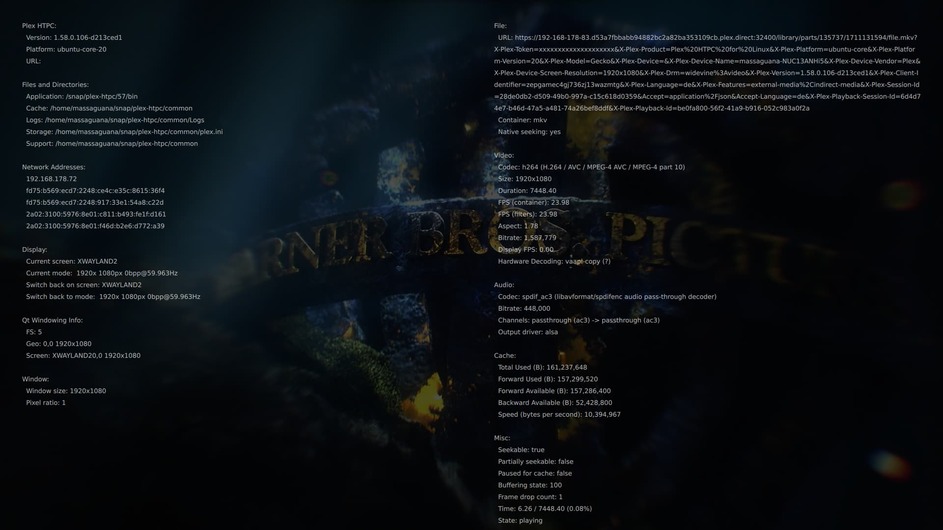
Hardwaredecoding “?”

vaapi-copy means you have hardware decoding of video but no interop by which the decoded video can be used in the GL context. You should see Testing Linux EGL for info on getting the vaapi-egl interop working which has major performance implications.

I have test this Linux EGL with the parameter " QT_XCB_GL_INTEGRATION=xcb_egl snap run plex-htpc"… but i see still vaapi-copy

QT_XCB_GL_INTEGRATION=xcb_egl snap run plex-htpc
MESA: warning: Driver does not support the 0xa7a0 PCI ID.
libEGL warning: DRI2: failed to create dri screen
qt.scenegraph.general: Using QRhi with backend OpenGL
Graphics API debug/validation layers: 0
QRhi profiling and debug markers: 0
Shader/pipeline cache collection: 0
qt.scenegraph.general: Using QRhi with backend OpenGL
Graphics API debug/validation layers: 0
QRhi profiling and debug markers: 0
Shader/pipeline cache collection: 0
Cannot load libcuda.so.1
[5585:5592:0404/174408.392585:ERROR:command_buffer_proxy_impl.cc(140)] ContextResult::kTransientFailure: Failed to send GpuChannelMsg_CreateCommandBuffer.
[5509:5580:0404/174408.578626:ERROR:context_group.cc(146)] ContextResult::kFatalFailure: WebGL1 blocklisted
[5509:5580:0404/174408.585939:ERROR:context_group.cc(146)] ContextResult::kFatalFailure: WebGL1 blocklisted
qt.scenegraph.general: Using QRhi with backend OpenGL
Graphics API debug/validation layers: 0
QRhi profiling and debug markers: 0
Shader/pipeline cache collection: 0

You may need to disable wayland as mentioned in that thread. Though likely the key line is libEGL warning: DRI2: failed to create dri screen.

Okay, Wayland are now disabled…

The result:

QT_XCB_GL_INTEGRATION=xcb_egl snap run plex-htpc
MESA: warning: Driver does not support the 0xa7a0 PCI ID.
libEGL warning: DRI2: failed to create dri screen
MESA: warning: Driver does not support the 0xa7a0 PCI ID.
libEGL warning: DRI2: failed to create dri screen
qt.scenegraph.general: Using QRhi with backend OpenGL
Graphics API debug/validation layers: 0
QRhi profiling and debug markers: 0
Shader/pipeline cache collection: 0
qt.scenegraph.general: Using QRhi with backend OpenGL
Graphics API debug/validation layers: 0
QRhi profiling and debug markers: 0
Shader/pipeline cache collection: 0
Cannot load libcuda.so.1
[4013:4083:0405/180545.120164:ERROR:context_group.cc(146)] ContextResult::kFatalFailure: WebGL1 blocklisted
[4013:4083:0405/180545.131894:ERROR:context_group.cc(146)] ContextResult::kFatalFailure: WebGL1 blocklisted
qt.scenegraph.general: Using QRhi with backend OpenGL
Graphics API debug/validation layers: 0
QRhi profiling and debug markers: 0
Shader/pipeline cache collection: 0

It is interesting that the described problems occur regardless of whether I have activated hardware decoing or not

Is Windows 10/ 11 perhaps better for an Intel NUC?

It highly depends on your needs and on how old the NUC is.

With Windows, you also get HDR passthrough but Windows is more demanding on the hardware. On slower hardware I would recommend sticking with Windows 10 - it works and has a smaller footprint compared to Windows 11. Something like AtlasOS can lower the system usage further.

Linux can be customized as you need it. I used an arch install when Plex Media Player was a thing. It was an extremely striped-down install featuring the drivers, ALSA, openbox, xorg, and Plex Media Player - with autologin and auto start of PMP. Worked wonderfully. No wayland, pulseaudio bs - just the things installed needed for it to work properly. Such an installation could be an option, as it also works with Plex HTPC - the downside is the “complex” setup process and dedication for only one service. (in case you do an autostart upon login)

i use an Intel NUC 13 with an i5 CPU and 16 GB RAM. Powerful enough for Windows. i use only 1080p… i have no 4k TV in the moment

My NUC is an HTPC only… Autologin… i miss Rasplex

I think the Linux problem are good working drivers

Linux drivers should be fine for your NUC.

As you only use 1080p media, a custom Linux install should be perfect.

The interesting question is why it works at times, then again the error occurs with every episode

That’s the question. Maybe the aforementioned driver issue + some weirdness with wayland/xwayland might cause this.

Last week i have start an Test With Kodi an PKC to see how Kodi works on this Intel NUC.

Now 4 Days of using Kodi, this issue don´t happens… it looks like this issue is an Plex-HTPC issue…

But, i think the usability of Plex is better
