Server Version#: 1.23.5.4862
Player Version#: 3.13.21 (on TV i guess)
hello there
i have finally a optical fiber conexion since 2 days (1Gbps, cable ethernet cat6) and i use plex since years… i wanted to play 4K movies i downloaded on my TV panasonic 4K 50EX700 from my PC… but i have buffering and stuttering issues
ok i check on google, i follow instructions for “fix” that and i buy plex pass for the options “hardware acceleration” and… nothing changed
so im a little bit disapointed for loosing my money for nothing… if someone can help me,i will appreciate
Not exactly sure what google guide you’re referring to.
Have you already verified what’s the issue with that buffering?
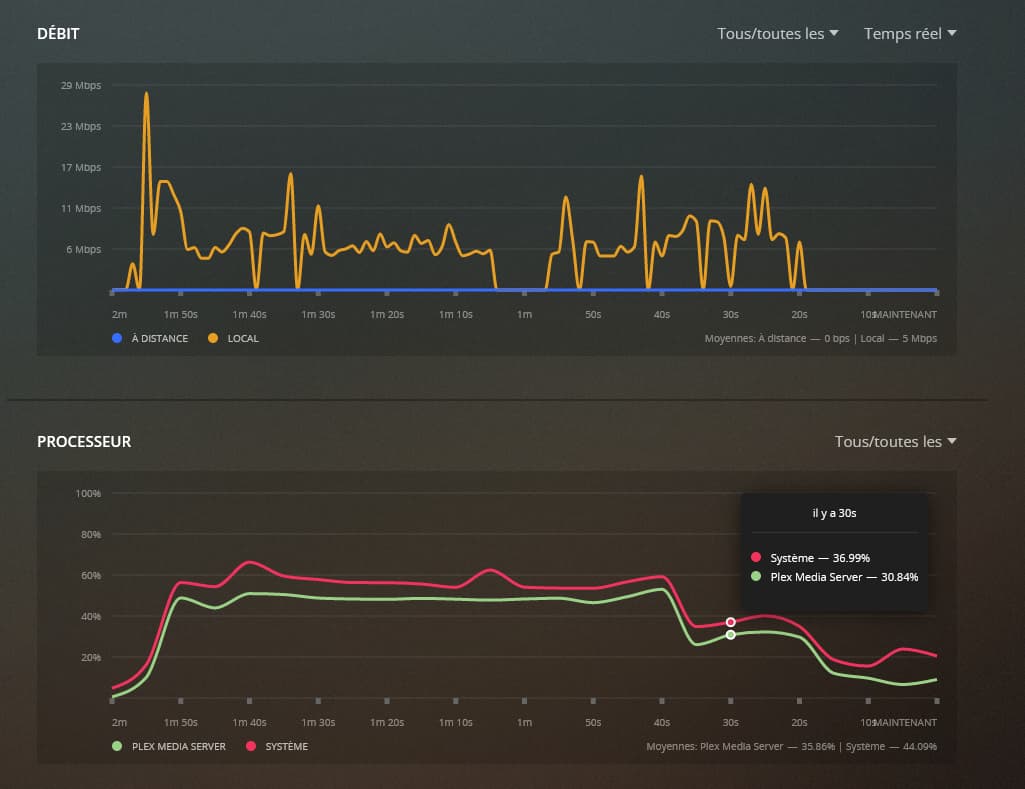
You can e.g. use the “now playing” section on the server dashboard to identify if this is due to transcoding. With huge 4K files, the bandwidth available through the LAN port of a tv can be a limiting factor… the player can technically deal with the 4K file but it doesn’t have enough bandwidth to keep up with the full 4K bitrate (many TVs still come with a 100 Mbps LAN port while 4K videos can easily exceed that).
The “now playing” section should also show if the video is transcoded with your (i)GPU. Keep in mind there’s limits to that… hw-accelerated transcoding cannot deal with burning in subtitles (that part still relies on your CPU – depending on what platform you run your server, burning subtitles into a 4K file can be too much for that CPU); hw-accelerated transcoding will not work with all Hardware – if your Plex is running on a NAS using an ARM chip, you’ll be out of luck.
i followed the guide you linked I was going to link you the same thing
im not an english speaker so i didnt undestand all what you said
" Have you already verified what’s the issue with that buffering?"
well, if i dont know what its the problem i cant verify the origin ^^
i have no problem with 4K on my PC, i have a 1Gbps conexion, i activated “hardaware acceleration”, so i dont get the problem
could it be an issue with h265 codec on my TV ?? although it seems to me to have already watched movies in 1080p h265
your picture does not correspond to anything that I have in my interface and the “now playing” I do not have that on my TV either
and now i have a new problem, i have “plex transcoder.exe” in my processus who use 25% CPU in idle (WTF) and it wasn’t before… not only did what I did this afternoon not solve my problem but it added a new one that I did not have, great
i just noticed it when i played a game and i had lags, and then i saw this plex processus who using CPU for nothing
im totally lost lol
sorry to be a noob and for my bad english

 I was going to link you the same thing