Hi pbenzschawel
I have the same problem. Also Ubuntu 18.10. Also Plex Media Player 2.20 is the last version working. But I could not make it work with the commands you proposed.
I would appreciate if anybody more knowledgeable with appimages than me cold advise what I can do to help solving this.
best regards, Jörg
Sorry if it’s a stupid question, but did you run the command in the directory PMP is in?
Hi,
I thought I did, but maybe I was in another directory when trying without noticing. I tried again, and it starts now.
What it does not do is creating a new desktop integration. I did clean the old one first.
Also, it writes the following error every few seconds in the terminal:
ERROR: ld.so: object ‘’/usr//libstdc++.so.6’’ from LD_PRELOAD cannot be preloaded (cannot open shared object file): ignored.
best regards, Jörg
Hi,
Thank you for this super work. Application runs perfectly under ubuntu 18. The only issue I am having is when application crashes without further information and this when I try to watch a movie in it’s original quality which is above 12Mbps. So to summarize, if I configure the app in the video parameter to limit to 12 Mbps, I have no problem at all. If I try to put original as the the video quality or anything above 12 Mbps, there is a small buffering and then a application crash.
Any idea on what needs to be changed.
My configuration:
- Ubuntu 18.06 LTS
- Latest Plex Media Server in a container locally
- Libraries are located on my Google Drive
Thank you for your feedback.
Sined
What’s the command to get pmp to start from commands line? I’ve tried plex media player but get a fatal error. I only as cause I’ve lost my Logitech dongle for my keyboard. And I can send commands to pc from my phone then use the remote
I am running PMP version 2.20 on Ubuntu 18.04. Sound does not work unless I select passthrough. Any time PMP decodes the media and sends PCM to my receiver the sound does not work. I have confirmed that PCM works fine with other players such as VLC and totem. I am happy using passthrough when I can, but some of my media only has AAC audio for which passthrough is not an option. I am also not able to get sound when playing music with PMP. Any thoughts?
Plex Media Player 2.24.0.924-63fcaa8e released.
AppImage and Flatpak pacakges are done and ready for download.
PMP crashes more and more often, latest from flatpak:
[52:52:1215/091908.703934:FATAL:PaintLayer.cpp(2629)] Check failed: isAllowedToQueryCompositingState().
#0 0x7f7dfe6b0d9f <unknown>
#1 0x7f7dfe6e5bab <unknown>
#2 0x7f7e02fadcdb <unknown>
#3 0x7f7e02bb7083 <unknown>
#4 0x7f7e0266960e <unknown>
#5 0x7f7dfc5b2e1d <unknown>
#6 0x7f7dfc5b3a43 <unknown>
#7 0x7f7dfc5b3898 <unknown>
#8 0x7f7e01f61e1c <unknown>
#9 0x7f7e03baab60 <unknown>
#10 0x7f7e01d9ea55 <unknown>
#11 0x7f7e03baab02 <unknown>
#12 0x7f7e01da2b29 <unknown>
#13 0x7f7dfff2fef3 <unknown>
#14 0x7f7dfff38d20 <unknown>
#15 0x7f7dfff37d66 <unknown>
#16 0x7f7dfff35520 <unknown>
#17 0x7f7dfff33eb4 <unknown>
#18 0x7f7dfe8098a9 <unknown>
#19 0x7f7dfe8b0bfa <unknown>
#20 0x7f7e025eefcd <unknown>
#21 0x7f7e025ef85f <unknown>
#22 0x7f7dfe8098a9 <unknown>
#23 0x7f7dfe8b0bfa <unknown>
#24 0x7f7dfe708232 <unknown>
#25 0x7f7dfe708390 <unknown>
#26 0x7f7dfe708863 <unknown>
#27 0x7f7dfe7254c6 <unknown>
#28 0x7f7dfe707e2f <unknown>
#29 0x7f7dfe79f594 <unknown>
#30 0x7f7e01fbf7c4 <unknown>
#31 0x7f7dfe60d56e <unknown>
#32 0x7f7dfe60d82d <unknown>
#33 0x7f7dfe60ea21 <unknown>
#34 0x7f7dfe5fe351 <unknown>
#35 0x7f7dfc59aae3 QtWebEngine::processMain()
#36 0x000000400c75 <unknown>
#37 0x0035a1c20291 <unknown>
#38 0x000000400aaa <unknown>

Received signal 6
#0 0x7f7dfe6b0d9f <unknown>
#1 0x7f7dfe6afc3b <unknown>
#2 0x0035a24117c0 <unknown>
#3 0x0035a1c32f8f <unknown>
#4 0x0035a1c343ba <unknown>
#5 0x7f7dfe6aecdd <unknown>
#6 0x7f7dfe6aecf6 <unknown>
#7 0x7f7dfe6e5f04 <unknown>
#8 0x7f7e02fadcdb <unknown>
#9 0x7f7e02bb7083 <unknown>
#10 0x7f7e0266960e <unknown>
#11 0x7f7dfc5b2e1d <unknown>
#12 0x7f7dfc5b3a43 <unknown>
#13 0x7f7dfc5b3898 <unknown>
#14 0x7f7e01f61e1c <unknown>
#15 0x7f7e03baab60 <unknown>
#16 0x7f7e01d9ea55 <unknown>
#17 0x7f7e03baab02 <unknown>
#18 0x7f7e01da2b29 <unknown>
#19 0x7f7dfff2fef3 <unknown>
#20 0x7f7dfff38d20 <unknown>
#21 0x7f7dfff37d66 <unknown>
#22 0x7f7dfff35520 <unknown>
#23 0x7f7dfff33eb4 <unknown>
#24 0x7f7dfe8098a9 <unknown>
#25 0x7f7dfe8b0bfa <unknown>
#26 0x7f7e025eefcd <unknown>
#27 0x7f7e025ef85f <unknown>
#28 0x7f7dfe8098a9 <unknown>
#29 0x7f7dfe8b0bfa <unknown>
#30 0x7f7dfe708232 <unknown>
#31 0x7f7dfe708390 <unknown>
#32 0x7f7dfe708863 <unknown>
#33 0x7f7dfe7254c6 <unknown>
#34 0x7f7dfe707e2f <unknown>
#35 0x7f7dfe79f594 <unknown>
#36 0x7f7e01fbf7c4 <unknown>
#37 0x7f7dfe60d56e <unknown>
#38 0x7f7dfe60d82d <unknown>
#39 0x7f7dfe60ea21 <unknown>
#40 0x7f7dfe5fe351 <unknown>
#41 0x7f7dfc59aae3 QtWebEngine::processMain()
#42 0x000000400c75 <unknown>
#43 0x0035a1c20291 <unknown>
#44 0x000000400aaa <unknown>
  r8: 0000000000000000  r9: 00007ffde2cbbce0 r10: 0000000000000008 r11: 0000000000000246
 r12: 00000000000004dc r13: 0000000000000000 r14: 00007f7e0abd8a40 r15: 0000000000000000
  di: 0000000000000002  si: 00007ffde2cbbce0  bp: 00007ffde2cbbf20  bx: 0000000000000006
  dx: 0000000000000000  ax: 0000000000000000  cx: 00000035a1c32f8f  sp: 00007ffde2cbbd58
  ip: 00000035a1c32f8f efl: 0000000000000246 cgf: 002b000000000033 erf: 0000000000000000
 trp: 0000000000000000 msk: 0000000000000000 cr2: 0000000000000000
[end of stack trace]
When playing a video with PMP 2.24:
plexmediaplayer: ../ta/ta.c:335: ta_dbg_check_header: Assertion `h->canary == CANARY' failed.
keitho15 what is the difference between Version 3.77.2 found when you click settings and the number you post? i use the appimage. thanks
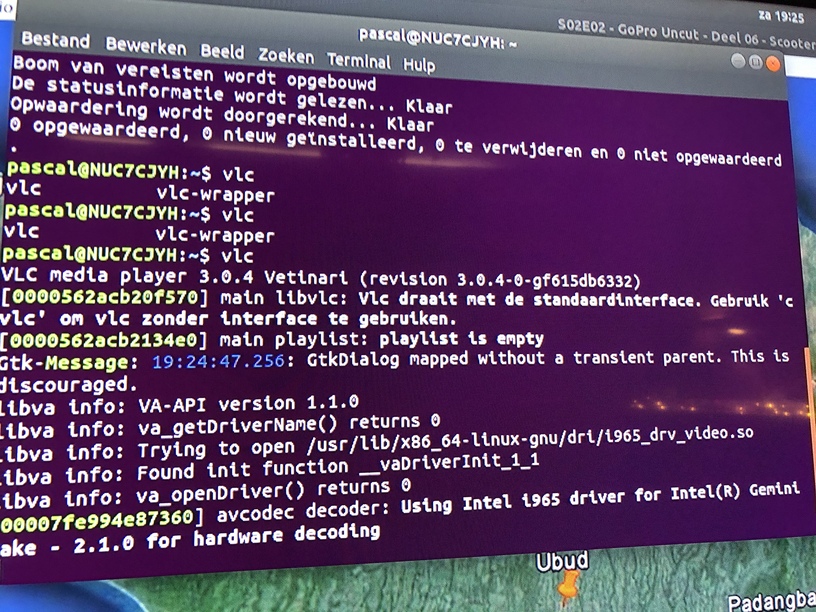
Tried the flatpak and it was even worse. There is just no video acceleration for Plex Media Player under Ubuntu 18.04 on a NUC7CJYH. VLC works fine with acceleration so the OS works. If you have any idea how to redirect PMP to use the HW acceleration…
Thanks for this. Can you tell me which branch on git you use for your nightly builds? I’ve been building from the master branch, would like to try the nightlies, cant seem to figure out which branch to use.
Thanks
Daily builds are using master branch. Release builds are using tags for checkout.
Please tell me which hardware acceleration is VLC using on your machine.
AppImage supports VA-API, VDPAU and CUDA.
Flatpak has VA-API and VDPAU only.
Will use Qt 5.11 in daily build to see if this helps with flickering on 4k screens.
Great! Tried the 20181220 but it was still on Qt 5.9. Also did you change something regarding fonts or subtitles? The AppImage version always crashes for me when playing up media with subtitles, last line printed in log is " sub/ass: Setting up fonts…"
Patrik, try this build
https://knapsu.eu/data/plex/Plex_Media_Player_20181222_4054a14f_qt5.11_x64.AppImage
Uses Qt 5.11.3
Thank you!
I eagerly tested it but sadly it didn’t change the behavior 
Any way to test the other approaches “providing it more surface memory, and/or restricting the size of the surfaces created.” as mentioned in PMP on Linux in 4K has a lot of flickering · Issue #819 · plexinc/plex-media-player · GitHub
Thanks for awesome work!
That’s unfortunate 
I don’t know how to provide more surface memory. This is more of a code thing, not packaging.
I also does not have such equipment to test it on my own. I would suggest to compile it yourself on your system and see the results / experiment. Sorry.