While investigating this, I stumbled onto a precursor which I had to run down.
The issue I found and isolated is Plex/web.
Specifically, if you change resolution/quality after playback starts (it was already transcoding), it will go blank and not continue at the selected resolution/quality.
I submitted that on Sunday. We reviewed on Monday and quickly determined Plex/web was failing to handle the change correctly. We dispatched it to that team to fix. (high priority as it impacts all platforms)
I’m just getting back onto this issue now.
If you’d join us there, with current screenshots of the failure and the logs which capture that failure, I’d greatly appreciate it (all effort into a currently active thread)
@ChuckPa I want to make sure I understand your last post. Are you saying the issue you found that is causing the behavior you mentioned in Plex web is also causing this issue? I primarily use Roku players, but I also see this pixelated behavior exhibited on my Samsung TV’s native Plex player as well (so multiple players). If needed, I can test on FireTV and AppleTV as well to confirm.
I found a problem in Plex/web which prevents resolution/quality switching after playback has started.
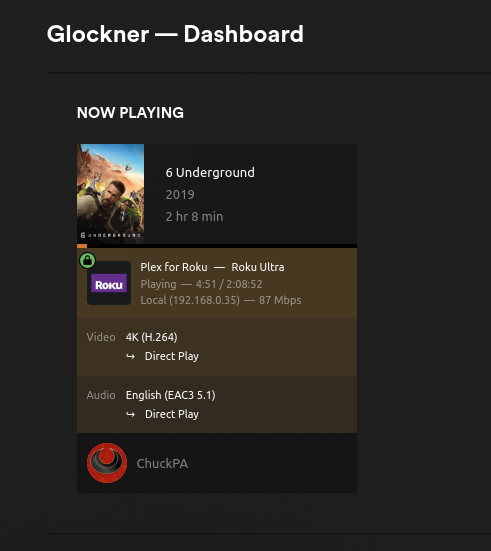
Regarding the Roku players, I experience no such pixelated behavior as shown below (picture of playback from my Roku Ultra - 4800x
When you say “pixelated”, the first thing that comes to mind is the playback quality setting in the Roku app . Remember, in Plex, the players set the quality – not the server. The servers can only limit bandwidth utilization.
@ChuckPa I appreciate you testing this. The pixelation only appears when playing Live TV, not static media (which I believe you were doing). It does this on all players, not just Roku. Also, you must be transcoding. Direct Play and Direct stream will not show pixelation. This is definitely a transcoder issue as reverting the version of Plex Server before the introduction of the new transcoder removes the pixelation.
To be clear:
Static media (like a movie or tv episode) + direct play/direct stream/transcoding = clear picture
Live TV + direct play/direct stream = clear picture
Indeed, these seem like two separate issues. The problem occurs only with LiveTV when installing 1.30 and above. I have had to stay on 1.29 since November-ish, which is the only known workaround for this issue.
This preview has long been over, so I’m closing out this thread. If you have transcoding issues with current Plex Media Server, please create separate topics.
When reporting issues, make sure to provide server logs and a sample file that reproduces the issue. Reports that do not include logs and samples cannot be reproduced and are not actionable.