Hello, I am using Plex for many years now, and suddenly, without me changing anything (at least not that I am aware of) the “Plex Media Server” does not launch anymore. The icon appears briefly at the top of the screen of my computer, but then disappear and nothing happens.
I have deleted all the apps in my compu, downloaded again the plex media derver, unlogg and relogg into my account in the web browser but nothing is working. If someone can help me please I would be grateful.
If the Plex Media Server won’t start and doesn’t even get to the stage where it’ll be writing to the server logs, you can attempt the following procedure to see if there’s any error messages on the OS level:
- Open Finder and navigate to
/Applications - Select
Show Contentfrom the context menu of thePlex Media Server.appitem - Navigate to
Contents/MacOS - Open the
Terminalapp - Drag the
Plex Media Serverexecutable from the Finder window (#3) into the Terminal Window and pressReturnto execute it
This is no different from running the app, so it won’t succeed – but you should get a more specific error message about what’s causing it to fail starting.
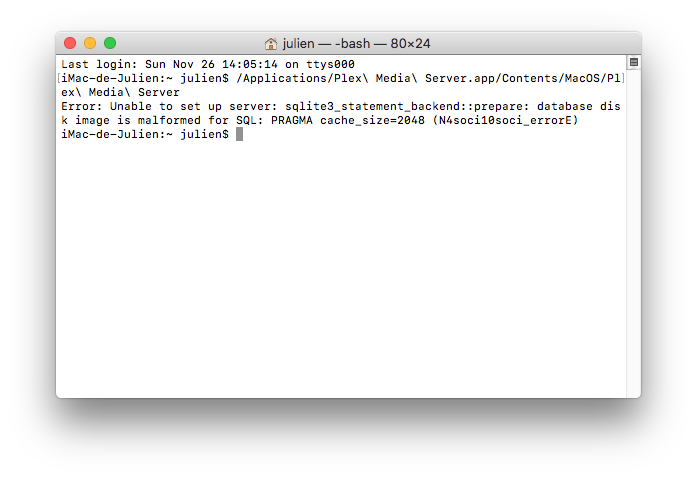
https://support.plex.tv/articles/repair-a-corrupted-database/
Edit: there’s also a script to help with a range of database problems
I am finding different issues to follow the instructions. First thing, I am not sure to understand what I am supposed to do, because they say I can simply delete the database:
" You can also simply delete the com.plexapp.plugins.library.db database file while the Plex Media Server is not running. Restarting the server will then restore your server to a nearly-fresh install state."
but the issue is that I can’t find it, it’s not here in my librairy I don’t have any database showing at the emplacement it should be.
Then I don’t understand at all anything with the PlexSQLite but I tried to follow anyway the instructions, they say : " The following commands are run in the Command Prompt application." But I only know the application “Terminal” to enter things like that, I tried to search for the “command prompt” thing and I cannot find anything alike. In any case, they say
“You may need to substitute [PLEX APPDATA PATH] with the appropriate location for your platform” but again when I go to the folder I can’t find anything in the location they tell me to go.
Thank you for trying to help by the way I really want this to be repaired 
The article describes you can delete the old/original database file if you want to start fresh or have a working backup from Plex scheduled maintenance tasks.
The SQLite tool is used to analyze the database ant to attempt repairing it. The macOS Terminal app is a „command prompt“. The SQLite executable is located inside the Plex Media Server app bundle (right-click the app and use the Show Content menu — loosely translated). You can drag it in the Terminal to obtain the full path (or type the command manually.
Database location:
- open Finder
- click the Go To > Directory menu
- enter ~/Library/Application Support/Plex Media Server/Plug-in Support/Databases/
- Finder will show the folder (user’s library folder is usually hidden)
Since the explanations for the repairing of the database were not clear to me, I managed to delete the librairy so now I am making all over again from stcratch to use Plex (crying).
What can I do to prevent this in the futur ? It seems I can make a copy of the librairy ? But which one ? I have a lot of things inside my folder O_O.
(Please can you be precise and specific in your answer ? Each time I take so much time to figure out what you say (for instance this
“1. open Finder
2. click the Go To > Directory menu”
It took me a long time to figure it out what I had to do, I’m telling you this so you can see my level of comprehension).
This is what I have in my finder now

