Thanks Luke. You know something, I DO have screen sharing turned on, part of the OS, and I’ll go in and shut all my network sharing checkboxes off and see what happens. Thanks!!! I’ll give it a try, if not I’ll try to figure out how to get a hold of plex since they don’t have any real support. I’d pay for Plex support if they had it.
More the better, not only thinking in rough numbers, 8gb in M1 processors, shows a high swap to hard disk, and for some people this is a huge concern, in the longevity of the internal SSD
I’ve seen the articles about it too, and was worried about it, but I guess that because of modern SSD speeds most modern operating systems utilize swap. And that the technology in the SSDs has improved so much since that old original worry about swap prematurely wearing out the drive is based on old technology in the SSDs. Not to mention the fail rate (TBW) is very conservative and should probably last at least twice that, and maybe even up to 4x that published limit.
Here’s where I got this new info but there’s plenty more articles out there supporting this too.
That being said, I still do think 16GB would be better on the swap issue, not to mention the power gains from it. Plus it’s not upgradable down the road like the Mac Pro is, so get as much future proofing in now as you can afford. @Chef83
Anyone else having stutter issues running on the M1? Ever since I migrated from my Windows server, my videos have not been playing smooth. It’s not just movies/shows on my hdd, live tv via HDHomerun has a stutter.
Do you have hardware acceleration turned on?
Yes, I have it turned on
As a decade+ Plex subscriber and Mac Mini user—I’ve contributed my fair share to the continued development of Plex. While Mac-based PMS users may not see the majority of use, I suspect we rate higher on the list for monetary support.
Anyone who uses a Mac for PMS and doesn’t subscribe to monthly or yearly plans should do so ASAP. Plex has long provided us with a fantastic solution for personal media consumption and deserves our support for continued development.
Of course this means Mac users should see a native M1 version of Plex Media Server sooner than later.
As we take care of Plex, so should Plex take care of us!
8 Likes
Lifetime Plex Pass user here and well worth it!
2 Likes
Every few days the Plex Server app locks up on my M1. Have to quit and re-launch, but other than that it’s been fine. Hoping for a native version soon, and hopefully we get to see some solid performance gains!
I asked Plex for an ETA on the Apple Silicon version of the server and got a quite curt reply, however, this thread just shows how important it is.
People are spending large sums of money on M1 machines because of the insane performance/price ratio it’s showing, all while emulating Intel code !!!
I can only imagine that the combination of the ARM CPU, Apple’s dedicated H264/265 hardware and the Metal library will make the M1 the Plex platform of choice.
Hurry up Plex !!!
4 Likes
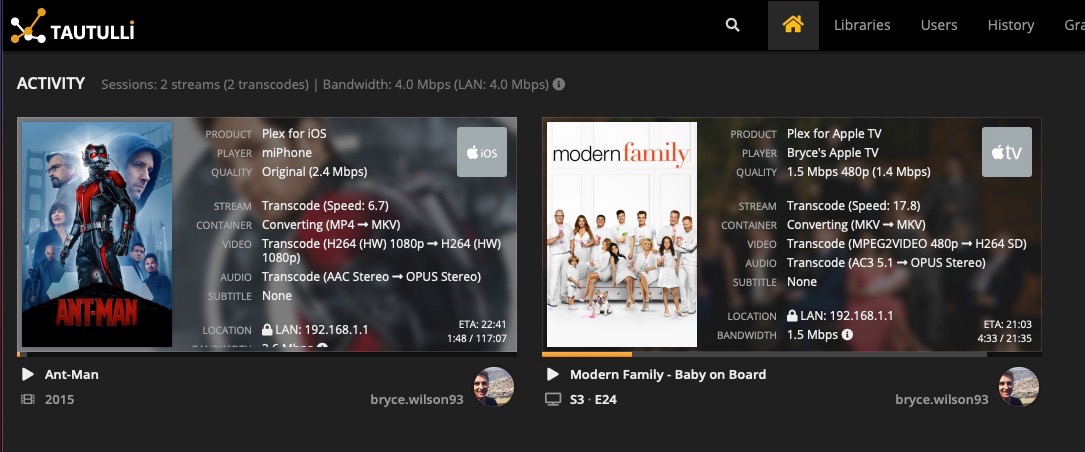
Do you know if there is still the limitation for a single encoding using m1?
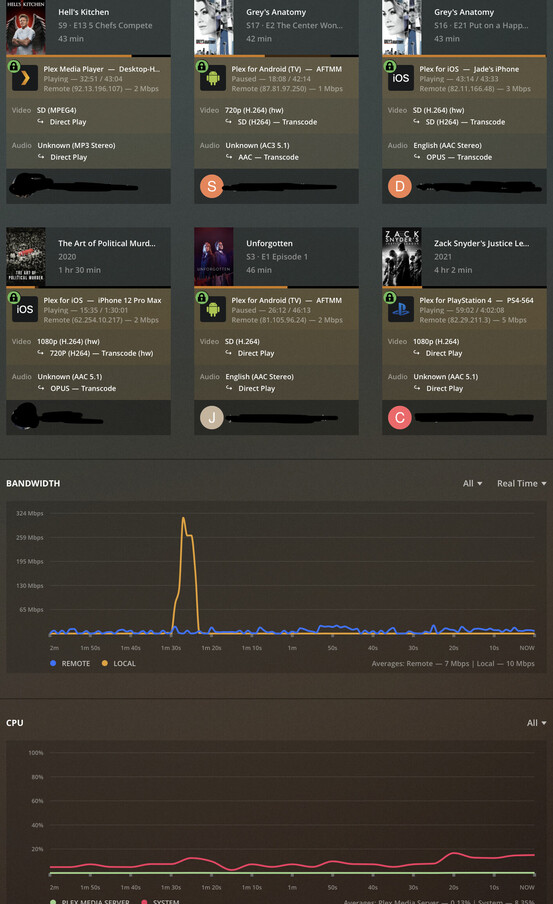
No limit as far as I am aware. I have had 9 transcodes on my M1 and was running at around 40% usage.
1 Like
1 Like

is PMS locking up or going down?
see my comment here - Plex Media Server Crashing on Mac Mini M1 - #4 by ColoradoSTi
TL;DR - you may have folks attempting to hack or at least scan your server. Since i beefed up my internet security, PMS has crashed one time in two months instead of every other day.
Hi everyone! I ordered a new MacMini M1 and will be replacing an older 2009 Mac mini. I use the MacMini as a dedicated PMS and I use it to run my home automation so pretty excited to get a much better machine.
I currently have a couple of Drobo DAS hooked up via Firewire 400 and looking to change out for a NAS. Since I am going to use a MacMini as the PMS, does it matter which NAS I should get? I have everything hardwired with Cat6e. I also have a dedicated Media room and was told to get a Nvidia Shield Pro to stream 4K so I can get Atmos etc.
Any suggestions or recommendations for a good NAS? was looking to save cash and get a Synology DS1817+ or something if it will be good enough for 4K using the MacMini.
lastly, all my other streaming devices throughout the house are AppleTV’s and FireTV’s
Was just checking this thread to see if there was an update on M1 support.
the DS1817+ is fine. I use a QNAP 451+ and have no issues with just a gigabit LAN port.
1 Like
I have used a DS1815+ for years with Plex on my old Quad Core Mac mini - no issues.
I managed to get my hands on a DS1819+ and upgraded to that and it also works great.
If you are looking to buy a NAS you should think about getting on that you can run Plex on natively. I set up a friend with a DS1815+ and installed Plex Server on it and it runs great.
However, they don’t transcode a lot of stuff, that is where the Synology falls down, there is a Gogole Doc that has list all major NAS and there compatibility with Plex https://docs.google.com/spreadsheets/d/1MfYoJkiwSqCXg8cm5-Ac4oOLPRtCkgUxU0jdj3tmMPc
QNAP might be a better choice if you want to go this route.
I will add, that I am just waiting for Plex to run natively and then I will buy a new M1 Mac mini. So while I advise to run it on your NAS - I don’t!!!
1 Like
May I ask how m1 mini perform? Is It capable of HDR tone mapping? How many simultaneous transcoded streams?
Yes it is capable of HDR tonemappjng, but it is software transcoding only. (The chip is very powerful so it should be fine but eventually I’m sure it will become hardware accelerated).
As far as transcodes goes, you’ll have to be more specific. What are you starting with and what are you trying to end with? Bit rates, 4K vs 1080, HDR, etc.
