Yeah, that was fine be as long as I didn’t allow the Mac to sleep.
Why do you allow it to sleep if its a server? Not judging but sleep mode for a server is kind of counter productive, unless you’re trying to go green or something.
It’s more of a workhorse for photography, video editing and plex so its use is sporadic but intense. The thing is so fast at coming out of sleep using wake-on-LAN that you don’t really realise that it was asleep.
3 Likes
I had no issues migrating, moved from a 2010 mini to this. I went the 16GB route as my last server lasted 10 years, and hope to get the same out of this. I wish I had waited a few months as the new mini now supports 10GbE as well. PMS runs via Rosetta 2, and it’s flawless. No issues whatsoever. I don’t transcode 4K, and have seen on average 6-8 transcodes almost every night.
1 Like
I don’t get too nuts about 10GB unless you’re entire network is 10GB you’re always going to hit a bottleneck somewhere. Plus if you go back a while in this thread a few have tested 10GB and it made little to no difference so don’t feel to bad.
Well, thanks everyone so far for your input and experiences, this was helpful and saved me from dropping almost the same on an older used Mini. I think I will take the plunge on a new one and get the M1 with 16GB. Going to finish paying a few things off this month and then throw it on my Apple Card for 0%, Ill certainly post pics and my progress so others can learn.
1 Like
You are correct, as to even enjoy the benefits of 10GbE I’d have to run new cables/get new hardware in my condo. Not worth it as of today lol.
1 Like
Ok, another month gone by, and that 12 months anniversary of the M1 release is coming up fast.
Blackmagic were almost out of the door with an Apple Silicon version of Resolve, and that’s a massive application.
Don’t get me wrong, the fact that the performance of the PMS running on the M1 even under emulation is incredible, this tiny machine outperforms my PC running an i9 9900K with 32Gb ram and an Nvidia 1660 Super without breaking a sweat AND IT’S SILENT !!!
Mine is as solid as a rock, never crashes, never falls over, it transcodes 4K HDR to 1080p SDR in multiple streams like a f*cking champ, and this never fails to blow my mind, WHILE EMULATING INTEL CODE.
It can’t be emulating Quicksync and it isn’t touching the Apple GPU, it’s doing ALL of this in software !?!?!
Elan, please, FFS, throw us a bone, show us the future, show us PMS running natively on Apple Silicon, using metal, using the GPU, transcoding 10 4K HDR streams with only 50% CPU/GPU, only consuming 22W and with NO FAN NOISE.
Even if you never release the M1 PMS, this, as it stands, actually nails it anyway.
Peace.
3 Likes
I hear ya. Just got a new OLED TV and grabbing more 4K content too now. Can only imagine how powerful the M1 Mini will be when its native.
Crazy to pay for software that isn’t native yet. Oh well, the wait continues.
Because it’s not.
Plex uses the macOS VideoToolbox functions to decode and encode video when possible. This means those operations are already native and already accelerated on Apple Silicon, Intel/QuickSync, or AMD VCE hardware. (Nvidia NVENC too maybe? I dunno where the Apple vs. Nvidia spat left that.)
3 Likes
Stop it. Please. I’m drooling over here with that imagery
Hi - I have been using a late 2012 iMac with external SSD drive as my Plex Media Server and also running the Channels App. I have it hardwired and get about 950 mb down and 50 mb up. Hardwired it about two weeks and helped with some issues I had streaming Plex. Before hardwiring I was getting Plex server too slow or some type of error like that.
I play mostly 4K and HD movies. If I get a M1 Mac Mini with 16gb of Ram will performance be even better or will the setup I currently have still be ok.
Only may stream one or two stream simultaneously and those are not common. Appreciate the help, just want to make sure I have the best setup possible with the least amount of issues. Thanks!
Hi - I’ve been using a M1 Mac Mini as a Plex server for a few months now, figured I’d share some details and some issues I’m having. I have an 8GB version, running on a symmetrical 100mbps fibre line.
Most of my content is 1080p stuff and the server can transcode that for remote viewing at ease, no issue. Not sure how many simultaneous streams but the 3 or 4 I’ve tried have worked fine.
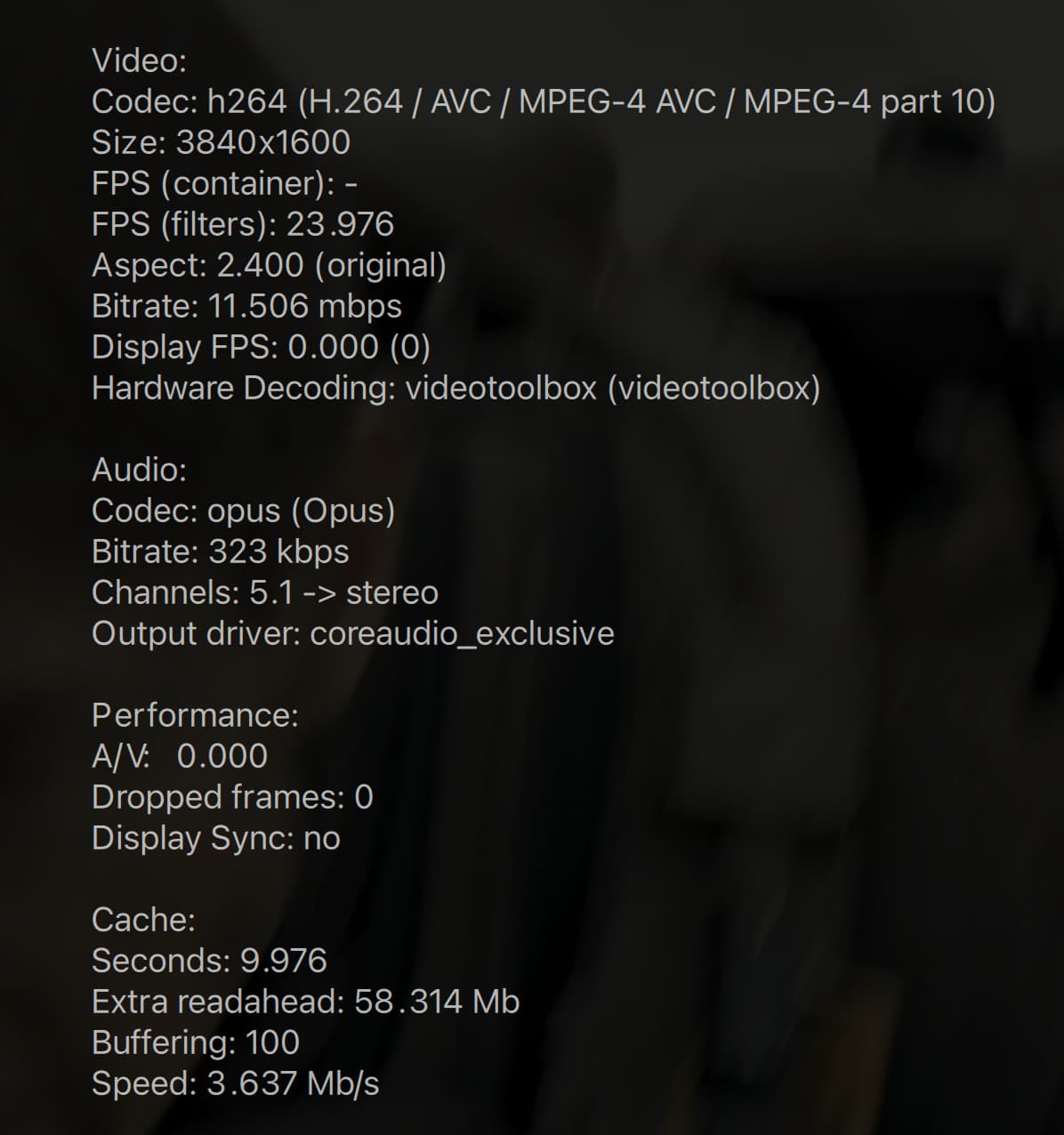
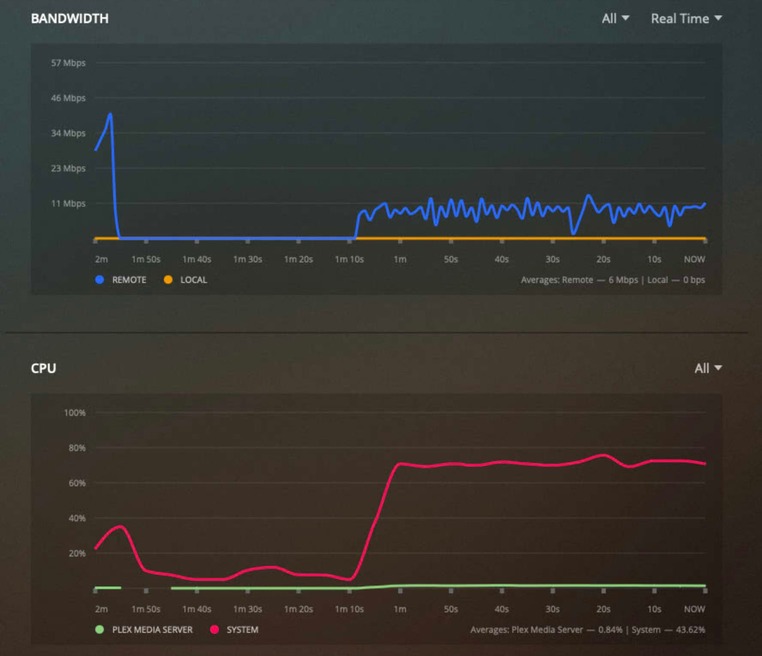
For 4k content though its a much more mixed bag, especially with tone mapping. I’ve got a 4k HDR rip of Edge of Tomorrow that averages (according to Plex) 62 Mbps that without tone mapping uses about 20%-30% of the CPU to transcode to 1080p, while with tone mapping it uses 70%-80% of the CPU and buffers like crazy.
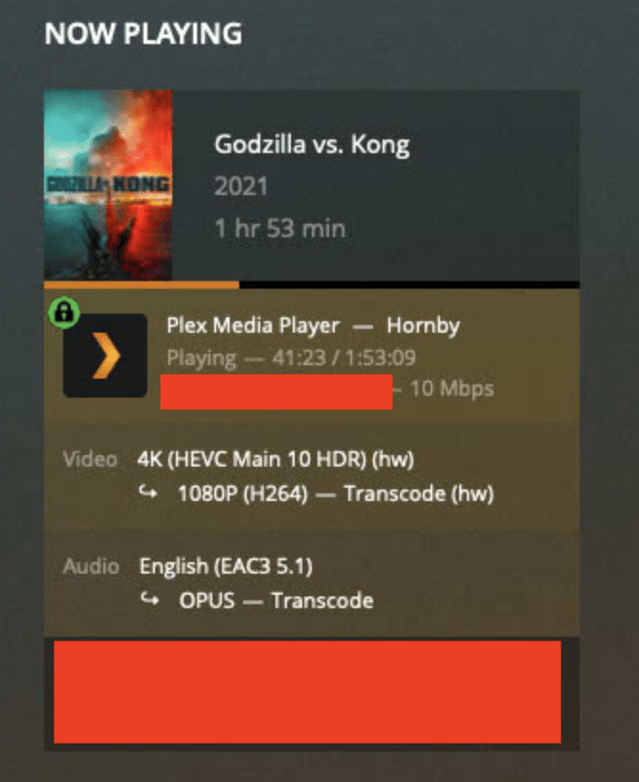
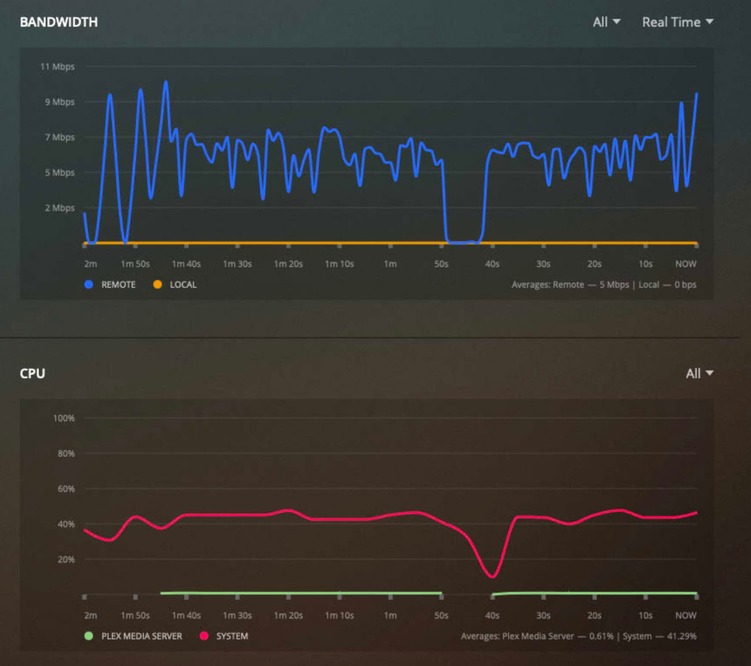
This is an issue that affects other films as well. I’ve done tone mapped transcodes of Godzilla (the new one) to 1080p, limited to 20 mbps or 10 mbps and even then, often enough, the system buffers. These cases are very strange as the CPU usage is in the 40% to 50% range, so there is still plenty of headroom above it.
Its not the internet or anything else, cause if I turn off tone mapping all these buffering issues go away, though then the colours look off.




On the surface, your issue seems to be with how the video is being transcoded and the viewing result. not whether the M1 is using more resources to deal with a 4K video that may need to be run through Handbrake to optimize the bit rate for what device your trying to stream it to.
Because unless you’re sending to a device that the video can be direct streamed, transcoding is always going to be a mixed bag and IMHO it won’t make any difference what computer is doing it.
Apple event on Tuesday Sept 14. I wonder if they will release the new Mac Mini Pro? Plex with rumored M1X support could be amazing!
Is there any news on the Plex Dev’s working on Apple Silicon?
3 Likes
+1 on when we might expect native Plex Media Server on Apple Silicon!
1 Like
Meanwhile, I’ll report that I bought a new M1 Mac Mini and migrated my Plex server and thousands of media files onto it from an old Intel-based (2012-era!) Mini. The new system is ridiculously fast and fun to use directly, but as a Plex server, it’s driving me a bit nuts: Whatever content I watch, I get sporadic buffering “black screen & circle wheel” delays. My connection is wireless and I’m viewing on Plex for Apple TV (also the latest gen unit), a setup that worked flawlessly on my old, slow server.
The M1 server, however, does this consistently across media, every 5-20 minutes, seemingly randomly. Super high def content, low-resolution 720p, it all has the same behavior.
Am I misconfigured on the M1 somehow? Or do we just really desperately need a recompile and release of an M1-native version of Plex server? If the latter, will an update automatically recognize I’m on the M1 architecture and update properly? Thanks!
Hi,
I did very similar - migrated from a 2010 Mac mini (albeit upgraded to 8gb and an internal SSD) to a new M1 Mini. Plex has been running without a hiccup thus far, but there are a couple of differences that I wonder might be relevant.
- Rather than wireless, I’m connected gigabit ethernet directly into a gigabit home network, and the playback devices (Apple TV 4K, Samsung TV) are also wired.
- I keep my media files on external USB-attached drives to avoid wear on the internal SSD.
That all said, I’d still love to see an M1-native version of Plex Server sometime soon. 
Ah, I also have my media on an external 2TB drive, now that you mention it.
Ah ok. That just leaves the networking then (assuming the external drive you’re using is relatively performant!)
What type of wireless network is in play? Do you have the option to try ethernet?
