Plex nfo agent works for me on web but not great on iOS app. The cast information and actor pictures aren’t showing. Although the entire nfo information can be confirmed from the extracted xml file.
That’s because Cast & Crew with the NFO agent doesn’t work on the iOS app (and Android app, Roku app and now also FireTV app). Only the ‘old’ apps.
I use Plezy, it does not have this issue. It should now be available on all platforms that have the ‘New Experience’.
Thanks Tommy. It is helpful. I am considering Strimr as Plezy is not my prior option. Many apps can cover part of requirements but not full. Maybe open-source Strimr will be one promising solution but I am unsure.
1.The summary toggle - I literally have thousands of movies. This is not really doable in the real world. A toggle would be preferred if it’s not too much trouble to implement.
2.Where is the ‘tag’ element meant to show up in Plex? I also have ‘set’ also turned on, I think, and the set still doesn’t transfer to Plex or requires to much detail with the NFO agent.
3.I use https://embermediamanager.org/ for generating NFOs and it goes between both premiered and releasedate- again have hundreds of NFOs like this.
4.The certification answer isn’t that helpful, unfortunately - again, I have thousands of movies like this. Can’t the certification come before the mpaa? or at the very least not be used if the country is set to something other than the US?
thanks for the continued support @drzoidberg33
This feels like a really niche requirement, probably best to create a feature suggestion and see if there are others that also want this functionality.
Generic tags aren’t shown anywhere, it’s not something Plex has ever supported (with the exception of photos).
For the <set> tags to work you need to be running the beta version and enable it in the library, see: Plex NFO Agent Forum Preview - #345 by drzoidberg33
Thank you! I’ll play around with it and see what they might be doing differently and try to fill these gaps.
Yes, we can do this. It was never really needed before as most people only store the content rating they use. I’ll file an issue for this.
So nice to see NFO support finally here ! I haven’t done any extensive testing by any means, but I did come across one minor, niche issue.
@drzoidberg33, regarding Movies NFO specifically
movie.nfo is the generally accepted naming if you have separate folders for each movie file. Using the exact name of the movie file is also supported, e.g. A Movie (2026).nfo
In the scenario where both movie.nfo and A Movie (2026).nfo exist in a movie folder, it seems that the latter is the one being picked by Plex ?
I’m wondering if it would be possible to switch this and give movie.nfo the ‘first slot’?
Reason being, historically, scene releases already contain a nfo file (with gibberish). So maintaining that original structure and just adding a “movie.nfo” will not work as of now, metadata won’t be parsed at all.
Of course, one could run into the issue the other way around having multiple movies in a single folder, each one of them with their individual nfo, and a random movie.nfo thrown in there too for some reason… but that seems even more unusual?
Maybe the better logic would be to try and parse A Movie (2026).nfo first and, if it’s not in the format that Plex is expecting, give movie.nfo a try too instead of giving up?
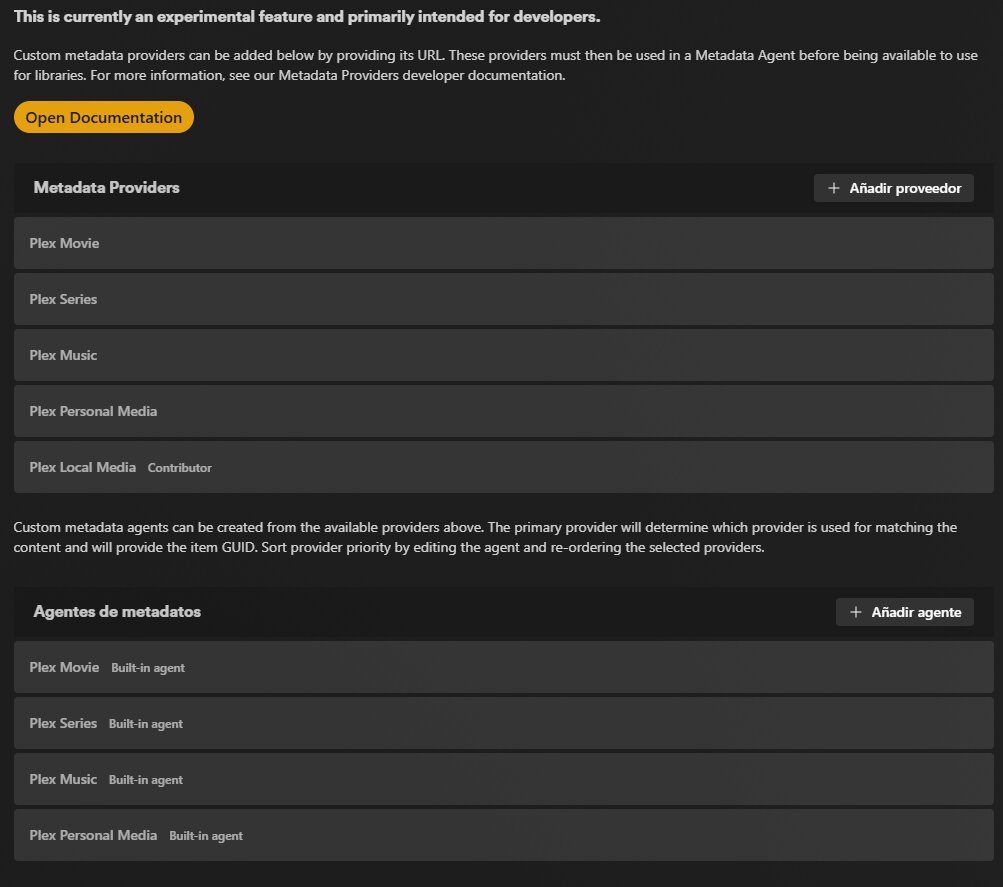
Hello. I’m having a problem with this version because the option to use .NFO files in Metadata Agents isn’t showing up, as you can see in the images.
I’m using Docker Compose with “image: plexinc/pms-docker:latest”
But I can’t get anything to appear. However, on my test server, which runs the same version of Windows and does show the .NFO Metadata Agents.
I’ve been trying to figure this out, but I can’t find a solution. Both servers are running the same version. Is anyone else experiencing something similar?

Try and restart the server again. It seems to take a second restart for them to show up.
Wow! That was it!! How difficult and easy to figure that out at the same time, haha. THANKS!!
A question about the .nfo file that’s generated. I’m looking for an option so that Plex doesn’t search for the MediaInfo directly in the file, but rather extracts it from the .NFO file that’s included with the movie, episode, etc. So far I haven’t been able to, but I’d like to know if it’s possible to make Plex read the MediaInfo from the codecs within the .nfo file and not from the file itself. Thanks!
Plex reads embedded metadata only from MP4/M4V files.
To disable that capability, edit the library → Advanced → deselect Prefer local metadata.
Thanks again for getting back to me about these issues @drzoidberg33
1.No worries with the summary toggle I will follow your suggestion with this.
2.Does that mean that the help file https://support.plex.tv/articles/using-nfo-metadata-files-with-plex/ that mentions tag-marvel-tag shouldn’t be there because it doesn’t correspond to anywhere in Plex? (or make it parse to collections as well possibly?)
3.Confused about the set tag still as I have it set to what you suggested with minimum number but still doesn’t parse. I have attached an NFO that EMM made that doesn’t work for you to look at?
Timecop (1994).2160p24.nfo.txt (11.1 KB)
4.Thanks for fixing the certification issue. Amazing of you!
You just have <set>Favourites</set> it should be this:
<set>
<name>Favourites</name>
</set>
Thanks, that worked! I should be able to change most of these manually, as there aren’t too many movies I have in sets and I added those manually anyways.
TV Credits work very differently to movies too @drzoidberg33 see the attached NFO.
12 Monkeys.S01E01.Splinter.nfo.txt (3.1 KB)
That makes no sense. If the person is an actor, regardless of whether they’re a guest role, should be classified as <actor> - the role can be used to designate whether they’re a guest role.
There is no clean way to handle credits being writers and then randomly also being guest stars.
Can you point to anywhere where the spec for this has been discussed. I can’t think this is very widely used.
I installed the beta from plex.tv/downloads. Thank you for all the work that goes into this. I am having some issues. Some episodes never have the metadata pulled in. I’ve refreshed metadata at the library level and at the show level to no avail. The video with no metadata displaying should be called “Right Wing Media Turns on Trump. The MAGA Civil War” by Josh Johnson. Great comedian, everyone should watch him :). Anyways, maybe I’ve configured something incorrectly?

These youtube videos are downloaded the exact same way using a tool called Pinchflat. Each have an nfo and jpg with the same name.

Looksmaxxing_Is_Making_Men_Miserable (2026-04-22) [__TVfHRhB64].nfo.txt (779 Bytes)
Right_Wing_Media_Turns_on_Trump._The_MAGA_Civil_War (2026-04-15) [v31slqTf9Zw].nfo.txt (794 Bytes)
Here are my agent settings:


Your custom metadata agent must use the NFO provider to read NFOs (or just use the built-in ones).
Plex Personal Media is just if you want it to read the files and their names.
I wish I could. That is what/how EMM scrapes the TVDB database for TV shows only. Seems movies work completely differently. If I come across something, I will definitely let you know.
Is there anyway to have library ‘tag’ fields in the NFOs populate/add to the LABELS field of Plex? @drzoidberg33 so at least they are somewhat useful?
That’s not what labels are meant for.
There is an existing feature request to add generic tag support to video, it hasn’t really got much traction in the 12 years it’s been open: Custom video tags
I can take a look at this one again as it does intersect with NFO support.
