I’ll help you with the naming. Again, no worries.
I clicked “RECOMMENDED” and nothing changed. I clicked on the upper “Movies” library and did the same thing. Nothing changed.
There are now 2 server logs.
Since PMS is now available for download from the Ubuntu App Store, I do need to know if you downloaded from Plex.tv/downloads directory or you downloaded it from Ubuntu. It’s makes a big difference.
Regarding the “Movie” directory naming, it’s easy to fix.
- Hover over the top “Movies” entry on the left.
- Slide the mouse cursor to the right until the ellipsis shows
- Go to “Manage Library”

- Slide over again and “Edit”
Now you can
-
Click on “Folders”. Look at which “Movies” they are.
-
Once it’s clear which ones this Movie library is, Change it’s name here in General
-
Save these changes


In the “Recommended” versus “Library” (top center)
Click Library
Clicking “Library” causes “There are no items in Library” to display.
That tells us the folders containing the media can’t be seen or none were defined.
If you follow the steps to “Edit” the library that I showed above, you should be able to see which folders are defined for your movie library.

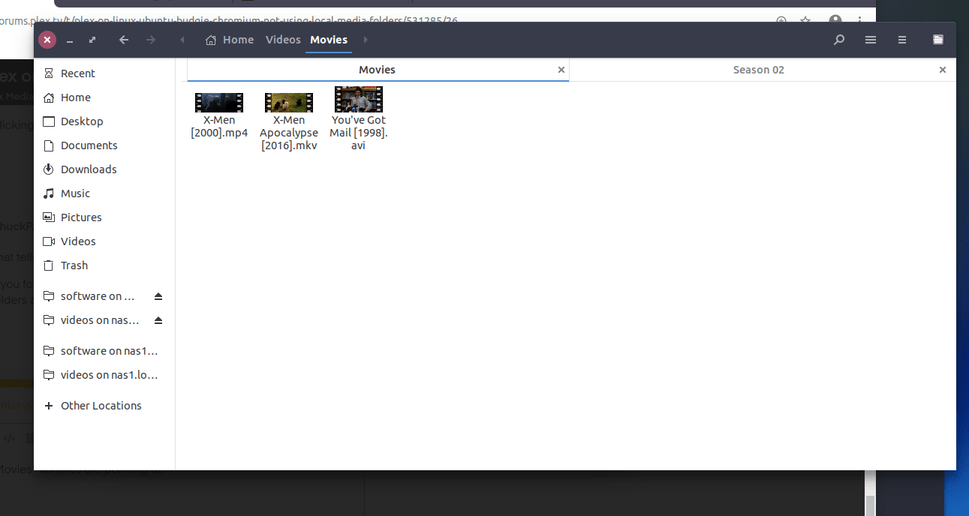

Putting media in your home directory can cause problems.
Let’s walk through this step at a time. Please forgive my pedantic nature here.
- Open a terminal session
ls -l /home/michael/Videos
Copy/paste that text output here in your reply please
I think there is an access permissions problem.
michael@mediaserver11:~$ ls -l /home/michael/Videos
total 8
drwxr-xr-x 2 michael michael 4096 Jan 22 16:16 Movies
drwxr-xr-x 2 michael michael 4096 Jan 22 16:14 ‘TV Shows’
Good. Now please also verify (I don’t want to see . and .. of your /home directory but please verify that /home/michael also has the same permissions as “Videos”
Nothing to forgive. I’ve been in your seat many years ago… Thank you for your patience.
michael@mediaserver11:~ cd /
michael@mediaserver11:/ cd home
michael@mediaserver11:/home$ ls -l
total 4
drwxr-xr-x 16 michael michael 4096 Jan 22 16:27 michael
michael@mediaserver11:/home$
Good. There’s no reason it can’t see the files themselves.
I will assume (please look but no need to post here) that your movies also have the same permissions (the part at the end … where it ends with r-x ). That’s all that PMS needs.
Regarding the names you showed me above, the [ ] brackets should be ( ) parenthesis.
Plex ignores anything in [] . It uses parentheses to indicate the year. It helps with matching .
I could write X-Men (2000) [Some dumb comment here].mp4 and all that PMS will see is X-Men (2000).mp4
Do you have a lot of movies to rename ?
michael@mediaserver11:~/Videos/Movies$ ls -l
total 5289376
-rw------- 1 michael michael 682906492 Feb 22 2018 ‘X-Men [2000].mp4’
-rw------- 1 michael michael 3893484164 Mar 19 2019 ‘X-Men Apocalypse [2016].mkv’
-rw------- 1 michael michael 839913472 Jan 22 2019 ‘You’'‘ve Got Mail [1998].avi’
The forum won’t let me add additional comments!!!
I STILL cannot add additional comments. It is saying I have to wait 21 hours before posting additional comments.
All I can do is edit this last post adding things. I’ve renamed the 3 movie file names, replacing the square brackets with parentheses. I deleted both “Movies” libraries and created one Movie library pointed to /home/michael/Videos/Movies where the 3 renamed movie files reside. I can see the three movie files when I created the library. Plex server still does not see the files. I even restarted the Plex service and no joy.

I suggest the following naming:
X-Men (2000).mp4
X-Men Apolocalypse (2016).mkv
You've Got Mail (1998).avi
Since nothing ever matched in your earlier attempts, I would like to delete the Library sections and start fresh. It’ll give us a solid foundation to move forward on.
ERROR; I edited above. I wish to delete the Library section, not the movie files.
Hey Chuck - The forum prevents me from making more posts for 21 hours, since I’ve never posted before today, I guess. Look above, I tried to reply to you by editing my last post. I guess you didn’t see it.
I created a new user so I can continue working with you and my problem…
I just noticed you go off the clock at 21:00 ET. I guess this will have to wait until tomorrow…
Oh, yeah, there is a limit (to prevent bots spamming) for the first couple days.
If you can do the following it will help.
-
Rename your movie library section names to be “Movies-1” and “Movies-2” . It’ll avoid frustration.
-
Now, if you’re willing, Delete the sections and create one new movie section. See what happens. When it’s done, Pull the logs (Settings - Server - Troubleshooting - Download Logs) and attach that ZIP if it lets you.
