Sent!
Thank you very much for the verbose logging and the wireshark capture.
I am afraid there is nothing in the network traffic to show any heavy Plex Media Server activity .
What I can see is the following
- PMS doing a udp broadcast to ports 32412 and 32414 every 5 seconds (2 being done for each of the ports).
- Between 09:54:27 and 09:54:30 PMS did an SSDP Search every second - so only 4 done in the 90 second period covered by wireshark data. Only responses were from the Philips TV on 10.0.0.196 - but confined to very short period of time between 09:54:27 and 09:54:33
- PMS communicating with pubsub server every 10 seconds. one message in one message out every 10 seconds
This shows the IO during the period for each 100ms period
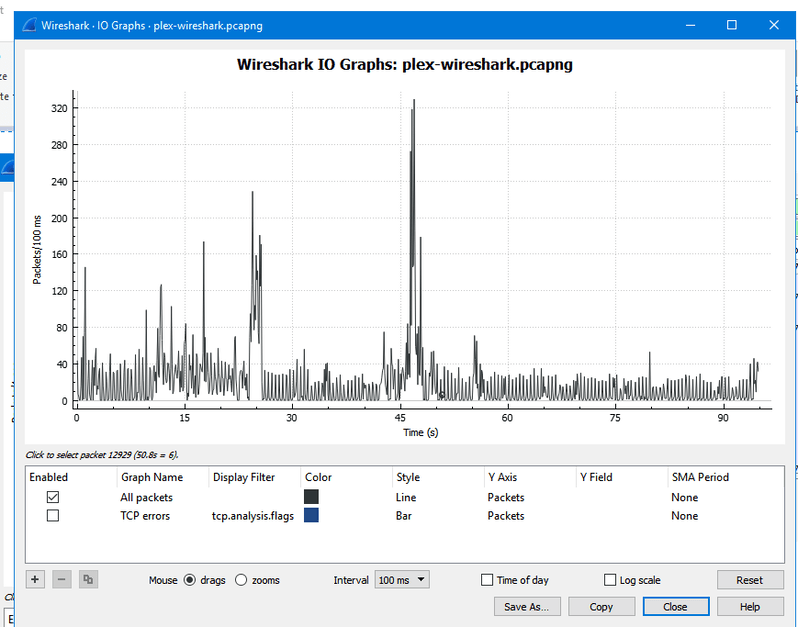
The peak was something i have not seen before a 1-byte packet going to uDP port 8888 (ddi-udp) That was 52 1-byte packets going out at 09:54:15 and 52 1-byte responses back
There was a lot of vnc related traffic for 10.0.0.250 and some iCloud traffic
So nothing in the wireshark that points to heavy Plex Media Server uPnP or any other network activity
If it is definitely a thread looping in Plex media Server so we would need to add process samples - perhaps a few whilst it is at 100% / 90%
https://support.plex.tv/articles/201373203-gather-a-process-dump-or-sample-process/
1 Like
Process samples sent!
1 Like
Thank you very much - one of the threads in the process samples looks very interesting with a massive stack
I have referred the diagnostics now to our development team. Thank you for all your help
2 Likes
This is great news @sa2000, your colleagues who looked at this issue in other threads were adamant there was no thread loop in the PMS processes, contrary to what we were observing on our servers.
If you’d like to see similar diagnostic data from a linux-based system I’d be happy to help. I’m running PMS 1.15.0.659 on a Synology-based system with miniupnpd on an OpenWrt router triggering similar symptoms to what edgar has observered.
Thanks - lets wait and see what the devs make out of the stack frames provided.
1 Like
FYI, this behaviour is still present in 1.15.1.707
…time passes
Still present in 1.15.1.791, too
Also still present in 1.15.1.780 on my Synology 918+ with Asus router (Merlin). Disabling UPNP does not fix it for me… It does sometimes take a few hours to manifest. I thought it was fixed yesterday, but it’s back at 25% CPU (1 full core) this morning…
I found that you have to restart PMS for the CPU usage to go back down after disabling UPnP.
Thanks. I have previously done that that and it still comes back. I’ll try again. I can disable UPnP in the router settings (no SSDP setting). I believe my router is using miniupnpd 2.1 (20181205) based on release notes. Downgrading to 1.14.0.5470 does fix the issue, so perhaps this is all related. There are several threads here as you know.
Update. I loaded 1.15.2.793 and this issue appears to be resolved. UPnP enabled with no CPU usage issues.
Sadly not the case for me. Still getting 100% utilisation of one core as soon as UPnP is turned on. Turn it off again and restart PMS and the CPU usage goes back to normal.
Seeing exactly the same behavior as @gary_parker.
PMS 1.14.1.5488 on macOS 10.13.6.
Amplifi routers running 2.9.5 (upgraded yesterday?).
I was tempted to just leave UPnP disabled, but it is needed for my Sonos speakers to connect. 
Amplifi is one of many commercial router products based on OpenWrt so it’s almost certainly using miniupnpd, which seems to be the common link with these CPU/UPnP issues.
Just installed 1.15.1.791, and PMS is still fully consuming a CPU core. Unfortunately, I can’t seem to get it to stop now. If I shut it down and bring it up w/out UPnP enabled on the router, it does not consume a full CPU core – of course, the remote access is broken at this point. Enabling UPnP on the router causes PMS to spike within 0-5 seconds.
So, I effectively am unable to use it for streaming to my Sonos speakers …
Yes, unfortunately this bug is still present in the current release.
Your best bet until it’s fixed, if you need UPnP, is to downgrade your PMS to 1.14.0.5470 if you can find a copy of that for Mac.
@sa2000 did you ever hear anything back from engineering about this?
Thanks @gary_parker,
Rolling back to 1.14.0.5470 works. I guess I’ll wait for word that the UPnP bug has been fixed before upgrading PMS again.
1 Like
Still not fixed in 1.15.2.793, same behaviour as in all previous versions since 1.14.1.5488
I don’t have an update on this - but the more examples we get from different users the better
So anyone getting the suspected loop, please get me wireshark capture (sent zipped pcap and via Private Message) together with logs and process sample/dump of the Plex Media Server app and cpu usage snapshots to show the times it was high
Please indicate the time of the first captured wireshark packet as the time may change when viewed in different timezone
1 Like
Debug output sent, as requested. Let me know if there’s anything else I can do to assist.
