Also experiencing crashing on 1.18, logs attached. I rolled back to 1.17 everything is happy Plex Media Server Logs_2019-11-08_18-55-30.zip (1.5 MB)
1 Like
Thank you. I will upload the logs when I experience the error again. Thanks again.
Hello, I am getting the same error even after the latest update to the server. Please see attached logs.my logs.txt (96.1 KB)
Unable to connect with LG tv after updating. Have tried restarting several times and no luck.Plex Media Server Logs_2019-11-08_20-42-29.zip (7.5 MB)
@gunjin,
Please retrieve the SERVER logs (a ZIP file). Settings - Server - Troubleshooting - Download Logs
What you provided is the single web client text log file.
I’m running into this issue now as well. I tried downgrading Plex to 1.17.0.1841-d42cfa161 but it’s still happening. I’m running the official Plex Docker image on Unraid. Everything has been fine until yesterday when this started. I start the docker, go to app.plex.tv (web GUI no longer works) and it works for generally a minute or less before becoming unreachable. No streams going on.
Logs: Plex Media Server Logs_2019-11-08_23-42-36.zip (1.1 MB)
This thread is for Synology native app.
What I’m seeing in your logs isn’t clear where the default adapter is.
Would you check the Synology and check it’s default gateway. (you have a lot of adapters).
Also, If that’s not the issue, set the preferred adapter in Settings - Server - Network.
While docker can be advantageous, on Synology you’re actually better off with the native app (assuming you never actually move your server to a new machine.
Having the same issue since upgrade. Since the update I can’t see my movies on the server itself, or from my tablet. It tells me:
The conversion failed. The transcoder came out due to an error (La conversión falló. El transcodificador salió debido a un error.)Plex Media Server Logs_2019-11-09_12-56-51.zip (3.4 MB)
And after a few hours I can’t access Plex in Synology unless I reinstall.
Also since the update the new movies are not updated (They do not appear in the grid), Although I put to update Metadata, Analyze, …
Thank you, I have uploaded the logs zipped.
my logs.zip (7.4 KB)
Here are my logs for the 1815+ (edited model number)… the recent update didn’t help. Still crashing every few hours… Plex Media Server Logs_2019-11-10_20-17-11.zip (4.0 MB)
When is the last time you did an “Optimize Database” ?
In Scheduled Tasks, is it enabled to run ?
Nov 08, 2019 09:41:39.689 [0x7f780fd11700] WARN - SLOW QUERY: It took 220.000000 ms to retrieve 1 items.
Nov 08, 2019 09:41:39.879 [0x7f780fd11700] WARN - SLOW QUERY: It took 210.000000 ms to retrieve 1 items.
Nov 08, 2019 09:41:40.303 [0x7f780fd11700] WARN - SLOW QUERY: It took 430.000000 ms to retrieve 1 items.
Nov 08, 2019 09:41:40.950 [0x7f780fd11700] WARN - SLOW QUERY: It took 340.000000 ms to retrieve 1 items.
Nov 08, 2019 09:41:41.172 [0x7f780fd11700] WARN - SLOW QUERY: It took 210.000000 ms to retrieve 1 items.
Nov 08, 2019 09:41:41.533 [0x7f780fd11700] WARN - SLOW QUERY: It took 350.000000 ms to retrieve 1 items.
Is this a real DS1815+ or an XPEnology (there are cuda references throughout the logs)
Hi Chuck,
The issue happened again, please see attached logs, this time with VERBOSE off.
Regards,
JeffLogs (11-11-2019).zip (10.3 MB)
I manually ran an optimise database a few days ago, but who knows – Plex might have crashed part way through. I’ll run it again to see if it makes a difference. All the scheduled task boxes are ticked, including optimise once a week. Not sure if it ever gets a chance to run.
Also, it’s a real 1815+ – not sure what cuda references are…?
having the same problems here. Most of my video files crash plex after minutes of playing
getting a lot of this
[FFMPEG] - Error setting child device handle: -16
among other errors
I truly wish I hadnt update plex this is quite horrible
Would you please check all your logs?
Kindly notice the date and version!
Apr 14, 2016 20:54:41 [0xb2d11b70] INFO - Plex Media Server v0.9.15.2.1663-7efd046 - synology DiskStation i686 - build: linux-synology-i686 synology
Apr 14, 2016 20:54:41 [0xb2d11b70] INFO - Linux version: 3.2.40 (#5644 SMP PREEMPT Wed Oct 28 12:35:52 CST 2015)
Apr 14, 2016 20:54:41 [0xb2d11b70] INFO - Processor        Intel(R) Atom(TM) CPU CE5335   @ 1.60GHz
Apr 14, 2016 20:54:41 [0xb1d11b70] DEBUG - Completed: [127.0.0.1:47186] GET /photo/:/transcode?format=png&height=48&url=http%3A%2F%2F127%2E0%2E0%2E1%3A32400%2F%3A%2Fresources%2Fdlna-icon-260%2Epng&width=48 (2 live) 4ms 4682 bytes 200
Apr 14, 2016 20:
@ChuckPa I ran “optimise database” and “clean bundles”. Part way through that Plex server stopped being reachable, although the package is still running on the Synology – see screenshot. After some time I’ll expect the package to stop and have to be restarted manually.
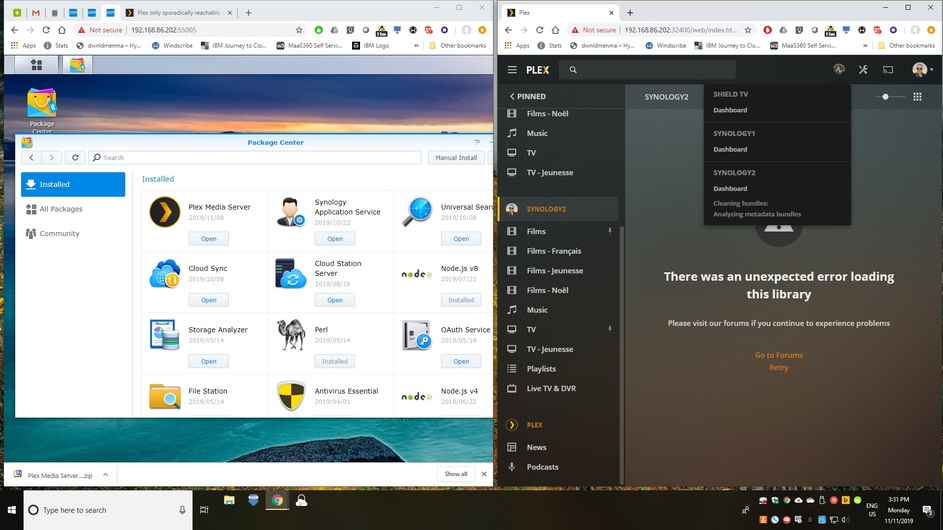
If the database is badly fragmented, it’s very likely it will stop responding for a while.
What it’s doing is dumping out the whole database , one table at a time, and then reloading them with each record back in proper sequence.
It’s very much like defragmenting a hard drive.
If this is unacceptable, we can actually manually do the work
This entails.
- dumping out the database to SQL (each row is output sequentially)
- Creating a new empty DB
- Importing the SQL
It’s a bit of a pain but works.
I just checked plex, it is the latest version and time is all correct on my NAS. I’m not sure how this occurred.
Hi Chuck,
Upon checking the logs folder, I don’t know what is wrong, could you please advise where I can get up to date logs?
