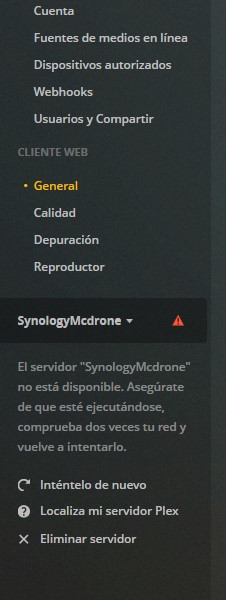
I have not received an answer to my PROBLEM:
If there are so many people who have the same problem suddenly, isn’t it possible that there is a problem in the Program / Server / ?:
I have not received an answer to my PROBLEM:
If there are so many people who have the same problem suddenly, isn’t it possible that there is a problem in the Program / Server / ?:
Thank you.
Please make a ZIP of the Logs folder and attach it.
In my previous note is the Zip. Anyway, I updated yesterday to the new PLEX and I updated the Synology to update 4. it worked again like other times and today it doesn’t work again.
I can’t do the Zip because I can’t access the server with Plex. I can access it with other applications
After I update PLEX again with the same package and only after restarting synology I can access it in the server but I can’t play any movie or any music record on the server or smartphone.:
Previo: Plex Media Server Logs_2019-11-14_09-15-11.zip (4.0 MB)
After: Plex Media Server Logs_2019-11-14_09-27-22.zip (4.2 MB)
Thank you for them but those logs are useless.
Because you enabled VERBOSE logging (off by default), Everything I need to see has been lost off the end.
Verbose logging is only valid in specific cases. This is why it’s off.
We turn it on, allow it to gather about 2 minutes (all the buffer will hold) and then capture logs.
The defaults are here: https://support.plex.tv/articles/201105343-advanced-hidden-server-settings/
I need you to manually edit the Preferences.xml file, using the Synology Text Editor app only (download it in Package Center)
/>, I need the following text added so it looks like this when done.logDebug="1" LogVerbose="0" />
Screenshot from my Synology

Hi Chuck,
The issue happened again, so I zipped new logs. I’m not sure what I’m doing differently. I’ve checked version and date on PMS and on the NAS, they’re all correct.
Regards,
JeffLogs (14-11-2019).zip (11.2 MB)
Hi @ChuckPa
would be willing to try the manual SQL process. Let me know how we’d proceed
Latest logs below fyi, from both Synology servers
Plex Media Server Logs_2019-11-14_10-36-28.zip (4.7 MB)
Plex Media Server Logs_2019-11-14_16-33-50 - SYN1.zip (6.3 MB)
This is done at the Synology command prompt. (SSH access)
ssh sign in as admin.This is my terminal session.
What it does.
admin (root) privilegeadmin@moesern's password:
admin@moesern:~$ sudo -su root
sh-4.3# cd "/volume1/Plex/Library/Application Support/Plex Media Server/Plug-in Support/Databases"
sh-4.3# ls
com.plexapp.dlna.db com.plexapp.plugins.library.blobs.db-2019-07-01 com.plexapp.plugins.library.db com.plexapp.plugins.library.db-2019-09-23
com.plexapp.dlna.db-shm com.plexapp.plugins.library.blobs.db-2019-07-04 com.plexapp.plugins.library.db-2019-07-01
com.plexapp.dlna.db-wal com.plexapp.plugins.library.blobs.db-2019-07-07 com.plexapp.plugins.library.db-2019-07-04
com.plexapp.plugins.library.blobs.db com.plexapp.plugins.library.blobs.db-2019-09-23 com.plexapp.plugins.library.db-2019-07-07
sh-4.3# cp com.plexapp.plugins.library.db PlexDB.backup
sh-4.3# sqlite3 com.plexapp.plugins.library.db
SQLite version 3.10.2 2016-01-20 15:27:19
Enter ".help" for usage hints.
sqlite> drop index index_title_sort_naturalsort;
sqlite> .output plex.db.sql
sqlite> .dump
sqlite> .quit
sh-4.3# mv com.plexapp.plugins.library.db plex.db.modified
sh-4.3# sqlite3 com.plexapp.plugins.library.db < plex.db.sql
sh-4.3# chown plex:users com.plexapp.plugins.library.db
sh-4.3#
With this done, if all is now working correctly, then the DB was indeed the issue
Rescan all your files and force update the metadata.
Empty the trash and optimize the DB when done.
You can then use File Station to delete those extra files.
They are under the Library/… / Databases directory
Just to clarify – my administrator ID is not “admin” (as per recent Synology security suggestions), I assume that doesn’t change anything to the script above?
Correct; Username admin is no longer required if you’ve changed per the Synology security advisory.
The essential privilege needed above is root
I tried the script, seemed to run fine – but unfortunately, no joy. Plex still crashes daily.
After updating about 2 weeks ago plex only works for a few hours after starting every night then i have to restart plex and sometimes the whole Synology and it will be good for a few more hours?
I ordered and installed a memory upgrade on the Synology Plex server. (2GB -> 16GB). % Physical memory use, is way down as is memory swap use (not surprising)… Will see if it makes a difference on the frequency of crashes.
2GB of memory really isn’t enough. Synology configured it as a NAS not a media appliance and hence the root issue.
The result is often insufficient space for any real utilization.
We recommend 8GB but 16 will serve you well.
FWIW, PMS hasn’t crashed since I upgraded the memory. But I ran Plex for at least two years on 2GB without a hiccup (tbh I didn’t even realise the memory was upgradeable). Something must have changed in how the Plex server manages memory for there to be such a big difference overnight. And the 416play runs on 1GB of memory… I suppose I’ll have to look about upgrading that one. Not as easy from what I read
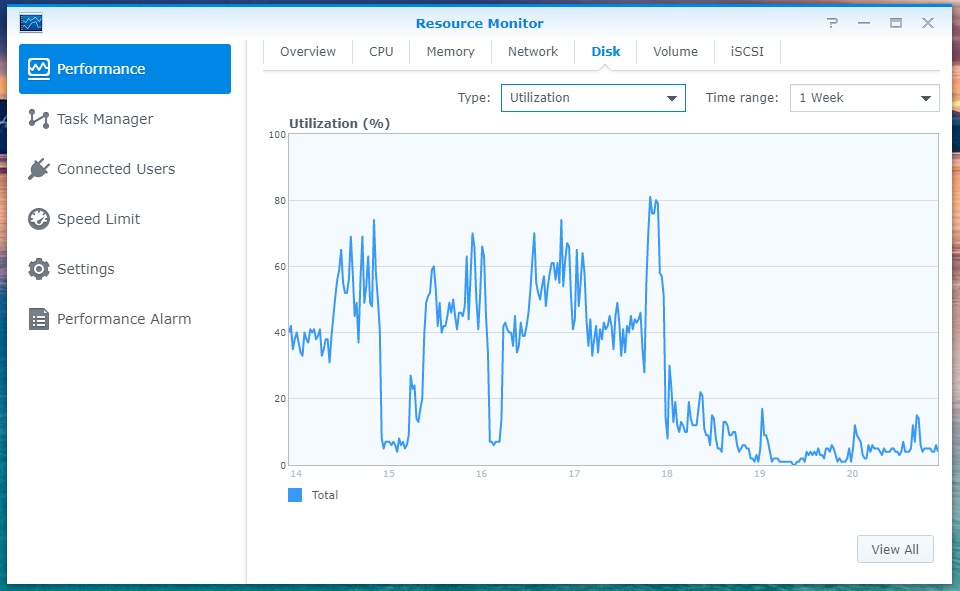
It’s been a few days and no Plex crashes to speak of. Took a few screenshots to show the performance difference when going from 2GB to 16GB on a DS1815+ – it’s quite significant (it will be pretty obvious where the change was made). I’ll try taking the DS416play to 8GB and see if I get a comparable change.
This topic was automatically closed 90 days after the last reply. New replies are no longer allowed.