Good idea. I found moving images in batches by phone or camera model a good approach as each phone/camera might use a different format or introduce its own metadata quirks. I also found that the further I went back in time, the more difficulties I seemed to face. It appeared as if image standards then were less mature and evolved rapidly, even over the last 10 years.
Use whatever you’re comfortable using. That tool looks great for renaming. I’m not sure of its suitability for manipulating image metadata though so you may need to supplement it with something else to do this. For instance, if the image does not have a DateTime Original tag, you may need to set this up from another tag or even the filename if the filename includes a suitable date stamp.
That’s what I do i.e. keep all images, photo or video, related to an event in the same day folder or straddling across the day boundary over two day folders.
Not at all, see previous point. The Plex Photo timeline makes this transition across days appear seamless.
For the renaming where a DateTime Original tag is unavailable, I’ve been using another Tag as you mentioned. Otherwise, where appropriate I’ve prefixed the filename with only the Folder name, e.g. YYYY-MM-01 Event A, without a Time portion.
Is the Time portion here only relevant to ensure the media is in some order within the folder?
To confirm, for a particular event, Event A, what I’ve done recently was to split over the various DateTime Original into their own respective folders. For an event that was on Day 01, 02, 03 this is appearing as:
Folder YYYY-MM_01 Event A - all media with DateTime Original Tag YYYY-MM_01
Folder YYYY-MM_02 Event A - all media with DateTime Original Tag YYYY-MM_02
Folder YYYY-MM_03 Event A - all media with DateTime Original Tag YYYY-MM_03
But, I could do as you’ve suggested, the following - is my understanding correct?
Folder YYYY-MM_01 Event A - all media using DateTime Original Tag YYYY-MM_01, YYYY-MM_02 OR YYYY-MM_03
So in this case, Plex is really looking at the Folder Name to collate the media?
I hope I haven’t confused the issue, but this is exactly what I’ve done. I’ve not treated events in any special way. The way the Plex Photo Timeline works, you’ll just pan over the event across those three days.
You could do it the second way as well i.e. by event. Means considerably more work on your part to group photos in folders by event. The timeline won’t know the difference, which implies it’s independent of the folder name.
No, not confused (… yet… ) I’ve done it this way as well at moment, same event across multiple days:
Folder YYYY-MM_01 Event A
- all media with DateTime Original Tag YYYY-MM_01
Folder YYYY-MM_02 Event A
- all media with DateTime Original Tag YYYY-MM_02
Folder YYYY-MM_03 Event A
- all media with DateTime Original Tag YYYY-MM_03
Main reason I’m considering alternatives is how easy is it to search for a particular Event without knowing the exact date?
Currently, I’ve named the Events appropriately with Christmas, Birthday, Wedding etc - but without this Event name in the Title, I’m not entirely sure how easy the Library would be to search.
Another option - I’ve not tried this as I was trying to keep to the Flat structure - is to do by Event then Date:
Event A
YYYY-MM_01 Event A \
- all media with DateTime Original Tag YYYY-MM_01
YYYY-MM_02 Event A \
- all media with DateTime Original Tag YYYY-MM_02
YYYY-MM_03 Event A \
- all media with DateTime Original Tag YYYY-MM_03
Event B
YYYY-MM_01 Event A \
- all media with DateTime Original Tag YYYY-MM_01
YYYY-MM_02 Event A
- all media with DateTime Original Tag YYYY-MM_02
YYYY-MM_03 Event A
- all media with DateTime Original Tag YYYY-MM_03
I tried to tool ExifTool - really nice and powerful! I can see why you used it.
Just to clarify, I haven’t treated events in any special way. I should have read your original post on this more closely. So events are included with everthing else in the /yyyy/yyyy-mm/yyyy-mm-dd/ folder structure I use. You can do it the way you’re proposing, but I wonder if this is really necessary?
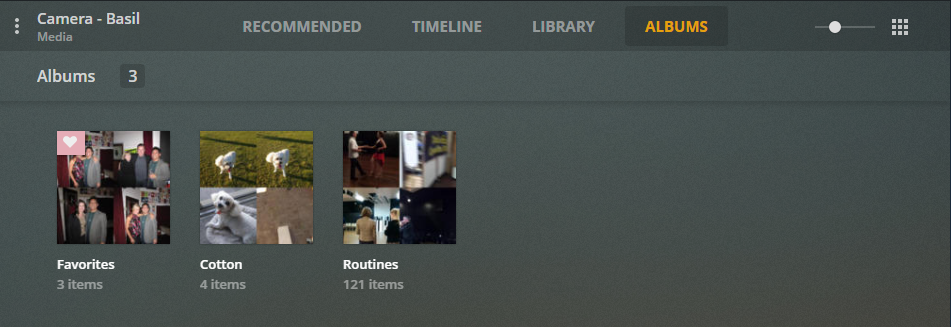
Plex has an Album feature which allows you to group images related to events (usually over consecutive days) or topics of interest (not necessarily over consecutive days; could even span years). I believe this is a much more flexible approach to tagging images with a common theme. Here’s an example:
The only issue I have with Albums is that there is an outstanding bug that prevents videos being included easily in Albums. There are workarounds. Refer to Plex Photos - Issue with Videos and Albums .
That is useful to know regarding the Albums - including the limitation / workaround.
I did read another limitation when I first started this on Sharing Albums or Sharing specific Albums too. This may be resolved now?
The main reason I went for keeping some sort of information with the file/folder is if you ever move out of Plex, then the Album information maybe lost?
Thank you for all your help. If I come across anything else more useful, I’ll definitely post back.
Hopefully our discussion here has also helped others on this journey as well.