PLex Server not responding after upgrade

We know PMS isn’t locked up because:

  1. 43% CPU utilization
  2. The 4-core ApolloLake will show 25% (total) per core. (4x25 = 100)
  3. You’re therefore using 28% (1.2 cores for compute, 0.6 cores for system i/o)
  4. Notice the 17.9% I/O wait. PMS & QTS are waiting almost 18% of the time for the disk I/O to complete. This is how we identify “I/O bound” . If it were “compute bound” then we would see nearly 100% CPU and very little I/O

Yes, this is a painful step but once done, it’s done. (many others complained too about their servers)

This is just like a normal computer where the HDD desperately needs fragmentation.

AFTER this is all done, I’ll suggest you run my “DBRepair” tool to completely reorder / optimize the DB in a way PMS can’t. It will prevent situations like this from ever happening again (The DBs will be in perfect , non-fragmented, order )

OK, thank you so much.
Where is the dbrepair tool?
How do I run it?
I assume there is no way to know how far through we are? I would really like my access back. All my music was scanned onto here. I may have to resort to CDs again :slight_smile:
…steve

Steve,

There is unfortunately no way of knowing how far it is in the process.

If you started over, you’d have to go through all that processing time again to
import it again… which is NOT fun.

When you get to the point, here’s the DBRepair too.

“Auto” mode is usually best for everyone.

The usual sequence is: Stop . Auto, Start, exit

  1. Stop PMS
  2. Auto optimize/repair if needed and then reindex the DB
  3. Start PMS
  4. exit the tool

The README.md shows several examples. One of the examples is for QNAP

So to help me.

I use Putty to get into the NAS.
How do I change folders, and how do I upload the program and which file is the program?
…steve

First, we wait until the upgrade is complete.

When it’s time,

  1. Download the ZIP file from my Github
  2. Using File Explorer (PC) / Mac, copy the ZIP file to the Public shared folder of the QNAP

I’ll show you the rest when it’s time. First things first.

OK, but just as a point. There is no public shared folder visible. There is a public folder which has a bunch of log and sm2 files in it. Is this what you mean?
Finally: when it finishes will the PMS become visible in the player automatically, or do I have to do something? in other words, how do I know it has finished upgrading?
thanks again
…steve

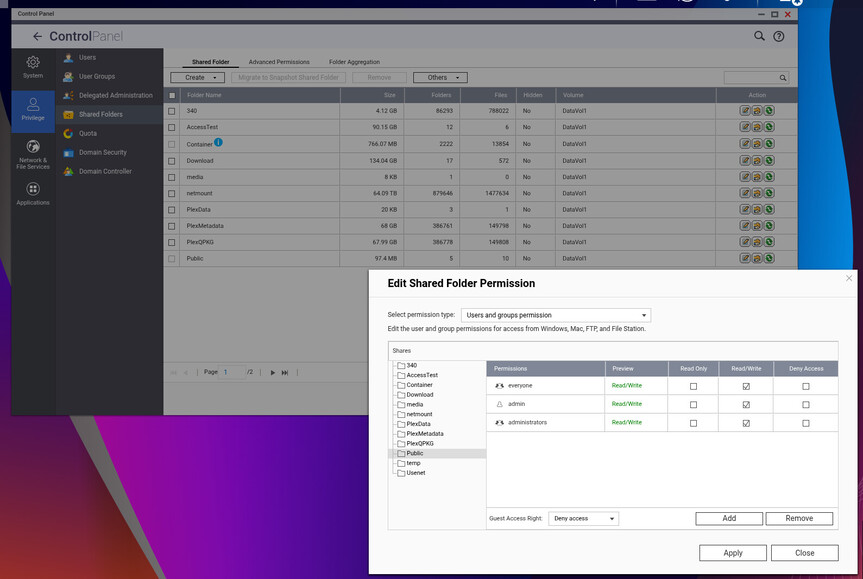
To enable the public shared folder on QTS,

  • Go to the QNAP Control Panel
  • Navigate to “Privilege” > “Shared Folders”
  • Ensure the “Public” folder is visible and has the desired access permissions set for users; if it’s not visible, you can create a new shared folder named “Public” and configure its access rights accordingly.

This is how I do it

If for some reason you don’t have one, create it and give it the same permissions as I show here.

PMS will function normally after the upgrade, you don’t have to do anything.

OK Good, all ready for the upgrade to finish
…steve

Here is a new error message. I assume there is nothing I can do as it would require a power off.

..steve

System looks very different now, but I still don’t have access to the PMS.
..steve


what does http://[Local Plex Media Server IP Address]:32400/web show?

@dbirch

Solved this today with him in PM.

His main DB was damaged.

Resolution sequence

  1. Used DBRepair to restore to his most recent backup (the last 1.32.8 backup)
  2. DBRepair - ‘auto’ optimize & repair
  3. Started PMS
    – It then perfomed the 1.40.x big DB migration
  4. Within 10 minutes it was up and running.

The most recent backup was Feb 26 therefore play history from Feb 26 → Today was lost.

Media additions had not been scanned. Scan Files and they were onboard

Server back online.

It showed maintenance mode, but it is all fixed now. ChuckPA solved the problems for me
Thanks to all who commented and special thanks to Chuck for his time to diagnose and fix the issue.
…steve

10 posts were split to a new topic: Plex Not Responding After Upgrade

This topic was automatically closed 90 days after the last reply. New replies are no longer allowed.
