Plex Server on a NUC

On synology, you must specify the volume as well as the share name

If you have “movies” (case sensitive) on volume 1, and the IP of the syno is 192.168.1.2, then /etc/fstab looks like

192.168.1.2:/volume1/movies /mount/point/on/nuc nfs defaults,auto,rw,nofail 0 0

The format is:

SourceShareSpec /local/dir nfs options 0 0

Chuck, this is my command line; do you see any error?

192.168.1.160:/volume1/Film /mount/nas/Film nfs defaults,auto,rw,nofail 0 0

This is what I get (last sentence, in italian means No file or directory found)

bash: 192.168.1.160:/volume1/Film: File o directory non esistente

I really don’t get what am I supposed to do with etc/fstab

That is not the command line.

That is the line you would put in /etc/fstab

To mount from the command line, you alter the form a bit

sudo mount 192.168.1.160:/volume1/Film /mount/nas/Film

Notice the source-spec and target directory are the same relative positions.

Ok. But how can I put the line in /etc/fstab ?

This is what I get in order to mount: user@nuc8i3beh:~$ sudo mount 192.168.1.160:/volume1/Film /mount/nas/Film
[sudo] password di user:
mount: /mount/nas/Film: mount point does not exist.
user@nuc8i3beh:~$

:frowning:

I know that we are almost there :wink:

This is my Terminal

user@nuc8i3beh:/nas$ ls
Concerti Film photo Serie video

You know nothing of the linux command line / tools?

  1. Find a tutorial – bookmark it
  2. Install gedit this is a graphical editor. It will help you make the transition.
  3. sudo gedit /etc/fstab
    (this elevates to the privileged user and uses the editor to open the file for editing)

Add this line to the bottom.

192.168.1.160:/volume1/Film     /mount/nas/Film     nfs defaults,auto,rw,nofail 0 0

If you are using a Debian-based linux (Ubuntu), you will need this before doing anything)

sudo apt install nfs-common

Now, with /etc/fstab edited, test the mount

sudo mount  /mount/nas/Film

Now go back to my how-to and read through again. This should have given you sufficient context

1 Like

By the way, I do not know how to thank you, at the moment :slight_smile:I hope you can understand my troubles, with language and with linux!

Linux requires patience. It is very powerful.

There is much you can learn from the internet tutorials.
Try their examples. You will see how much fun it is.

I hope to learn (I’m 57 :-))
This is what I get

** (gedit:4682): WARNING **: 22:35:30.126: Set document metadata failed: Impostazione dell’attributo metadata::gedit-spell-language non supportata

** (gedit:4682): WARNING **: 22:35:30.127: Set document metadata failed: Impostazione dell’attributo metadata::gedit-encoding non supportata

** (gedit:4682): WARNING **: 22:35:31.808: Set document metadata failed: Impostazione dell’attributo metadata::gedit-spell-language non supportata

** (gedit:4682): WARNING **: 22:35:31.808: Set document metadata failed: Impostazione dell’attributo metadata::gedit-encoding non supportata

** (gedit:4682): WARNING **: 22:35:32.647: Set document metadata failed: Impostazione dell’attributo metadata::gedit-position non supportata

It’s OK. I am 61. :rofl:

Do not worry about those lines. Did the window open for you to use ?

1 Like

I restarted the system and now I have in my desktop, under “+Other Positions” a folder called “mount”, and inside I have a folder called Film (not the one under “nas”). Inside the folder called Film I can see my NAS and all the movies. In Plex it is finally scanning!!! So I really do not know how to thank you for your patience and for your effort!

For now… have a good evening, CIAO

As you become more comfortable with Linux, you can make changes to the mounting if you wish something else.

Buona serata CIAO

Hi ChuckPA, here I am, AGAIN :frowning:

After a couple of hours, with the help of my wife… I have to give up… The only thing I got is that, under MY NUC /mount/nas I have this structure:
/mount/nas/Foto
/mount/nas/Serie_TV
/mount/nas/Video_GoPro

and the one mounted and running
/mount/nas/Film

________-

I need to mount these 3 NAS folders
ipNAS:/volume1/Foto
ipNAS:/volume1/Serie TV DS918
ipNAS:/volume1/Video GoPro

I do not know what am I doing wrong…
Probably the names of the NAS folder, and their blanks…

Can you please, please, write the three commands for each folder, in order to:
A) modify /etc/fstab using sudo gedit /etc/fstab
B) mount from the command line the 3 folder
C) test them properly
D) Other things I’m forgetting

A big thank you, my wife is ready to file for a divorce :slight_smile:

  1. Tell her it’s OK to file for divorce. You will forgive her :wink:
  2. We can now find out the problem.
  3. You can ask her to cuddle up with you and watch the TV together when she returns.

:rofl:

Linux will not like the spaces in the other names. We need to rename these on the NAS.

I suggest:

  • Serie TV DS918 to become SerieTV or Serie_TV_DS918
  • Video GoPro to become GoPro or Video_GoPro

I wish to also change the structure we use on the NUC. This will make it easier.
I will write my instructions below using my assumptions. If you chose different names, please remember to change those pieces of my instructions to match.

We will create

/nas/
  Film/
  SerieTV/
  GoPro/

For this, we type the following commands

sudo sh
mkdir /nas  /nas/Film /nas/SerieTV /nas/GoPro
chowm -R 755 /nas

In /etc/fstab we will now have the lines: (sudo gedit /etc/fstab)

192.168.1.160:/volume1/Film      /nas/Film       nfs defaults,auto,rw,nofail 0 0
192.168.1.160:/volume1/SerieTV   /nas/SerieTV    nfs defaults,auto,rw,nofail 0 0
192.168.1.160:/volume1/GoPro     /nas/GoPro      nfs defaults,auto,rw,nofail 0 0

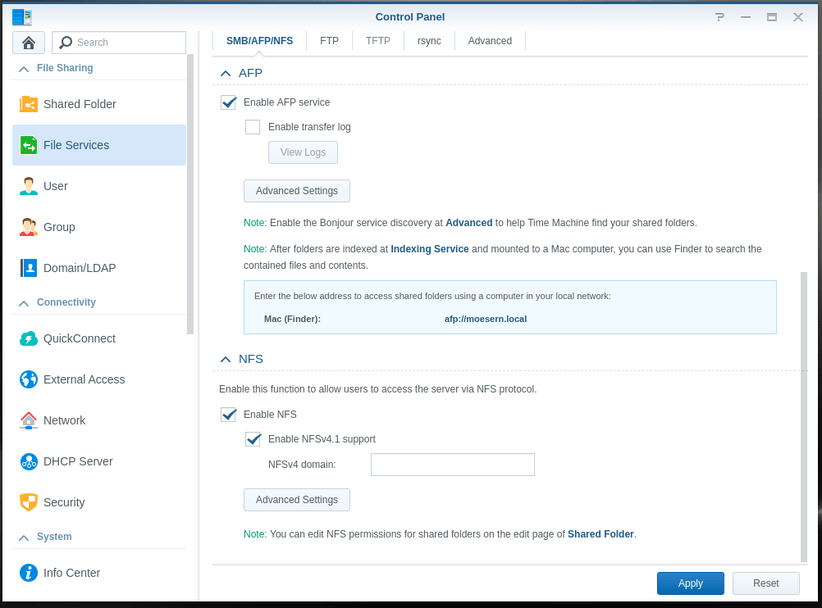
I also wish to make certain the Synology is ready for this. Below are the screenshots

Verify NFS is active.

Make certain the shares are exported for NFS. Do this for each share.

Now we do one last thing on the Synology.
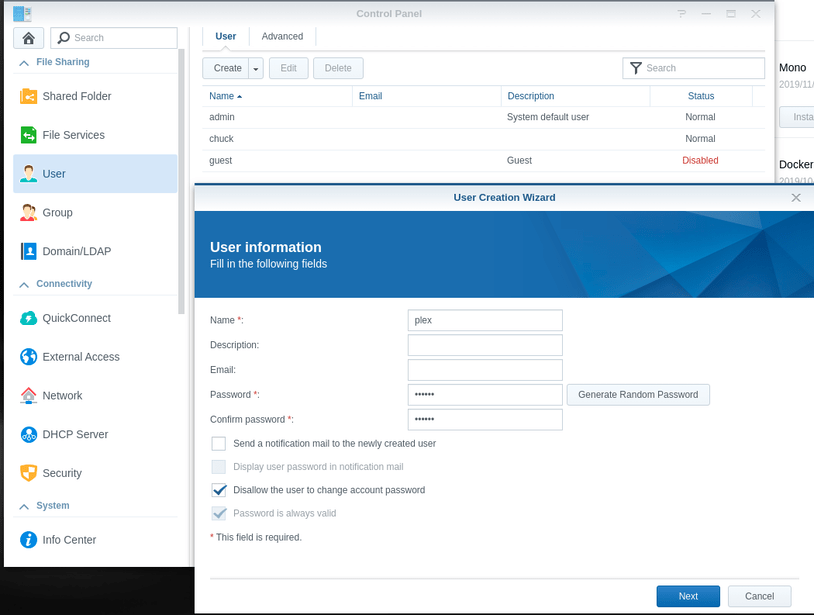
User plex will also be reading your media.
We must add user plex for NFS.

I tried to switch to Italian for this but could not. I apologize.

  1. Create user plex (lower case letters)

  2. Make certain it is a member of the user group.

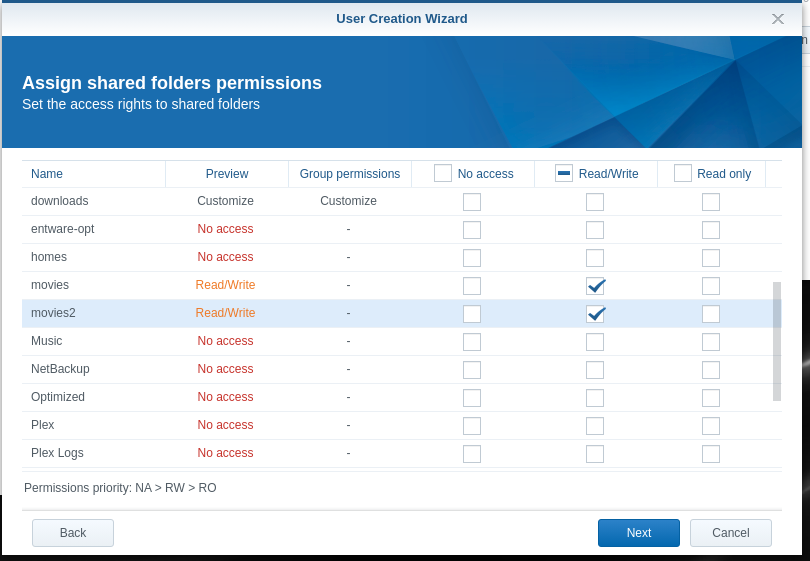
  3. Give it permission to read your shares (you may add to this at any time)

  4. Skip other displays (use the defaults). Confirm final settings for plex.

Now we can mount the shared folders.

At the terminal window again on the NUC

sudo sh
mount /nas/Film
mount /nas/SerieTV
mount /nas/GoPro

There should be no error messages

Let me know if you encounter problems. Copy/paste what it prints.

1 Like

Thanks Chuck.

Is it mandatory to change the names? Because I already have, on my Synology a Plex server running smoothly, and I’d prefer not to mess with it. My nas (with the mentioned structure) has a backup on another Synology… so changing the names would affect a lot of things…
on the nas, on the target and in Plex library, I believe.

Should Ubuntu allow to type and use spaces in files or folders name, it would be perfect… if not, probably the best option is to go on with my “plex on synology” system, and leave the Nuc alone, running Roon for my multiroom stereo system…

I’m so sorry to have bothered you!

Ps: having just finished to watch a Nba game (GSW@Blazers) my wife is in love with me, again :slight_smile: despite the NUC…

As long as your wife still loves you, we will solve the problem.

I will have time later tonight to work on this and resolve it.

It will not be pleasant to read but it will work.

1 Like

:smile: you will be my hero!

For me will be enough to use the folders on the Nuc as they are now… and keep the folders on the nas with the present names.

MY NUC
/mount/nas/Foto
/mount/nas/Serie_TV
/mount/nas/Video_GoPro

and the one mounted and running
/mount/nas/Film


On the Nas
/volume1/Foto
/volume1/Serie TV DS918
/volume1/Video GoPro
/volume1/Film

Now I’m gonna sleep, please, stay in touch!

Good night and thank you.

If you wish to use them as they are now, that’s fine. :slight_smile:

I did figure it out. It’s been a long time since I’ve dealt with it.

192.168.1.160:/volume1/Serie\040TV\040DS918    /nas/SerieTV    nfs   defaults,auto,rw,nofail,bg 0 0
192.168.1.160:/volume1/Video\040GoPro  /nas/Video_GoPro nfs defaults,auto,rw,nofail,bg 0 0

We must use the Linux escape character (\) and octal values for the space character (040)

With this, you can use spaces anywhere.

As I said earlier, it would not be pretty but it would work :slight_smile:

1 Like

ChuckPA, you are my hero!

Everything is running perfectly.

Is there anything that I can do from Italy, for you?

Have a nice day. Thank you

This topic was automatically closed 90 days after the last reply. New replies are no longer allowed.