Server Version#: 1.20.4.3517
Player Version#: Web Browser - browse directly to server from outside HOSTNAME:32400
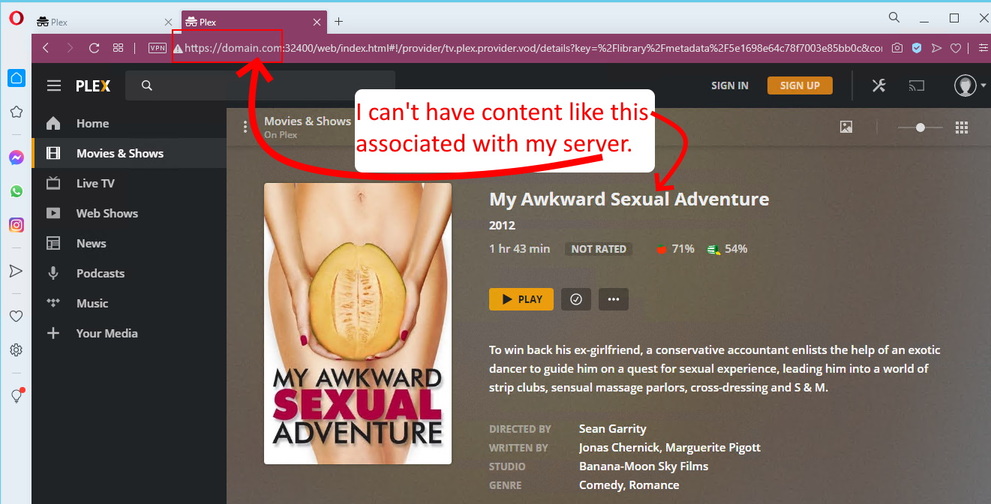
In the screenshot, you see the film and tv shows and recommended videos listed, instead of a simple/blank login screen. I understand that this may be “working as intended”, however I absolutely can’t have any content listed on that web address prior to login. Is there a setting or a mod or an older version that I can use that will disable displaying all of this content on the sign-in page? This is an absolute deal-breaker for me. I can’t have people thinking that the random content displayed on this screen is hosted for free by me and my server. Which, is exactly what it looks like.
hmm… if this is intended this does seem like a really bad idea.
(fwiw, It also happens if you visit app.plex.tv and are not signed in)
There is content available within the free offerings that is unsuitable for children, that is now just freely accessible without any login on any and all plex servers with remote access enabled.
Exactly! I’m glad that I’m not the only one that gets it. If I were to say, want to use Plex to host a server for the students in a school system that only had Educational Documentaries and Videos of teacher’s Zoom meeting recordings containing instructional content by subject and grade-level… Then I would absolutely not want the students to be presented with a bunch of random movies at the login screen…
I guess trying to come up with hypothetical scenarios isn’t helping any.
I mainly just don’t want my domain name or Server’s IP associated with whatever random shows Folks decide to offer via Plex. What are my options here? I can’t imagine they monitor posts like these and immediately release new features such as an option to have a minimalistic login page for your server.
So I do need to open a support ticket?
Request a feature?
Remove Port Forwarding and keep my server offline?
Use https://app.plex.tv instead, and there won’t be any assumption that this is your content.
The web app which is available under http://yourserverip:32400/web is only intended for initial server setup anyway.
If you tell your web browser to not throw away cookies and “website data” from the domain plex.tv when it’s closed, the browser will usually start in a logged-in state.
Alternatively, think about using either Plex Player for Windows/Mac or Plex Media Player. These require a separate download and installation, but stay logged-in permanently. And they can often avoid the server transcoding, because they can play most file formats directly.
I don’t mind using the desktop app or https://app.plex.tv myself. I’ll also be buying the plex android app.
What I don’t want is to have my domain name / IP Address associated with watching free movies by anyone who happens to browse to http://IP_ADDRES:32400. I’d happily turn off that type of access if my Plex Server for Windows application had a setting that restricted access only to the Mobile app or Desktop app.
Parents can also create accounts for their children and set profiles to control what sort of content is accessible.
Is this not a bit redundant if you can just browse to app.plex.tv (or any plex server with remote access enabled) and see all the content without even logging in?
bilm, You’re absolutely right! They’re breaking the parental controls by hosting adult movies that are visible by accessing any one of the outward facing Plex servers on the internet.
I sure hope they change this. I was just about to purchase the lifetime Plex Pass, but I cannot unless this issue is resolved. I may have to run an FTP server and point instances of Kodi at it instead.
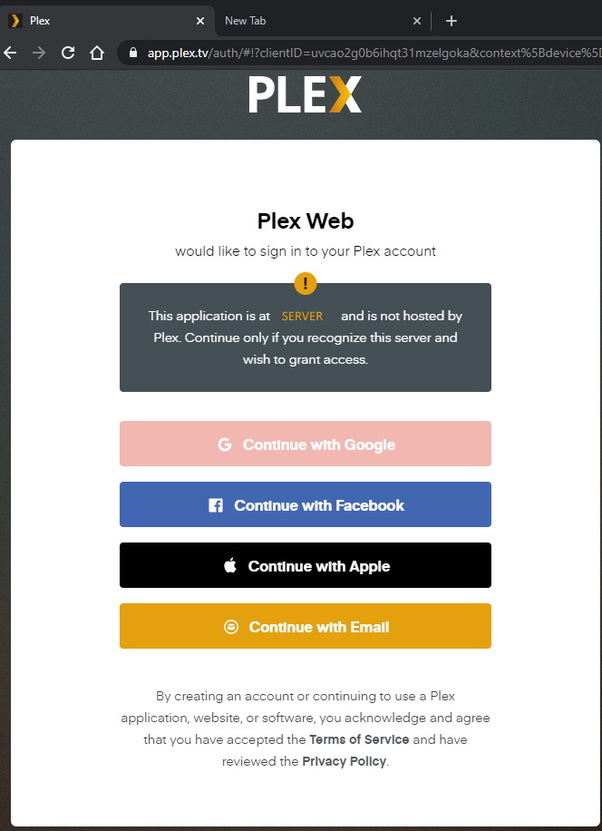
It looks like Plex Media Server version 1.20.1.3252-a78fef9a9 works the way that I want. It looks like Version 1.20.3.3437 works properly too. I tested an older version on a different box, and got the result that I was looking for. This is what users should see when browsing to my server’s IPADDRESS:32400 :
I’m going to try to roll back to the older version on my server, or reinstall from scratch. Then I’ll disable automatic updates until Plex resolves this issue in a future release.
Plex’s choice I suppose, but it does make parental control a bit hard if you can just browse to any public facing plex server and watch potentially inappropriate content.
I would suggest the overview on the support page needs updating if this is now the case.