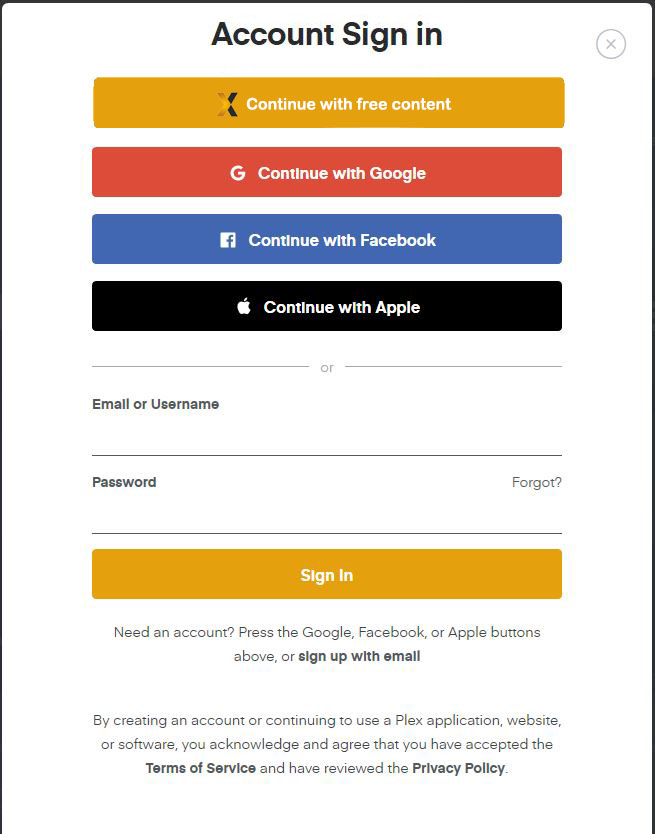
This sums up most of my concerns about the update.
I CANNOT have any video hosting publicly accessible, it’s a ticking time bomb my ISP could jump on. I don’t want the hastle of having to explain that no I do not have the rights to distribute this free content but even though it’s my domain, it’s not actually my content. That would be a fun phone call.
I’ve been using plex for 4 years or so now, I really didn’t mind the plex as a streaming service stuff, but this is too far.
I like the idea of 2 options :
Login and access server content
Continue without login that then REDIRECTS to plex.tv and does not stay on my domain
I don’t often use the forum but I am truly concerned about this and am seriously considering moving to EMBY now. For the moment I rolled back to a previous version.
So they never actually view anything on your server, it all goes back to how it used to work + the added benefit (to Plex) of allowing their free content to work on their web player via a redirect to plex.tv.
If Plex has added functionality to allow web servers to serve content to guests then the admin should decide what content those guests view on the private admins domain/server. If an option is added to continue as guest on a private domain it should keep the user at the private domain and not redirect to plexs server.
Plex forgot to add a few settings in the Plex admin panel before they rolled out this update: Allow/don’t allow guests, the ability to restrict which libraries they can view and restrictions for guests based off Settings - Online Media Sources.
That should be how free content on plex.tv should be handled.
It provided by plex.tv, and so it should redirect to a plex.tv domain in order to see them, NOT on the user’s url exposed to the internet.
I am wondering if this is a violation of IP and will landed individual user running its own plex and expose it for access when not at home in any sort of trouble.
I’ve explicitly disabled all of your online media sources and now I find out anyone who can find my IP and port through shodan can use my web interface to watch content from your service is completely unacceptable. If you don’t have a plex account you should see NOTHING but a login screen on my web interface.
I’m not concerned about my ISP believing this is somehow coming from me. I simply don’t see how this could have ever been considered a good idea. You are essentially turning every internet facing user hosted plex (regardless of whether they participate in your free offerings or not) into an app.plex.tv mirror for free streaming content. Keep that crap on your own domain.
My hosted server, on my internet connection I pay for, is for MY CONTENT, not whatever crap you’re shoveling today.
Management is aware of the perception being created. They had not anticipated it.
At last word they are rethinking this mechanism.
It was done as a way to give more people easy access to free content in the light of COVID restricting everyone’s activities.
well, I guess that’s something
I really don’t want to revert to 1.20 again
but blaming this decision on the current covid situation, seems a bit … shallow at least
you can provide free content on plex.tv to anyone you like
but don’t use my server for this
If it’s not too terribly off topic, I’m curious if you did anything special? I had to open 32400, pointed to plex, but that was all. Did you take extra steps to lock it down?
Thanks for the update, Chuck. Nice to hear someone fighting this corner.
Mistakes like this happen. People think they’re doing the right thing, but they sometimes don’t think about it from a different perspective. That’s likely all that’s gone on here and I’m glad it’s being discussed seriously.
I received an alert in my Plex app saying a new device (Chrome) had connected to my server. Seeing as it was the middle of the workday and nobody that uses my server uses Chrome to watch movies, I had to check to make sure my credentials weren’t compromised. I use individual, randomized passwords for all sites so my main concern was Plex got breached.
Looking at the logs, someone from India had connected, downloaded some javascript files (about 12 MB worth) with 200 response codes, then there were some 401’s, then that’s it.
Is that what it looks like when someone connects and gets pushed to plex.tv for the free streaming? Why did I get a new device alert for that? It didn’t appear that anybody logged in, but all of the get requests in the debug log end in ‘signed in’.
What notification did you receive? The “New Device [User] used a new device to access [Servername]: Chrome” mobile push notification?
Save your logs.
Consider opening a new topic for this, too - it would be nice if a Plex person reviewed the logs and could speak precisely about it and about your account.
I agree with most of your thought process. A drive-by shouldn’t generate a notification about server access.
It is possible for a stranger to log into their account after loading Plex Web from your Plex Server. I don’t think that generates a notification either.
Yes, that’s the notification. The username, I believe, was mine in the alert, which is why i was really concerned. I can’t find anywhere to look at previously closed alerts on iOS. I have the logs saved, I’ll open a new thread and see what happens.