Server Version#: 1.40.4.8679
Plex Media Server Logs_2024-07-09_20-02-24.zip (3.8 MB)
Over the last several weeks, every evening without fail, when I open plex after supper, my libraries show as unavailable and I’m unable to access the web player.
However, plex docker container on Unraid stills shows as running.
I’ve tried clicking around in the logs, but it all looks like gibberish to me.
Can someone take a look and see if they can see anything that might point me in the right direction?
Is there another channel I should be posting this in to get support?
Thanks for the logs.
Not seeing any errors so I suspect your server became unclaimed
I have a tool which will help.
It has multiple operation modes. You might want the -p option. Please do go through the README.md
It’ll do the job for you of reclaiming. (with the container or PMS stopped)
My setup is using Unraid.
I tried running this script two times.
The first time, I ran it as a console session in the docker container. After entering the plex claim number, the script tried to stop Plex and was unable to do so.
So I stopped Plex and ran it in a console session on Unraid at the platform level. Here, the script was unable to run because “Unrecognized host type”
If you use the -p option (see the README.md for example)
you can specify the path to the Preferences.xml when the container is stopped from outside the container.
The only dependencies this way are curl and sed.
Ok, I got the script to execute and complete with the -P option.
Let’s see if it resolves the issue.
@chansearrington
Make also make absolute certain that runtime UID:GID owns all files and directories in /config (where it maps on the host)
If it can’t write the updated Preferences.xml or the new certificate (when it refreshes), it will fail and start over with the next restart (which is unclaimed)
@ChuckPa eeesh, that’s above my pay grade. lol.
How do I check?
Here’s my Docker Container settings in UnRaid if that helps.
3
This hasn’t been an issue for years. I’ve had this UnRaid setup for 4x without any crashes/issues until the last ~2 months and then EVERY DAY it stops working but the container doesn’t “crash”.
This is some of the stuff you’ll need to learn with unraid and using containers (docker).
The first thing we need check is to grab server log files ZIP (downloaded from PMS 2-3 minutes after you restart it )
I’d like to see that zip
Then, if we need to go further —
-
Open a terminal window (upper right)
-
see where it says the AppData path? we’re going there
-
cd /mnt/user/appdata/plex
-
now look at the permissions numerically and see if they are 99:100
(Something like this: the 99 & 100 values)
-
ls -lan
drwxrwxrwx 4   99  100   119 Jan 10  2024 .
drwxrwxrwx 8   99  100   116 Nov 29  2023 ..
lrwxrwxrwx 1    0    0    32 Nov 28  2023 192.168.0.20_media -> /mnt/remotes/192.168.0.20_media/
drwxr-xr-x 3 1000 1000    54 Nov 10  2023 PlexMediaServer
drwxr-xr-x 3   99  100    54 Mar  7 19:44 plex
-rwxrwxrwx 1 1000  100 13283 May  7 17:34 UserCredentialReset.sh
root@lizum:/media/chuck/Unraid8T/appdata#
- If you have that 99:100 (which is what comes from
PUID and PGID on the form, we’ll make sure everything else is right. If it doesn’t match here at the top, STOP!
chown -R 99:100 plex
@ChuckPa got it. Thank you!
I know how to open terminals and get into places, etc. hence how I was able to successfully run the User Credential service.
I just didn’t know what UID:GID was and how to check if it was working properly. 
Here’s a grab of the plex folder permissions.
So far, it seems that the UserCredentialReset might have resolved the problem, but I’m not sure since I’ve restarted the server several times in the last 24 hours. I’m including a copy of the logs a couple minutes after restart.
Plex Media Server Logs_2024-08-01_09-12-49.zip (3.8 MB)
Chanse,
Thank you for the logs.
I found the real problem. The database got damaged somehow
Aug 01, 2024 09:06:33.790 [22873509698360] ERROR - SQLITE3:0x80000001, 11, database corruption at line 71905 of [a29f994989]
Aug 01, 2024 09:06:33.790 [22873509698360] ERROR - SQLITE3:0x80000001, 11, statement aborts at 41: [INSERT INTO 'activities' ('id', 'parent_id', 'type', 'title', 'subtitle', 'scheduled_at', 'started_at', 'finished_at', 'cancelled') VALUES (:activities_id, :activities_parent_id, :activities_type, :activities_title, :activities_subtitle, :activities_scheduled_at, :activities_started_at, :activities_finished_at, :activities_cancelled)] database disk image is malformed
Aug 01, 2024 09:06:33.790 [22873509698360] ERROR - Saving activity history aborted with soci exception: sqlite3_statement_backend::loadOne: database disk image is malformed
Aug 01, 2024 09:06:33.790 [22873509698360] DEBUG - Activity: registered new activity 4dcda5bb-3f28-4399-b71f-8305d32080a4 - "Processing subscriptions"
Aug 01, 2024 09:06:33.798 [22873532959544] DEBUG - [HttpClient/HCl#9] HTTP/1.1 (0.0s) 200 response from GET http://127.0.0.1:41545/system/agents
We should fix this too while we’re here.
How much media & watch history do you have stored in that PMS server ?
(Trying to decide if easier to start over or if you want to increase your paygrade) 
@ChuckPa a lot, I assume. Several years of watch history and library size of over 120TB
I do, however, run Tautulli as well, if that helps.
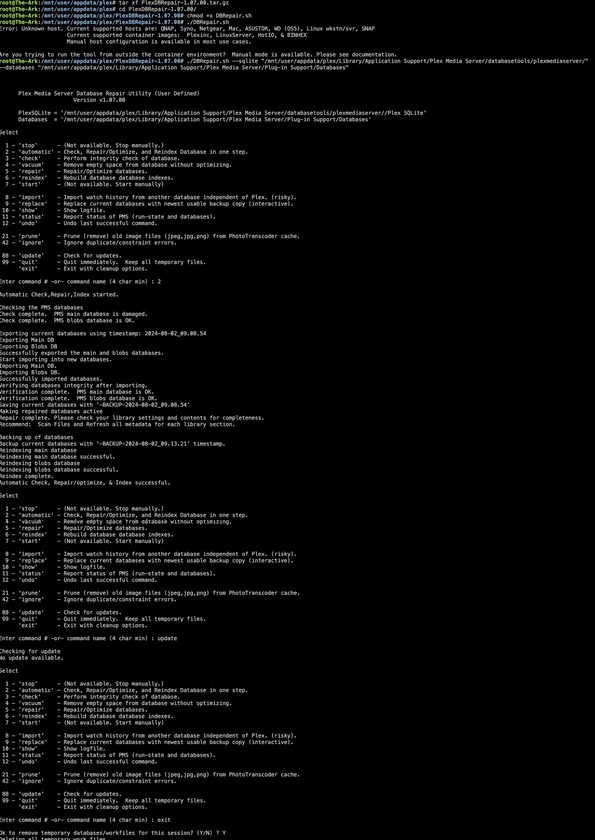
@ChuckPa After a lot of Google searching and trying to figure things out, I used your tool Database Repair tool to fix the database. GitHub - ChuckPa/DBRepair: Database repair utility for Plex Media Server databases
It worked great! BUT it was not easy to do with UnRaid because there is no Plex SQLite in the app data for Plex. It’s all in the container and has to be copied over and then PlexDBRepair has to be executed with manual configuration even though it seems like it should work because I’m using one of the “supported” containers.
In the end I used SpaceInvaders video for Plex Database Repair to figure out how to copy over Plex SQLite and then manually pointed PlexDBRepair to that location and the location of the “Databases” folder and it worked like a charm!
The SpaceInvader guide alone didn’t repair the database but PlexDBRepair did on the first attempt
I’m sorry about that.
There are some images on specific hosts which don’t work well inside the container with PMS stopped (those images I support). Those images either have crazy aggressive health checks or are images whose configuration varies from image release to image release.
For example, I can support PMSinc docker images on unraid (auto detect). Given you’re showing me what looks like PlexInc docker on unraid, there must be something afoot which needs to be fixed.
If you’re willing, I will help you both fix the DB and, with your permission, see why it’s not detecting the container’s image correctly.
That’s why I added the ability to run it from outisde
Sure! Happy to help! Let me know what you need.
It might be a day or two before I can get to this with you.
(The alligators are biting because I forgot to drain the swamp… lol)
I’ll send a PM.
I’ve had this happen too. Why should I have to reclaim my server more than once?