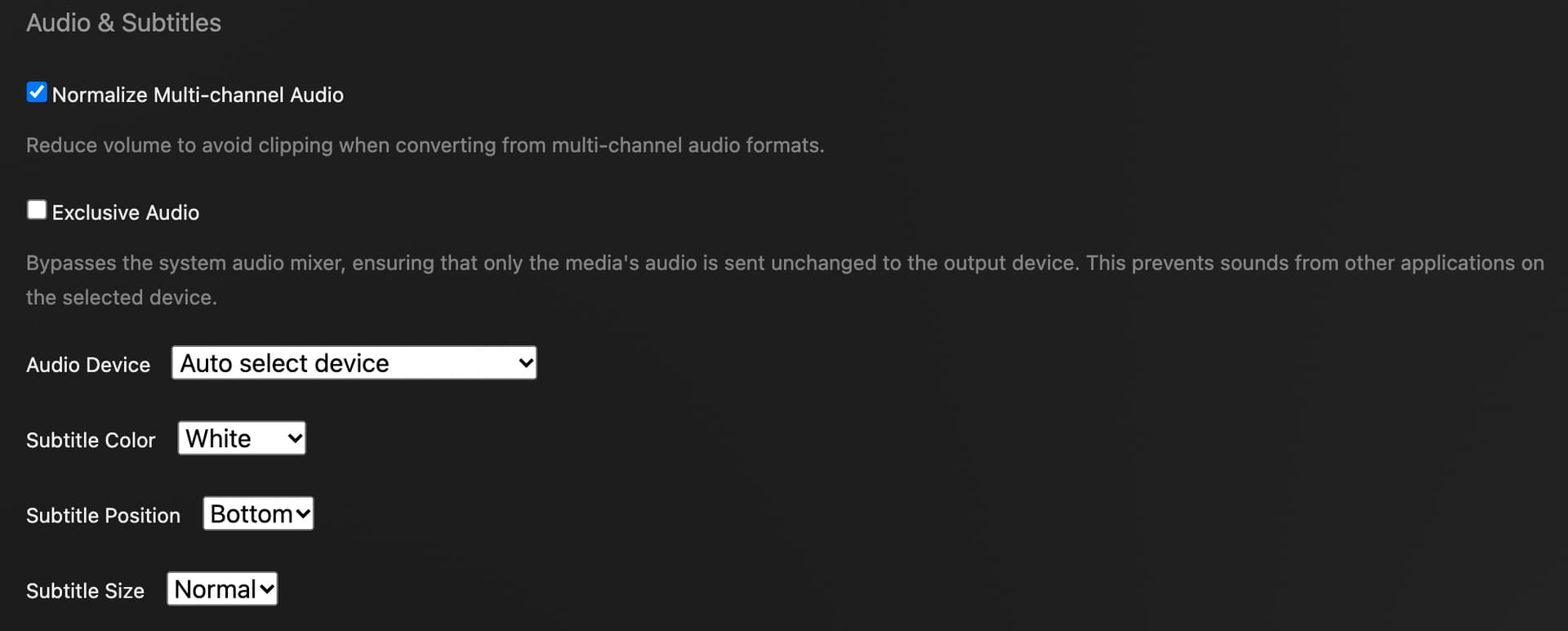
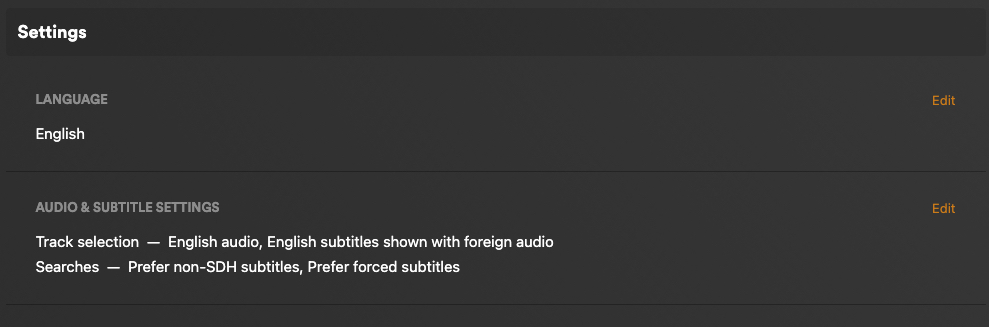
Hi @nibbles ! Thank you so much for the detailed answer  Let me try to answer in parts then.
Did Plex for Mac used to work? Are you using the Mac internal speaker or headphone jack?
Right now I did it using the internal speaker, and it both failed and succeeded. The other day I think I was using the internal speaker only.
I really can’t say, honestly. I want to believe it used to, but since I haven’t changed anything in a long time, it probably didn’t. To be fair, I don’t watch a lot of videos on Plex for Mac, it’s normally on my TV or iPad, so it might never have worked.
The silly thing is that on the Web it sometimes works, and sometimes falls back to the same 2MB connection. I just replicated it here. When I reloaded the Chrome tab it then worked with Direct Play. Also, after that, I just closed and reopened Plex for Mac and lo and behold, it decided to Direct Play.
Do you want to try gathering a bunch of messy logs or just reinstall Plex for Mac cleanly?
Always up for both I’ll elaborate on the logs down below.
In Plex for Mac → Settings → General, what version do you have? The last working version for me was Version 1.58.1.3380-ea159c52 but for you we don’t know yet.
I’m on Version 1.60.1.3413-533a7645
In Settings → Player, screenshot your show advanced settings.
In Settings → Quality, screenshot it too.
In Settings → Debug let’s hope Direct Play is checked
Hah, that could indeed be the case  Thankfully it was checked, though. I also just turned on Verbose logs just in case.
In general, any settings like Maximum and Original Quality are what you want for local playback along with Direct Play and Direct Stream selected.
Thanks. I’m pretty sure that most on the server are set that way, just checked the server config as well, on the Network tab. Remote access is enabled.
What is your ISP? Verizon Fios? Some ISPs use DNS rebinding protection that causes local connections to be treated and WAN, to go through a relay, and to be capped at 2mps. I don’t expect that considering HTPC works.
Vodafone, Europe. I agree that that shouldn’t be likely.
What are your DNS servers?
I’m using Google’s DNS servers, 8.8.8.8 and 8.8.4.4.
Does PMS have a static IP address?
In the local network, yes.
Now, given the inconsistency of the reports, I’m wondering: could it just be a spotty network issue on the client side that forces it to request a lower bandwidth version of the video?
Alternatively - though it doesn’t justify the inconsistency in the report - these are the main things on the logs.
Transcode server log seems to suggest it might be related to the subtitles, even though they’re plain text SRT files:
<Variant id="7bf9ae47-5ccf-4e5c-b0a5-d0519208f9dc" targetBitrate="6064" context="streaming" subtitleDecision="transcode" protocol="http" container="ass" transcodeHwRequested="0" transcodeHwFullPipeline="0">
<Media audioProfile="lc" id="297725" videoProfile="main" container="ass" duration="8462826" selected="1">
<Part audioProfile="lc" deepAnalysisVersion="6" id="306224" requiredBandwidths="11657,9834,7961,6495,6031,5775,4813,4813" videoProfile="main" container="ass" duration="8462826" decision="transcode" selected="1">
<Stream codec="ass" displayTitle="Unknown (SRT External)" extendedDisplayTitle="Unknown (SRT External)" file="<movie title>.srt" format="ass" id="210706" key="/library/streams/210706" selected="1" streamType="3" decision="transcode" location="embedded" />
On the server logs for the web session, the main thing that calls to my attention is it saying it can’t find a profile for direct play, which is unexpected:
Dec 28, 2022 08:05:17.918 [0x7f78f65aa0] DEBUG - [Req#376a9/Transcode/Req#376aa] We're going to try to auto-select an audio stream for account 1.
Dec 28, 2022 08:05:17.918 [0x7f78f65aa0] DEBUG - [Req#376a9/Transcode/Req#376aa] Selecting best audio stream for part ID 306224 (autoselect: 0 language: xn)
Dec 28, 2022 08:05:17.918 [0x7f78f65aa0] DEBUG - [Req#376a9/Transcode/Req#376aa] We're going to try to auto-select a subtitle.
Dec 28, 2022 08:05:17.918 [0x7f78f65aa0] DEBUG - [Req#376a9/Transcode/Req#376aa] Subtitles: Found a candidate subtitle language [] for a foreign film
Dec 28, 2022 08:05:17.919 [0x7f78f65aa0] DEBUG - [Req#376a9/Transcode/Req#376aa] Audio Stream: 210675, Subtitle Stream: 210706
Dec 28, 2022 08:05:17.925 [0x7f74c62aa0] DEBUG - Request: [192.168.86.12:56142 (Subnet)] GET /:/timeline?ratingKey=298408&key=%2Flibrary%2Fmetadata%2F298408&playbackTime=0&playQueueItemID=219146&state=playing&hasMDE=1&context=home%3Ahub.continueWatching&row=0&col=0&time=386000&duration=8462000 (14 live) #376ab TLS GZIP Signed-in Token (pjft) (Chrome)
Dec 28, 2022 08:05:17.927 [0x7f74c62aa0] DEBUG - [Req#376ab] Client [gdqcorexdhebc2pxo78fq47z] reporting timeline state playing, progress of 386000/8462000ms for guid=, playbackTime=0ms ratingKey=298408 url=, key=/library/metadata/298408, containerKey=, metadataId=298408, source=
Dec 28, 2022 08:05:17.930 [0x7f78f65aa0] DEBUG - [Req#376a9/Transcode] MDE: Selected protocol http; container: ass
Dec 28, 2022 08:05:17.930 [0x7f78f65aa0] DEBUG - [Req#376a9/Transcode] MDE: analyzing media item 297725
Dec 28, 2022 08:05:17.930 [0x7f78f65aa0] DEBUG - [Req#376a9/Transcode] MDE: <Movie Name>: no direct play video profile exists for http/mp4/h264
Dec 28, 2022 08:05:17.931 [0x7f78f65aa0] DEBUG - [Req#376a9/Transcode] MDE: <Movie Name>: no direct play video profile exists for http/mp4/h264/aac
Dec 28, 2022 08:05:17.931 [0x7f78f65aa0] DEBUG - [Req#376a9/Transcode] MDE: <Movie Name>: transcoding selected subtitle stream
Dec 28, 2022 08:05:17.931 [0x7f78f65aa0] DEBUG - [Req#376a9/Transcode] MDE: <Movie Name>: selected media 0 / 297725
Dec 28, 2022 08:05:17.932 [0x7f78f65aa0] DEBUG - [Req#376a9/Transcode] Streaming Resource: Added session 0x7f7976c7a8:gdqcorexdhebc2pxo78fq47z
Dec 28, 2022 08:05:17.933 [0x7f78f65aa0] DEBUG - [Req#376a9/Transcode] Streaming Resource: Reached Decision id=298408
But when it works well, it shows that it reaches a decision that Direct Play is OK:
Dec 28, 2022 08:36:45.319 [0x7f78f65aa0] DEBUG - [Req#3e94c/Transcode] TranscodeUniversalRequest: using profile Plex Desktop
Dec 28, 2022 08:36:45.319 [0x7f78f65aa0] DEBUG - [Req#3e94c/Transcode] Downloading document http://127.0.0.1:32400/library/metadata/298408?includeBandwidths=1&offset=462&X-Plex-Incomplete-Segments=1&X-Plex-Session-Identifier=n1s4idcy0eueg4rdd2hacnsc
Dec 28, 2022 08:36:45.341 [0x7f78f65aa0] DEBUG - [Req#3e94c/Transcode/Req#3e957] We're going to try to auto-select an audio stream for account 1.
Dec 28, 2022 08:36:45.341 [0x7f78f65aa0] DEBUG - [Req#3e94c/Transcode/Req#3e957] Selecting best audio stream for part ID 306224 (autoselect: 0 language: xn)
Dec 28, 2022 08:36:45.341 [0x7f78f65aa0] DEBUG - [Req#3e94c/Transcode/Req#3e957] We're going to try to auto-select a subtitle.
Dec 28, 2022 08:36:45.342 [0x7f78f65aa0] DEBUG - [Req#3e94c/Transcode/Req#3e957] Subtitles: Found a candidate subtitle language [] for a foreign film
Dec 28, 2022 08:36:45.342 [0x7f78f65aa0] DEBUG - [Req#3e94c/Transcode/Req#3e957] Audio Stream: 210675, Subtitle Stream: 210706
Dec 28, 2022 08:36:45.347 [0x7f78f65aa0] DEBUG - [Req#3e94c/Transcode] Streaming Resource: Added session 0x7f7cb944f8:n1s4idcy0eueg4rdd2hacnsc
Dec 28, 2022 08:36:45.347 [0x7f78f65aa0] DEBUG - [Req#3e94c/Transcode] Streaming Resource: Reached Decision id=298408 codes=(MDE=1000,Direct play OK.) media=(id=297725 part=(id=306224 decision=direct play protocol=http streams=(Video=(id=210674 decision= width=1920 height=1036) Audio=(id=210675 decision= channels=0 rate=0) Subtitle=(id=210706 decision=ignore languageCode= location=embedded))))
I’m a bit at a loss, as it seems that for the same movie, under the same circumstances, it makes different decisions. I’m just selecting “continue play” from the Home screen, so no shenanigans whatsoever. It always plays with subtitles.
Thank you for engaging here. Would love to get to the bottom of this.