I have everything name according to convention. It’s perfect. I’ve done the Plex dance, even though it’s an annoying hoop we shouldn’t have to jump through. After a google search, I see that lots of other people are having trouble getting Plex to recognize this particular show. For every other folder in my library, since the beginning of time, Plex will recognize it, and if it doesn’t understand it, it will match it with something stupid. But not this one. It acts as if it’s a .plexignore, but, obviously, it’s not. I can’t think of anything else I could possibly do and it’s incredibly frustrating. I’m glad I stopped paying for this for as much time as I spend trying to get it to work right.
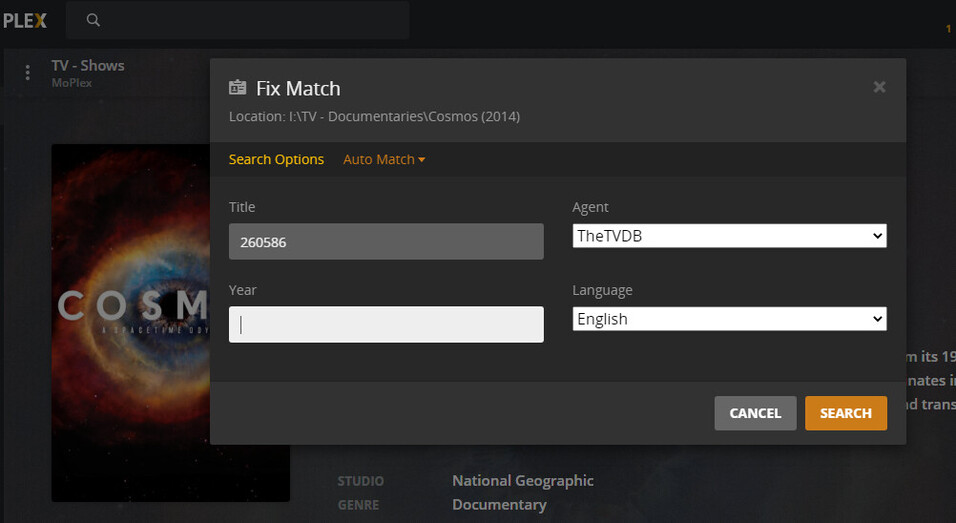
But considering the perpetual problems TVDB is creating for themselves - or Plex is creating for them - it’s very likely you’ll need to employ the ID# at some point… it’s on the first page at TVDB and this is where you put it when you’re Fixing the Match:
I don’t get a chance to enter a show ID because it doesn’t detect ANYTHING to match, so I can’t fix it. Like I said, it should pick up SOMETHING and at least match it with something stupid…
In the logs it says “The system cannot find the file specified: “D:\TV Shows\Cosmos A Space Odyssey”) during scanning: 2 in “D:\TV Shows\Cosmos A Space Odyssey”
Jan 24, 2021 10:52:34.210 [2508] ERROR - We got an error scanning in D:\TV Shows\Cosmos A Space Odyssey
Jan 24, 2021 10:52:34.211 [2508] WARN - Scanning the location D:\TV Shows\Cosmos A Space Odyssey did not complete”
That’s what I’m saying. It doesn’t find the files at all…And as I go through, there are actually several shows it’s skipping over…Guess it’s time to start over…ANNOYING
That may be the case. If the series did imfact get matched to another series. You won’t see it populate in the home HUB screen. Go to your shows and sort by episode added.