I have run the server betas for years; I’m currently on 1.21.1.3830.
I checked the Track Popularity setting and it is enabled for the library.
My music is reasonably mainstream classic rock/hard rock/heavy metal. For some bands I certainly have a large track catalog.
However for some of those bands I don’t get any shuffled tracks while for another I get 6 tracks out of the last 10 played. Perhaps I’m not playing the shuffled playlist long enough. Perhaps I should turn off Track Popularity?
I did find find “Library Radio” and had similar results.
I just listened to Library Radio for ~45 minutes. I did hear the same bands I usually have been offered recently, although a few outsider songs showed up. Interestingly I listened to “Don’t Misunderstand Me” by the Rossington Collins Band (the only song I have by that band) again today…it has been offered multiple times in the last couple of weeks (along with a number of HSAS, Motorhead, Motley Crue, Raven, and Queensryche songs). It feels like I am getting shuffled albums by a few artists (although the artist/album does sometimes change) instead of a library wide shuffle. I have attached the server logs (hopefully no unencrypted credentials are present!).
I’ll try disabling the smart shuffling. Thanks for the help; the PlexAmp app really sounds great both on Windows and Android!
Lack of Shuffle option, as discussed here. Totally key feature.
My music library on my Plex server has 1400+ artists. I tried out the Mood Radio. Skipped through 30 tracks or so under the Energetic mood. It played music by only 6 or 7 artists (almost always Wu-Tang, Skrillex, Smashing Pumpkins, Hole, Pearl Jam, Matthew Good Band)
I do understand that, like most people’s mp3 collections, some of my tags aint right. But these artists/genres only? Out of 1400 to choose from? Strange.
Even if 50% of the artists aren’t considered “Energetic”. Still 700 to choose from.
1970’s Radio plays Pantera (a band formed in the 80’s). To confirm, I pulled up the tag for that specific file/song - it was from 1983.
Tried 1980’s radio - it plays only 5 songs from my library (all Pantera).
Using a custom filter in Plex Web, I can see that I have more than 400 artists available in the “Album Decade” range of the 1980’s that could be considered for 1980’s Radio.
I’m not a fan of what the Home tab offers. Much like Plex’s annoying Recommended tab, it’s probably non-negotiable/here to stay.
So please consider allowing the user to be able to set which page they see on launch.
(Library - always Library - who cares to see what was “Most Played in October”?)
The Home page/tab doesn’t allow the user to remove categories and/or change the order of them.
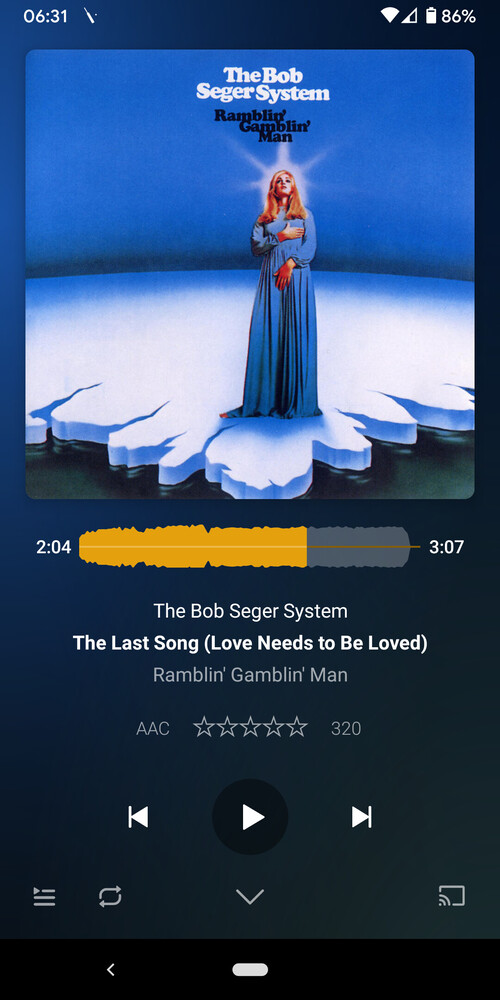
On the main playback page (where you see the currently-playing track, controls, visualization, etc.), it would be nice to know what grouping/queue this playback is part of (for example, am I currently on “Energetic mood”? or am I playing all music by Artist X? or am I currently playing My_Custom_Playlist_001?)
*answered by @aubrey.wodonga - also on the main playback page, it would be nice to see the list of upcoming tracks that Plexamp has come up with for this currently-playing queue. (and allow the user to strike certain tracks off that list).
It’s funny, that down arrow at the bottom of the playback page - i would always tap it instead of trying to scroll the page down. Thank you
I can’t speak for most of these, but re. point number 7, if you scroll down on the player screen, you can switch between “Up Next”, “Back To”, and “Related”, which show you the upcoming queue, the last played tracks, and tracks that are similar to the currently playing track. In the Up Next section, you can swipe to remove items, or drag to rearrange.
I personally don’t like or use the radio features. They never work how I would like them to work, regardless of my tags. I will start out with something like Skid Row, and end up with Death Metal. It is so strange.
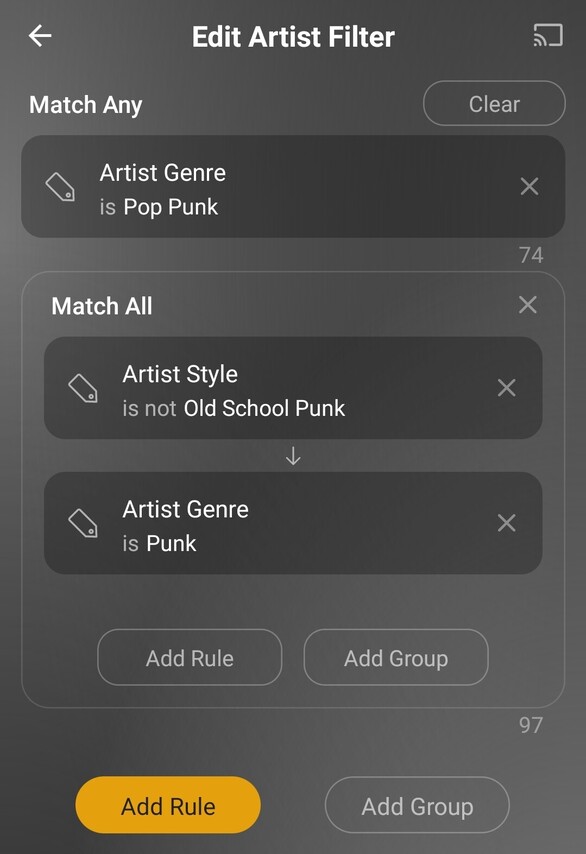
The Artist Filter and shuffle features are great, but I would still like to see an option to select what I want and play it in a true shuffle without going to my Windows dashboard and creating playlists. Whether it be check boxes, or radio buttons, or using mix builder with broader options like selecting genres, moods, and styles rather than just artists… Then shuffle.
Another option would be the ability to create a Playlist within Plexamp, go to the playlist and add to it, and delete it. For example, go to Genre “Punk”, create a Playlist, go to that playlist and add Genre “Pop Punk” etc.
I can do it that way, it’s just too much back and forth. I would love to see an easier method. There is a lot of opportunity to do it better. If it could all be done within Plexamp it would be so much nicer.
I have been using the new filters but I certainly don’t love them. You really have to put some thought into them to achieve what you want. Maybe I’m alone in how I like to play my music. But I like to try different combinations of genres and moods/styles. With the filters it gets more complicated that I would like it to be. Here is a ‘simple’ example of what I’ve done recently:
I would rather go to Genre - Pop Punk, create a Playlist in Plexamp, go to the Playlist I create (or go to Genre Punk) and add to that Playlist, etc. Then delete the playlist within Plexamp when I am done with that combination so that I don’t have 100 playlists out there. It seems like you should be able to use the pop up menu in Plexamp to have a “delete playlist” option:
Do you mean the “imperative” version on the player screen which shuffles an existing PQ? If so, coming.
I tried the same Energetic Radio which resulted (per server logs) in 1400 tracks (I have ~1900 artists). Can you see what your log said?
Dec 23, 2020 10:22:48.211 [0x70000ecf6000] DEBUG - Radio: Generated library mood mode with 3 top tracks per album in 131 ms into 1403 tracks.
We get the moods from the same source as AllMusic, so you can cross-check your album moods with the ones appearing on there. For example, it picked Roxy Music / The Thrill Of It All and if you visit Roxy Music - Country Life Album Reviews, Songs & More | AllMusic you can see it lists Energetic as a mood there.
These moods are downloaded regardless of what your ID3 (or other) tags are, but it does rely on an upgraded music library. It’s possible you need to do a Refresh All if you still have old artists there.
It’s looking at the release year for the album. Check that, and you’ll understand why it was picked.
This makes it sound like you are lacking popularity data, which is a required feature for it to show up in a radio; please check again in the server log, here’s my 80s radio:
Dec 23, 2020 10:30:44.521 [0x70000e85b000] DEBUG - Radio: Generated library decade mode with 3 top tracks per album in 116 ms into 618 tracks.
So generally on the radios, it sounds like something is amiss in your library, what you’re seeing isn’t normal. We’re happy to help track it down with you.
wish granted. we’ll remember the last active tab, even though I think you have a fairly poor attitude —the stuff above the fold (recent plays, recent additions) is usually pretty useful stuff. Most Played is way way down on the page.
Agreed, in some cases it would be a nice touch.
We added that wiggling little PQ icon on the left to make it more discoverable.
Yes, thank you. But also, sometimes I just want to go straight to Tracks and shuffle it. Shuffle errrythang. No categories, moods, just pick randomly from the entire library.
It said “DEBUG - Radio: Generated library mood mode with 3 top tracks per album in 3 ms into 28 tracks.” (keep scrolling, because you fixed this for me :D)
This was true, and you have fixed the problem. I remember many server versions back, I had attempted to do the Scan and/or Analyze on my Music library, and it would get stuck. I would let it run overnight and see the Activity icon still spinning the next morning. After several attempts I got fed up and forgot about it. Since I could access all the artist/tracks in Plex Web / Plex app (and even see artwork), I figured all was OK. Anyway - ran a fresh Scan / Analyze this time and it finished gracefully. PlexAmp is detecting many many more tracks now for the Radio/mood channels. Thanks @elan !
That’s great, thank you.
Can you show me what this wiggling object looks like? To make sure I’m being clear about where this arrow is, I’m attaching a screenshot. Would be nice if this arrow/chevron does the wiggling or animating to let the user know to scroll (instead of tap like a noob, like I did)
Thanks for your help and attention to these matters.



 wish granted. we’ll remember the last active tab, even though I think you have a fairly poor attitude